


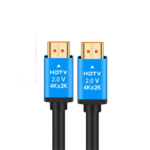


5m High-Speed HDMI 2.0 Cable with 18Gbps Bandwidth for Smooth 4K Video
₵100.00
The High-Speed HDMI Cable delivers stable and high-quality audio and video transmission for home, office, and entertainment use. It supports ultra-clear visuals and smooth performance across multiple devices including TVs, laptops, and gaming consoles. Designed for durability and efficiency, it ensures a reliable connection with minimal signal loss.
50 in stock
🔹Key Product Features
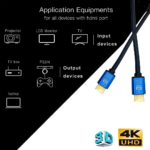
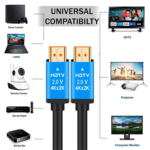
- High-Speed Compatibility: Works with HD-TV, LED/LCD TV, PC/Laptop, Projector, CD/DVD Player, Home Theater, and CCTV DVR Box for wide device support.
- Gold-Plated Connector: Ensures stable, high-quality signal transmission with reduced interference and improved HD graphics output.
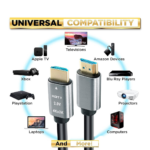
- Wide Device Support: Compatible with HDTV, LCD/LED/Plasma TVs, laptops, Blu-ray/DVD players, set-top boxes, AV receivers, and more HDMI devices.
- High-Speed Ethernet: Provides fast and stable data transmission for smoother connectivity and performance.
- 18Gbps Bandwidth (HDMI 2.0): Supports up to 18Gbps for lag-free streaming, gaming, and video playback without interruptions.
- 4K Ultra HD Support: Delivers sharp 4K resolution (3840×2160), HDR, 3D video, and synchronized audio for an immersive viewing experience.
- Plug & Play Use: No drivers required—simply connect and use instantly across gaming consoles, projectors, TVs, and more.
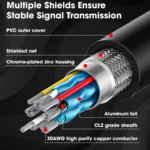
- Durable Build Quality: Made with high-purity copper core and strong shielding for long-lasting performance and stable signal transfer.
5m HDMI 2.0 Cable with Bandwidth for 4K Video, Gaming and Home Entertainment
The 5m HDMI 2.0 Cable is designed to transmit high-quality digital video and audio between compatible televisions, laptops, desktop computers, projectors, gaming consoles, DVD and Blu-ray players, home theatre systems, and other HDMI-enabled devices. With support for 4K Ultra HD resolution, up to 18Gbps bandwidth, gold-plated connectors, a copper conductor, and high-speed Ethernet capability, this 5-metre HDMI cable provides a practical connection solution for home entertainment, office presentations, gaming, and commercial audiovisual installations.
For customers in Ghana looking for an HDMI cable for a TV, projector, computer, or entertainment system, this cable offers a convenient way to connect compatible equipment using a single HDMI connection for digital video and audio. Available from COSMIC ELECTRONICS, it is suitable for individual buyers, businesses, schools, churches, technicians, and organizations that need reliable HDMI connectivity.
Product Overview
The 5m High-Speed HDMI Cable is a male-to-male digital audio and video cable that connects two compatible HDMI devices. Its 5-metre length provides flexibility when connecting equipment positioned some distance apart, such as a laptop to a television, a decoder to a display, or a computer to a projector.
The cable uses the HDMI 2.0 specification and supports bandwidth of up to 18Gbps. This bandwidth supports compatible 4K Ultra HD video applications, including high-resolution video playback, streaming, and gaming, depending on the capabilities of the connected devices and the quality of the source signal.
Its gold-plated connectors are designed to provide dependable electrical contact and resistance to corrosion. The copper conductor and shielding help support signal transmission between connected devices.
What Does This HDMI Cable Do?
An HDMI cable carries digital audio and video signals between compatible devices. Instead of using separate cables for picture and sound, a single HDMI connection can transmit both to a compatible display or audio system.
For example, you can use this cable to connect a laptop to a television for presentations, connect a gaming console to a TV, or connect a media player to a home theatre receiver.
The cable is designed for users who need a 5-metre HDMI connection for everyday entertainment, office work, education, and other audiovisual applications.
Key Product Benefits
- 5-metre connection length: Provides flexibility for devices that are not positioned directly beside each other.
- HDMI 2.0 specification: Supports compatible equipment using HDMI 2.0.
18Gbps bandwidth: Supports high-bandwidth digital video applications when the connected equipment and cable installation are suitable.
- 4K Ultra HD support: Designed for compatible 4K displays and video sources.
- Gold-plated connectors: Help maintain electrical contact and resist connector corrosion.
- Copper conductor: Supports digital signal transmission.
- High-speed Ethernet capability: Supports HDMI Ethernet functionality when compatible devices and network features are available.
- Plug-and-play connection: No separate driver installation is normally required.
- Combined audio and video: Carries compatible digital sound and picture through one cable.
- Wide device compatibility: Suitable for many TVs, laptops, PCs, projectors, media players, gaming consoles, and other HDMI-enabled equipment.
Who Should Buy This 5m HDMI Cable?
Home Users
This HDMI cable is suitable for home entertainment setups where a television, decoder, media player, gaming console, or computer needs to connect to another compatible device.
The 5-metre length can be useful when the television is mounted on a wall or when the connected device is positioned on a different shelf or table.
Gamers
Gamers can use the cable to connect compatible consoles or computers to an HDMI-enabled television or monitor. The available resolution, refresh rate, and other gaming features depend on the console, display, game, and the complete connection setup.
For gaming, check the HDMI requirements of your device before purchasing, particularly if you need a specific refresh rate or advanced display feature.
Office Workers and Businesses
Businesses can use the cable to connect laptops, desktop computers, and other HDMI sources to projectors, monitors, or large-screen televisions.
It is useful for meetings, training sessions, presentations, demonstrations, and digital content display in offices and commercial spaces.
Schools, Churches and Training Centers
Educational institutions and churches can use this HDMI cable to connect presentation computers, media players, and other HDMI-enabled equipment to projectors or large displays.
The 5-metre length provides installation flexibility in smaller rooms and selected presentation setups. For larger rooms or permanent installations, measure the required cable route before choosing the length.
Technicians and AV Installers
Technicians can use the cable for compatible audiovisual installations, equipment replacement, troubleshooting, and customer setups.
Businesses purchasing several cables for meeting rooms, classrooms, retail displays, or entertainment systems can contact COSMIC ELECTRONICS about bulk supply and product selection.
Key Features Explained
1. HDMI 2.0 Connectivity
HDMI 2.0 supports higher data bandwidth than earlier HDMI specifications, allowing compatible devices to handle demanding digital video formats.
This cable is specified for HDMI 2.0 and up to 18Gbps bandwidth. The actual output depends on the source device, display, content, and other equipment in the signal path.
Customer benefit: You can connect compatible modern entertainment and presentation equipment without relying on older analogue video connections.
2. 4K Ultra HD Resolution Support
The cable is designed to support 4K Ultra HD video, commonly associated with a resolution of 3840 x 2160 pixels.
A compatible 4K source and display are also required to view content at 4K resolution. Connecting a 4K television to a device that outputs only Full HD will not automatically make the source content 4K.
Customer benefit: The cable can be used in compatible high-resolution setups for movies, presentations, streaming, and other digital video applications.
3. Up to 18Gbps Bandwidth
Bandwidth describes the amount of digital data that can be transferred over a connection in a given period. The stated 18Gbps bandwidth is associated with HDMI 2.0 capability.
High-bandwidth applications can include compatible 4K video and other demanding digital content. The final result depends on the specifications of all connected equipment and the signal format being used.
Customer benefit: It provides a suitable cable specification for many HDMI 2.0 entertainment and display applications.
4. Gold-Plated HDMI Connectors
The cable features gold-plated HDMI connectors. Gold plating helps resist corrosion at the contact surfaces and supports reliable electrical contact when the connector and port are clean and undamaged.
Gold plating does not automatically improve picture quality beyond what a properly functioning digital connection can deliver. Its practical value is mainly associated with contact durability and corrosion resistance.
Customer benefit: The connectors are designed to maintain dependable contact during normal use.
5. Copper Conductor
The cable uses copper as its conductor material. Conductors carry the electrical signals needed to transfer digital information between connected devices.
Correct cable construction, shielding, connector quality, and installation all contribute to signal reliability, particularly over longer cable runs.
Customer benefit: The copper conductor supports the cable’s intended digital audio and video transmission function.
6. High-Speed Ethernet Capability
The product specifications identify high-speed Ethernet capability. HDMI Ethernet functionality allows compatible HDMI equipment to share a network connection through an HDMI cable when the connected devices support this feature.
This does not mean that every HDMI connection automatically provides internet access. Both connected devices must support the relevant HDMI Ethernet functionality, and the network setup must be compatible.
Customer benefit: Ethernet functionality is available for supported equipment without requiring a separate network cable for that HDMI feature.
7. Plug-and-Play Operation
The cable is designed for straightforward connection. In a typical setup, you connect one HDMI plug to the source device and the other to the display or compatible receiver, then select the correct input.
No dedicated software or driver is normally required for a standard HDMI connection.
Customer benefit: You can set up compatible devices quickly without complicated installation procedures.
8. Five-Meter Cable Length
The 5m length gives you more placement flexibility than a short cable. It can help connect equipment across a desk, between a media cabinet and television, or from a presentation computer to a nearby projector.
Measure the complete route, including the distance around furniture or cable-management points, before installation. Avoid stretching the cable tightly or bending it sharply.
Customer benefit: You have additional flexibility when arranging your entertainment or presentation equipment.
Technical Specifications
Specification Details
Product type High-Speed HDMI Cable
Product category HDTV Cable
Length 16FT (5M)
Color Black
HDMI version HDMI 2.0
Bandwidth Up to 18Gbps
Resolution support 4K Ultra HD
Connector type HDMI Male to HDMI Male
Connector finish Gold-plated
Conductor material Copper
Ethernet capability High-speed Ethernet functionality, subject to device support
Main functions Digital video and audio transmission
Installation Plug and play
Typical uses TVs, PCs, laptops, projectors, DVD players, home theatre systems and CCTV DVR boxes
Practical Applications in Ghana
Home Entertainment in Accra and Other Cities
Households in Accra, Tema, Kumasi, Takoradi, Cape Coast, Tamale, and other parts of Ghana can use the cable to connect compatible televisions and entertainment devices.
It can be useful when arranging a decoder, streaming device, gaming console, or computer away from the television. Its 5-metre length gives more flexibility for selected room layouts.
Offices and Corporate Meeting Rooms
Businesses can use the cable to connect a presentation laptop to a meeting-room television or projector. It can support training, client presentations, demonstrations, and internal meetings.
Before buying for a permanent installation, check the distance between the source and display and confirm the required video resolution.
Schools, Churches and Training Facilities
Schools, universities, churches, and training centres can use the cable to connect compatible computers and media players to displays or projectors.
For facilities that require multiple cables, confirm the number of rooms, cable routes, device ports, and required lengths before placing a bulk order.
Retail and Commercial Displays
Retail shops and commercial premises can use HDMI connections to display promotional videos, product demonstrations, menus, and other digital content on compatible screens.
The cable is also suitable for selected digital signage setups, provided the distance and display requirements are within the capabilities of the equipment and connection.
CCTV Monitoring
A compatible CCTV DVR or recorder can use an HDMI output to connect to a television or monitor. This allows security personnel to view the recorder’s interface and camera feeds on a larger screen.
The cable connects the DVR’s HDMI output to the display’s HDMI input. It does not itself transmit CCTV footage over a network or replace the cables connecting cameras to the recorder.
How to Connect the HDMI Cable
Follow these basic steps to connect your devices.
- Check the ports: Confirm that both devices have compatible HDMI ports.
- Identify the source: Locate the HDMI output on the laptop, console, decoder, computer, or media player.
- Identify the display input: Locate the HDMI input on the television, monitor, projector, or receiver.
- Connect the cable: Insert one HDMI connector into the source and the other into the display or compatible receiver.
- Select the correct input: Use the display’s input or source menu to choose the HDMI port you connected.
- Check the picture and sound: Play content or open the intended application to confirm that both devices are communicating correctly.
- Adjust display settings if needed: If the picture does not appear at the expected resolution, check the output settings on the source and the supported modes of the display.
If the connected devices do not detect each other, make sure the plugs are fully inserted, select the correct input, and test the devices with a known-working HDMI connection where possible.
HDMI Cable Buying Advice: What Should You Check?
Confirm the HDMI Port Type
This product uses standard HDMI male-to-male connectors. It is not a VGA-to-HDMI converter, DisplayPort-to-HDMI adapter, USB-C-to-HDMI adapter, or mini-HDMI cable.
If your laptop or device has only USB-C, DisplayPort, VGA, or mini-HDMI, you may need a different cable or a compatible adapter.
Choose the Correct Length
The 5m length is useful when equipment is separated by a moderate distance. A shorter cable may be easier to manage for devices positioned next to each other, while longer installations may require additional attention to cable specifications and signal reliability.
Avoid buying a cable that is too short for the planned route. Also avoid leaving excessive cable tightly coiled or placing it where it can be crushed or tripped over.
Match the Cable to Your Resolution Requirements
This cable is specified for HDMI 2.0, up to 18Gbps bandwidth, and 4K Ultra HD support. If your setup requires a particular refresh rate, HDR format, gaming feature, or audio capability, confirm that the source device, display, and cable installation all support that requirement.
The presence of a 4K label alone does not guarantee that every 4K format or refresh rate will work in every setup.
Check Whether You Need Ethernet Functionality
HDMI Ethernet functionality is relevant only when supported by the connected equipment. If your main objective is to connect a television to a router for internet access, check whether the TV and other equipment support HDMI Ethernet and whether that feature is intended for your setup.
For most ordinary HDMI connections, the primary purpose is transmitting compatible audio and video.
Care, Handling and Maintenance
Correct handling can help preserve the cable and its connectors.
- Hold the connector body when plugging in or unplugging the cable. Do not pull it out by the cable itself.
- Avoid sharp bends, kinks, crushing, and excessive tension.
- Keep the connectors free from dust, moisture, and debris.
- Route the cable away from places where chairs, doors, or heavy equipment can damage it.
- Do not force the connector into a port if it does not align properly.
- Disconnect the cable carefully before moving connected equipment.
- Store the cable in a loose coil when it is not in use.
The cable is intended for compatible indoor audiovisual connections. Do not assume that it is waterproof or suitable for outdoor exposure unless the product is specifically rated for those conditions.
Common HDMI Cable Problems and Solutions
No Picture on the Screen
Check that both ends are connected securely and that the display is set to the correct HDMI input. Confirm that the source device is powered on and configured to output video.
Picture Appears at a Lower Resolution
The source device may be set to a lower output resolution, or the display may not support the selected format. Review the specifications and settings of both devices.
No Sound
Check the source device’s audio output settings, the television’s volume, and the selected playback device. If an AV receiver is involved, confirm that the audio routing is configured correctly.
Intermittent Signal
Inspect the connectors and cable route for loose connections, physical damage, sharp bends, or pressure on the cable. Testing with another compatible cable can help identify whether the issue is related to the cable or another part of the setup.
The Cable Does Not Fit
This product has standard HDMI male-to-male connectors. A mini-HDMI, micro-HDMI, USB-C, VGA, or DisplayPort connection requires the appropriate compatible cable or adapter.
Bulk Purchasing and Supply Support
Organizations that need HDMI cables for several rooms or locations should consider more than the individual cable price. Important factors include the number of cables required, cable lengths, supported display resolutions, connector types, installation routes, and the equipment already in use.
COSMIC ELECTRONICS supports individual purchases and enquiries from businesses, schools, churches, offices, technicians, and other buyers in Ghana. For larger orders, provide the quantity and intended application so that the required cable specifications can be checked before procurement.
Why Buy from COSMIC ELECTRONICS?
COSMIC ELECTRONICS supplies electronics and technology accessories to customers across Ghana through online and physical store channels. Customers can enquire about products for personal use, business requirements, institutional procurement, and larger projects.
When purchasing this 5m High-Speed HDMI Cable from COSMIC ELECTRONICS, buyers can enquire about:
Product advice: Assistance identifying the correct cable for the devices and connection required.
- Competitive pricing: Pricing information for individual purchases and applicable bulk enquiries.
- Bulk supply support: Enquiries for offices, schools, churches, retail businesses, and technicians requiring multiple cables.
- Nationwide delivery across Ghana: Delivery options for customers in Accra and other locations nationwide.
- After-sales assistance: Help with product-related questions and basic compatibility guidance.
Before ordering, confirm the connector type, required length, and supported video specifications for your equipment. This helps you select a cable that matches your intended use.
Frequently Asked Questions
1. What is a 5m HDMI cable used for?
A 5m HDMI cable connects compatible devices such as televisions, laptops, computers, projectors, gaming consoles, DVD players, and AV receivers to transmit digital audio and video.
2. Does this HDMI cable support 4K?
Yes. The supplied specifications identify HDMI 2.0 and 4K Ultra HD support. The actual resolution and refresh rate depend on the source device, display, content, and complete connection setup.
3. What does HDMI 2.0 mean?
HDMI 2.0 is an HDMI specification associated with bandwidth of up to 18Gbps and support for compatible high-resolution video formats. The features available depend on the connected devices.
4. How long is this HDMI cable?
The cable is 16 feet, equivalent to approximately 5 meters.
5. Can I use it to connect a laptop to a TV?
Yes, provided the laptop has a compatible HDMI output and the TV has an HDMI input. If the laptop uses USB-C or another port instead, you may need a compatible adapter.
6. Can I use this HDMI cable with a projector?
Yes. It can connect an HDMI-enabled laptop, computer, media player, or other source to a compatible projector. Check the distance and supported resolution before installation.
7. Does the cable transmit both sound and picture?
Yes. HDMI carries compatible digital video and audio through one connection. Audio availability and format depend on the connected equipment and its settings.
8. What is the benefit of gold-plated connectors?
Gold plating helps resist corrosion at the connector contacts and supports reliable electrical contact. It does not guarantee better picture quality than a properly functioning compatible digital connection.
9. Does the HDMI Ethernet feature give every TV internet access?
No. HDMI Ethernet functionality requires compatible devices and an appropriate setup. It does not automatically replace a conventional Ethernet connection or guarantee internet access.
10. Is this cable suitable for CCTV DVR boxes?
Yes, if the DVR has a compatible HDMI output and the monitor or television has an HDMI input. It can display the DVR’s video output but does not replace the camera-to-recorder connections.
11. Do I need to install drivers?
A standard HDMI connection normally works without separate driver installation. You may need to adjust the source device’s display or audio settings.
12. Where can I buy an HDMI cable in Ghana?
You can enquire with COSMIC ELECTRONICS about the 5m High-Speed HDMI 2.0 Cable, product compatibility, pricing, bulk supply, and nationwide delivery across Ghana.
Quick Summary
- Product: 5m High-Speed HDMI Cable
- Length: 16FT (5M)
- Version: HDMI 2.0
- Bandwidth: Up to 18Gbps
- Resolution: 4K Ultra HD support
- Connectors: Gold-plated HDMI male-to-male
- Material: Copper conductor
- Color: Black
- Features: High-speed Ethernet capability, digital audio and video transmission, and plug-and-play use
- Applications: TVs, laptops, PCs, projectors, DVD players, home theatre systems, gaming setups, and compatible CCTV DVR boxes
- Availability: Enquire with COSMIC ELECTRONICS for pricing, product advice, bulk supply, and nationwide delivery across Ghana.
| Product Type | HDTV Cable |
|---|---|
| Length | 16FT (5M) |
| Color | Black |
| Version | HDMI 2.0 |
| Bandwidth | 18Gbps |
| Resolution | 4K Ultra HD |
| Connector Type | HDMI Male to HDMI Male |
| Material | Copper |


IT'S ALL ABOUT YOU
At COSMIC ELECTRONICS, we strive to process and dispatch orders as quickly as possible. While some orders may be shipped on the same day they are placed, processing times can vary depending on product availability, order volume, and delivery location. Please allow 2–3 business days for order processing before shipment.
IMPORTANT DELIVERY INFORMATION
- Fast Order Processing: Orders are processed and dispatched as quickly as possible, typically within 2–3 business days. A confirmation email will be sent shortly after your order is placed.
- Nationwide Delivery Across Ghana: We deliver to selected regions and cities across Ghana. Please check our delivery options to confirm availability in your location.
- Delivery & Collection Requirements: All deliveries require a signature upon receipt. Orders are not processed or shipped on Sundays, although you may place orders online at any time. If you do not receive your confirmation email, please check your Spam or Junk Mail folder.
For enquiries regarding delivery times, order status, or the lead time of a specific item, please contact COSMIC ELECTRONICS on +233 54 724 0128. Our team will be happy to assist you with any questions before or after your purchase.
Related products


360° Suction Cup Car & Desk Mount – Stable Smartphone Holder for Auto & Home Use
This compact phone holder is perfect for automobile dashboards, keeping your device secure and within easy view. Its lightweight and portable design makes it easy to carry and use anywhere. Made from durable, safe materials, it allows hands-free operation for navigation, calls, or media while driving.


CH-01 Universal Phone Holder for Bikes and Motorcycles – Adjustable Mount for Smartphones of All Sizes
This universal bike and motorcycle phone holder allows you to control your phone conveniently while riding without blocking your view or taking up much space on your bike. It features 360° rotation to adjust to different viewing angles and four-claw locking to hold your phone securely. The holder is adjustable, easy to install and remove, and is compatible with most smartphones ranging from 3.5 to 6.5 inches, making it a versatile and practical accessory for riders.


HDMI Splitter 1×4 – 1 Input to 4 Outputs, Supports Full HD 1080p, 4K & 3D, Compatible with Xbox, PS3/PS4, Roku, Blu-ray Player and HDTV (Includes High-Speed HDMI Cable) – Black
The HDMI Splitter 1x4 allows you to distribute one HDMI signal to four displays simultaneously with stable and clear output. It supports 4K x 2K@30Hz, 1080P, and 3D resolution for sharp, high-definition video performance. Designed for easy plug-and-play use, it is compatible with gaming consoles, Blu-ray players, PCs, and HDTVs.


LCD Display Video Wall 1×2 4K HDMI Splitter – High-Definition Signal Distributor for Dual Screen Display
The HDMI Splitter 1x2 lets you split a single HDMI source to two HDMI-compatible monitors or projectors. It supports resolutions up to 3840 × 2160 @ 30Hz with 8/10/12-bit deep color for clear, high-definition video. Ideal for multimedia setups, it can also regenerate HDMI signals at the end of long cables for stable performance.


Metal Soldering Iron Stand & Wire Holder – Stable Square Base for Electronics Work
This metal soldering iron holder is designed for pencil-style soldering irons, featuring dual coiled springs that protect both users and workpieces from burns and damage. Its heavy-duty metal base ensures stability and prevents movement during use, while the fully enclosed design provides a safe resting place for the iron between tasks. Ideal for hobbyists, electricians, and anyone working with solder or small, detailed projects.


Reviews
There are no reviews yet.