


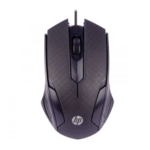
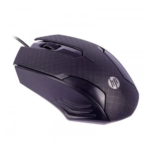
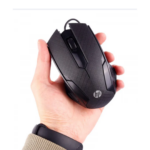
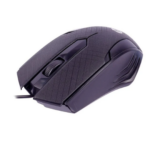
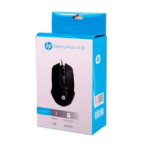


HP X-55 Wired Gaming Mouse with 1200 1600 DPI Optical Tracking for Smooth Computer Control
₵80.00
Experience smooth and precise control with the HP X-55 wired gaming mouse, designed for both gaming and everyday use. It features adjustable DPI, an ergonomic design for comfort, and easy plug-and-play USB connectivity. With reliable optical tracking and a durable build, it delivers consistent performance on most surfaces.
50 in stock
🔹Key Product Features
- Connectivity: Wired USB 2.0 / 3.0 connection for stable and fast performance
- DPI: 1200–1600 DPI optical tracking for smooth and accurate control
- Buttons: 3-button design with scroll wheel for easy navigation
- Sensor: Optical sensor for precise movement on most surfaces
- Design: Ergonomic shape with elongated arch for comfortable use (left or right hand)
- Plug & Play: No software required, simple USB connection for instant use
- Dimensions: 14 × 9 × 4.9 cm compact size
- Weight: 159 g solid and durable build
- Power Source: USB powered, no batteries needed
- Usage: Gaming and everyday computer use
HP X-55 Wired Gaming Mouse Product Description
The HP X-55 Wired Gaming Mouse is a USB-connected optical computer mouse designed for gaming, office work, and everyday home use. Featuring 1200 1600 DPI optical tracking, three buttons with a scroll wheel, and an ergonomic shape, it provides practical cursor control for users who want a straightforward, plug-and-play mouse for a compatible computer.
Product Overview
The HP X-55 is designed for users who need a dependable wired mouse for navigating computer applications, managing documents, browsing websites, and playing compatible games. Its USB 2.0 / 3.0 connectivity, optical sensor, adjustable DPI range, and ergonomic construction make it a practical option for personal and professional computing environments.
Unlike a wireless mouse, the HP X-55 draws power directly from the computer through its USB connection. This eliminates the need for batteries and makes it suitable for workstations where a mouse remains connected for extended periods.
For customers searching for an affordable mouse in Ghana, the HP X-55 offers essential computer navigation features in a compact, solidly built design.
Who Is the HP X-55 Mouse For?
The HP X-55 wired mouse is suitable for:
- Gamers: Optical tracking supports responsive cursor movement during compatible gaming sessions.
- Office workers: Useful for spreadsheets, document editing, presentations, email, and administrative tasks.
- Students: Suitable for online learning, research, assignments, and computer-based studies.
- Home users: Provides convenient control for browsing, entertainment, and everyday computing.
- Businesses: Can serve as a standard mouse for desktop computers and office workstations.
- Schools and training centers: Suitable for computer laboratories and educational environments with compatible USB computers.
- Retailers and computer accessory buyers: An option for customers seeking wired computer mice for personal use or workstation replacement.
Key Features and Customer Benefits
1. Adjustable 1200 1600 DPI Optical Tracking
The HP X-55 uses an optical sensor with a specified DPI range of 1200 1600. DPI, meaning dots per inch, describes mouse sensitivity and helps determine how far the cursor moves in relation to physical mouse movement.
A higher sensitivity setting generally moves the cursor farther across the screen with the same hand movement. The stated range offers a reference for users who want responsive control for browsing, office tasks, and compatible games.
Why it matters: Different applications and users require different levels of cursor sensitivity.
Customer benefit: The specified DPI range supports smooth, controlled navigation for common computing tasks.
The product information identifies a 1200 1600 DPI range but does not explain the adjustment mechanism. Confirm how DPI is changed on the supplied unit if switching sensitivity levels is important to your purchase.
2. Three Buttons and a Scroll Wheel
The HP X-55 features a three-button layout with a scroll wheel. This arrangement supports the standard interactions used in most desktop operating systems.
The main buttons allow users to select items, open files, and interact with applications. The scroll wheel helps move through long documents, web pages, spreadsheets, and lists.
Why it matters: A straightforward button layout is easy to understand and suitable for general computer use.
Customer benefit: Complete routine computer tasks without needing an unnecessarily complicated control layout.
The supplied specifications do not identify dedicated programmable buttons or specialized gaming controls.
3. Ergonomic Shape with an Elongated Arch
The HP X-55 features an ergonomic design with an elongated arch intended to support comfortable use. Its shape is described as suitable for either the left or right hand.
This design can be useful for people who regularly work with documents, browse the internet, study, or use computer applications.
Why it matters: The mouse’s shape influences how naturally users can hold and move it.
Customer benefit: Enjoy a practical mouse design for everyday use at home, school, or work.
Comfort depends on hand size, grip style, and personal preference. Users who spend many hours at a computer should also take regular breaks.
4. Wired USB 2.0 / 3.0 Connectivity
The HP X-55 connects through a wired USB 2.0 / 3.0 interface. Its direct USB connection provides a straightforward way to connect the mouse to a compatible computer.
The wired design eliminates the need to pair a Bluetooth mouse, configure a wireless receiver, or manage batteries for wireless operation.
Why it matters: A direct connection simplifies setup for fixed computer workstations.
Customer benefit: Connect the mouse to a compatible USB port and begin using it without a separate wireless pairing process.
Check the available ports on your computer before purchasing. A laptop with only USB-C ports may require a suitable adapter.
5. Plug-and-Play Operation
The HP X-55 is described as a plug-and-play mouse that requires no additional software for basic operation.
Plug-and-play connectivity is useful for users who want a straightforward setup without installing a separate mouse configuration application.
Why it matters: A simple setup can reduce the time required to prepare a computer workstation.
Customer benefit: Connect the mouse through USB and allow the compatible operating system to recognize it.
Actual operation depends on the computer, USB port, and operating system. The supplied specifications do not identify a dedicated driver or configuration application.
6. USB-Powered Operation
The HP X-55 draws power through its USB connection. It does not require separate batteries for normal operation.
This can be particularly convenient in offices, schools, computer laboratories, and homes where a mouse is used regularly.
Why it matters: Users do not need to purchase replacement batteries or recharge an internal wireless battery.
Customer benefit: Keep the mouse connected to a compatible computer and avoid routine wireless battery management.
7. Compact Dimensions and Solid Construction
The HP X-55 has specified dimensions of 14 x 9 x 4.9 cm and a stated weight of 159 g.
These measurements provide a practical reference when comparing the mouse with other models. Its stated weight may be relevant to users who prefer a more substantial mouse rather than an especially lightweight design.
Why it matters: Size and weight affect how a mouse fits into a workstation and feels during movement.
Customer benefit: Evaluate the mouse’s physical dimensions and weight before choosing it for your desk or computer setup.
The supplied information describes a solid and durable build but does not specify the body material, a drop-resistance rating, or water resistance
Technical Specifications
Specification Details
Brand HP
Model X-55
Product type Wired optical gaming mouse
Connectivity Wired USB 2.0 / 3.0
DPI 1200 1600 DPI
Sensor Optical
Buttons 3 buttons plus scroll wheel
Design Ergonomic with elongated arch
Hand orientation Described as suitable for left or right hand
Dimensions 14 x 9 x 4.9 cm
Weight 159 g
Power source USB powered
Batteries Not required
Setup Plug and play; no software required
Intended use Gaming, office, and home
Performance Benefits for Gaming and Everyday Work
Smooth Computer Navigation
The HP X-55’s optical sensor and 1200 1600 DPI specification support cursor control for routine computing. Users can navigate desktop applications, open files, scroll through documents, and interact with websites.
The actual experience depends on the computer’s pointer settings, operating system, surface, and individual preferences.
Practical Office Productivity
A standard three-button mouse with a scroll wheel is suitable for many daily office tasks. Employees can use it for email, spreadsheets, presentations, document editing, and general administration.
The wired USB design is especially practical for desks where the mouse remains connected to the same computer.
Everyday Gaming
The HP X-55 is intended for gaming as well as office and home use. Its optical sensor and stated DPI range provide useful basic specifications for casual gaming.
Players who need advanced programmable buttons, specialised software, high polling rates, or other competitive gaming features should verify those requirements before choosing this model.
Convenient Shared Workstations
Schools, training centres, and businesses can consider wired mice for shared computers. Direct USB connectivity avoids the need to manage wireless pairing for each workstation.
For larger installations, confirm the quantity required, the available ports, and compatibility with the computers being used.
Applications in Ghana
The HP X-55 can support personal and professional computing needs across Ghana.
Home Use
Households can use the mouse for browsing the internet, online communication, entertainment, personal projects, and general computer navigation.
Its wired design is useful for desktop computers and compatible laptops used primarily at a desk.
Offices and Commercial Businesses
Businesses can use the HP X-55 for everyday administrative activities, customer service, data entry, and document management.
Small businesses, retail shops, and offices can consider it as a standard computer accessory or replacement mouse.
Schools and Training Centres
Educational institutions can use compatible wired mice for computer literacy lessons, research, assignments, and general workstation activities.
Schools purchasing several units should confirm the required quantities and check compatibility with their existing computers.
Gaming Setups
Home gamers can consider the HP X-55 for compatible computer games and general navigation. The optical sensor, three-button layout, and stated DPI range provide basic information for comparing it with other gaming mice.
Users with specialised gaming requirements should compare additional specifications before making a decision.
How to Choose the Right Computer Mouse
Before buying a computer mouse in Ghana, consider the following factors.
Check the Connection Type
The HP X-55 uses wired USB connectivity. Make sure your computer has a compatible port, or arrange an appropriate adapter if necessary.
Consider the DPI Range
The 1200 1600 DPI specification can help you compare the HP X-55 with other optical mice. However, higher DPI does not automatically guarantee a better experience.
Choose a sensitivity that suits your screen size, applications, and preferred hand movement.
Evaluate Comfort and Size
The HP X-55 has an ergonomic shape with an elongated arch and is described as suitable for left- or right-hand use.
Consider the stated dimensions of 14 x 9 x 4.9 cm and weight of 159 g when deciding whether its size and feel suit your workspace.
Match the Mouse to Your Intended Use
For browsing, office productivity, studying, and general computer use, the HP X-55 provides standard mouse controls and wired connectivity.
For specialised gaming, compare the button layout, sensor specifications, and other features against the requirements of the games you play.
Common Buying Mistakes to Avoid
Confusing wired and wireless models: The HP X-55 is a wired USB mouse, so it does not offer cable-free operation.
Assuming all DPI settings are adjustable through a dedicated button: The specifications provide a 1200 1600 DPI range but do not confirm the precise adjustment method.
Ignoring computer compatibility: Check your USB ports and operating system before purchasing.
Choosing a mouse based on DPI alone: Comfort, weight, button layout, tracking behaviour, and connection type also affect suitability.
Assuming specialised gaming features are included: The supplied information confirms three buttons and a scroll wheel, not programmable gaming buttons or dedicated configuration software.
Setup and Maintenance Best Practices
How to Connect the HP X-55
- 1Locate a compatible USB port on your computer.
- Connect the mouse’s USB plug.
- Allow the operating system to recognise the device.
- Move the mouse to confirm cursor response
- Adjust the computer’s pointer settings if necessary.
The product is described as plug and play, with no additional software required for basic operation.
How to Maintain the Mouse
- Keep the mouse clean and free from excessive dust.
- Wipe the exterior with a soft cloth.
- Prevent liquids from entering the device.
- Avoid sharply bending or pulling the USB cable.
- Disconnect the mouse by holding the plug rather than pulling the cable.
- Store it in a dry place when not in use.
- Avoid dropping the mouse or applying excessive force to the buttons.
These practices can help maintain the mouse’s condition during normal use.
Frequently Asked Questions
1. What is the HP X-55 wired gaming mouse?
The HP X-55 is a wired optical computer mouse designed for gaming, office work, and home use. It features 1200 1600 DPI tracking, three buttons, a scroll wheel, and an ergonomic design.
2. What is the DPI of the HP X-55?
The specified optical tracking range is 1200 1600 DPI.
3. Is the HP X-55 wired or wireless?
It is a wired mouse that connects through USB 2.0 / 3.0. It does not require wireless pairing.
4. Does the HP X-55 require batteries?
No separate batteries are required. The mouse receives power through its USB connection.
5. How many buttons does the HP X-55 have?
It has three buttons and a scroll wheel for standard computer navigation.
6. Is the HP X-55 suitable for office work?
Yes. It is suitable for browsing, document editing, spreadsheets, presentations, email, and other everyday office tasks.
7. Can I use the HP X-55 for gaming?
Yes. It is designed for gaming and everyday computing. Whether it meets your needs depends on your preferred controls and the requirements of your games.
8. What are the dimensions and weight?
The stated dimensions are 14 x 9 x 4.9 cm, and the stated weight is 159 g.
9. Does the HP X-55 require software installation?
The product is described as plug and play, with no additional software required for basic operation on a compatible computer.
10. Where can I buy the HP X-55 mouse in Ghana?
You can enquire with COSMIC ELECTRONICS about availability, pricing, ordering, and delivery arrangements across Ghana.
Why Buy the HP X-55 from COSMIC ELECTRONICS?
COSMIC ELECTRONICS supplies electronics and computer accessories to individual customers, businesses, schools, and institutions in Ghana.
When enquiring about the HP X-55 wired mouse, customers can request product information and guidance on compatibility and purchasing requirements.
Customers can enquire about:
- Competitive pricing and product availability.
- Online and physical store purchasing options.
- Delivery arrangements to locations across Ghana.
- Bulk supply for offices, schools, and businesses.
- Assistance with choosing compatible computer accessories.
- Applicable after-sales assistance.
For institutional or commercial orders, provide the required quantity and intended application so that the supply requirements can be assessed.
Availability and Procurement Support in Ghana
Customers looking for an HP X-55 wired mouse for sale in Ghana can contact COSMIC ELECTRONICS to enquire about the model and current availability.
The mouse may be relevant to individuals replacing a computer accessory, offices equipping workstations, or educational institutions sourcing mice for compatible computers.
Enquiries can cover individual purchases, bulk quantities, pricing, and delivery arrangements. Confirm current stock and all purchasing details before placing an order.
Quick Summary
The HP X-55 Wired Gaming Mouse is a USB-powered optical mouse designed for gaming, office work, and everyday computing.
- Brand and model: HP X-55.
- DPI: 1200 1600 DPI.
- Connectivity: Wired USB 2.0 / 3.0.
- Controls: Three buttons plus scroll wheel.
- Sensor: Optical.
- Design: Ergonomic with an elongated arch.
- Dimensions: 14 x 9 x 4.9 cm.
- Weight: 159 g.
- Power: USB powered, with no batteries required.
- Setup: Plug and play, with no additional software required for basic operation.
- Applications: Gaming, office work, and home computing.
- Availability in Ghana: Enquire with COSMIC ELECTRONICS about pricing, stock, delivery, and bulk supply.
For customers seeking a straightforward wired computer mouse with optical tracking, standard navigation controls, and an ergonomic design, the HP X-55 is a practical option to consider. Contact COSMIC ELECTRONICS to enquire about purchasing the HP X-55 for your home, office, school, or gaming setup.
| Model | X-55 |
|---|---|
| Connectivity | Wired USB 2.0 / 3.0 |
| DPI | 1200–1600 DPI |
| Buttons | 3 Buttons + Scroll Wheel |
| Sensor | Optical |
| Design | Ergonomic |
| Power Source | USB Powered |
| Usage | Gaming / Office / Home |



IT'S ALL ABOUT YOU
At COSMIC ELECTRONICS, we strive to process and dispatch orders as quickly as possible. While some orders may be shipped on the same day they are placed, processing times can vary depending on product availability, order volume, and delivery location. Please allow 2–3 business days for order processing before shipment.
IMPORTANT DELIVERY INFORMATION
- Fast Order Processing: Orders are processed and dispatched as quickly as possible, typically within 2–3 business days. A confirmation email will be sent shortly after your order is placed.
- Nationwide Delivery Across Ghana: We deliver to selected regions and cities across Ghana. Please check our delivery options to confirm availability in your location.
- Delivery & Collection Requirements: All deliveries require a signature upon receipt. Orders are not processed or shipped on Sundays, although you may place orders online at any time. If you do not receive your confirmation email, please check your Spam or Junk Mail folder.
For enquiries regarding delivery times, order status, or the lead time of a specific item, please contact COSMIC ELECTRONICS on +233 54 724 0128. Our team will be happy to assist you with any questions before or after your purchase.
Related products


CH-01 Universal Phone Holder for Bikes and Motorcycles – Adjustable Mount for Smartphones of All Sizes
This universal bike and motorcycle phone holder allows you to control your phone conveniently while riding without blocking your view or taking up much space on your bike. It features 360° rotation to adjust to different viewing angles and four-claw locking to hold your phone securely. The holder is adjustable, easy to install and remove, and is compatible with most smartphones ranging from 3.5 to 6.5 inches, making it a versatile and practical accessory for riders.


Dell MS111 Wired USB Optical Mouse – Reliable and Comfortable Everyday Use Mouse – Black
Enjoy smooth and precise control with the Dell MS111 wired mouse, designed for reliable everyday performance. Its optical tracking and 1000 DPI resolution ensure accurate cursor movement for work, browsing, and office tasks. With USB plug-and-play connectivity and an ambidextrous design, it offers easy setup and comfortable use for all users.


Dell WM126 Wireless USB Mouse with LED Light and Adjustable DPI – Black, Compatible with PC and Laptop
The Dell WM126 Wireless Mouse features a sleek black design made from durable plastic, combining style and longevity. Its lightweight build ensures comfortable use for work, gaming, or everyday tasks. Perfect for PCs and laptops, this mouse delivers reliable performance with smooth navigation and effortless control.


HP M160 RGB Backlit Optical Gaming Mouse, 2400 DPI Wired USB Mouse for Gaming and Everyday Use
HP M160 RGB Optical Mouse delivers precise 2400 DPI tracking for smooth and accurate control during gaming and everyday use. It features 7-color RGB lighting that enhances your setup with a stylish and immersive gaming atmosphere. Designed with an ergonomic shape and comfortable grip to reduce fatigue during long hours of use.


T-WOLF G510 Professional Gaming Mouse – 6 Programmable Buttons, RGB LED Lighting, 3200 DPI, and 20 Million Click Lifespan
The T-WOLF G510 Gaming Mouse in sleek black features 6 responsive buttons and adjustable DPI settings from 800 to 3200 for precise control. With a 1.35-meter USB cable, it ensures a stable and lag-free connection for gaming or everyday use. Designed for comfort and performance, this wired mouse is perfect for both casual and professional gamers.


Reviews
There are no reviews yet.