





KM901 Compact 78-Key Wireless Keyboard and Mouse Combo with Ergonomic Design for Home and Office Use
₵150.00
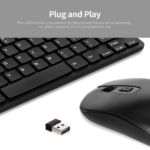
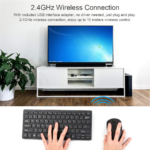
Compact 78-key wireless keyboard and mouse combo designed for portability, comfort, and everyday office or entertainment use. Features stable 2.4GHz wireless connectivity with plug-and-play USB receiver for quick and easy setup without drivers. Ergonomic design with smooth keycaps and comfortable mouse grip ensures efficient and fatigue-free usage.
50 in stock
🔹Key Product Features
- Connectivity Technology: 2.4GHz USB wireless connection provides stable and reliable signal transmission with reduced interference and no dropped frames.
- Special Features: Ergonomic and lightweight design with plug-and-play USB receiver for easy setup without drivers, plus dual device connection for keyboard and mouse.
- Keyboard Description: 78-key mini compact layout with multifunction Fn+F1–F12 keys, designed for portability, work, and entertainment use.
- Key Design: Lightweight chocolate-style independent keycaps with micro-arc surface for comfortable fingertip fit and smooth clicking experience.
- Ergonomic Design: Mouse and keyboard designed to naturally fit the palm and fingers, offering comfortable use with balanced key rebound and soft touch feel.
KM901 Compact 78-Key Wireless Keyboard and Mouse Combo Ergonomic 2.4GHz Computer Keyboard Set for Everyday Use in Ghana
The KM901 Compact 78-Key Wireless Keyboard and Mouse Combo is a lightweight computer accessory set designed for convenient typing, comfortable navigation, and everyday computing. Featuring 2.4GHz wireless connectivity, a plug-and-play USB receiver, an ergonomic mini keyboard, and a matching optical mouse, it is suitable for home users, students, office workers, and professionals who want a compact wireless setup for compatible PCs and laptops.
With its 78-key layout, multifunction Fn+F1 F12 keys, chocolate-style independent keycaps, and ergonomic palm-fit design, the KM901 provides a practical combination of portability, comfort, and convenience for work and entertainment.
Product Overview
A keyboard and mouse are essential computer accessories for typing, navigating applications, preparing documents, browsing the internet, and managing everyday computer activities.
However, not every user needs a large full-size keyboard. Some prefer a compact keyboard that takes up less desk space and is easier to position or carry between work areas.
The KM901 Compact Wireless Keyboard and Mouse Combo is designed for users who want a smaller keyboard arrangement alongside the convenience of wireless computer navigation.
Its 78-key mini keyboard features multifunction Fn+F1 F12 keys and lightweight chocolate-style independent keycaps with a micro-arc surface. The design is intended to provide a comfortable fingertip fit and smooth typing experience.
The accompanying optical mouse features an ergonomic palm-fit design intended to support comfortable handling during everyday use.
Both devices connect through a 2.4GHz USB wireless receiver, providing a straightforward setup without requiring additional drivers according to the supplied product information.
For customers searching for a compact wireless keyboard and mouse combo in Ghana, the KM901 is a practical option for compatible PCs and laptops used for office work, study, browsing, and entertainment.
What Is the KM901 Wireless Keyboard and Mouse Combo?
The KM901 is a compact wireless computer keyboard and mouse set designed to provide two essential computer input devices in one package.
Instead of connecting the keyboard and mouse through separate wired connections, the combo uses 2.4GHz wireless connectivity through a USB receiver.
The keyboard has a 78-key mini layout, making it more compact than a conventional full-size keyboard. It also includes multifunction Fn+F1 F12 keys for accessing additional keyboard functions.
The mouse uses optical sensor technology for cursor tracking and features an ergonomic palm-fit design.
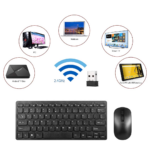
The product is specified for use with PCs and laptops.
Its main purpose is to provide a convenient wireless input solution for customers who want a compact keyboard arrangement without sacrificing the usefulness of a separate mouse.
Who Is This Product For?
The KM901 Compact Wireless Keyboard and Mouse Combo is suitable for different categories of computer users.
Home Users
Home users can use the combo for everyday computer activities such as browsing, typing, online communication, document preparation, and entertainment.
Its compact keyboard design can be useful where desk space is limited.
Students
Students who use compatible laptops or desktop computers for assignments, research, online learning, and presentations can consider the KM901 as an additional wireless input solution.
Office Workers
Office professionals who need a compact keyboard and mouse for everyday typing, communication, and computer navigation may find the set useful.
Remote Workers
People working from home or moving between different work areas can benefit from a lightweight keyboard and mouse combination that uses a wireless USB receiver.
Business Owners and Commercial Users
Businesses that use computers for administration, correspondence, records, and general office activities can consider the KM901 for compatible workstations.
Everyday Computer Users
Anyone looking for a compact wireless keyboard and optical mouse for a compatible PC or laptop can consider this combo.
Key Features of the KM901 Wireless Keyboard and Mouse Combo
1. 2.4GHz Wireless Connectivity
What it is: The KM901 uses 2.4GHz USB wireless connectivity to connect the keyboard and mouse to a compatible computer through a USB receiver.
Why it matters: Wireless connectivity reduces the need for separate keyboard and mouse cables. It also gives users more flexibility when positioning the two devices around a workstation.
The supplied product information describes the connection as stable and reliable, with reduced interference and no dropped frames.
Customer benefit: Users can enjoy a less cluttered workstation and convenient wireless operation for everyday computer activities.
2. Plug-and-Play USB Receiver
What it is: The combo uses a USB receiver for connection and is designed for setup without additional drivers.
Why it matters: Complicated installation can make new computer accessories inconvenient, especially for users who simply want to connect their devices and begin working.
Customer benefit: The plug-and-play arrangement helps simplify setup. Connect the receiver to a suitable USB port on the compatible PC or laptop and follow any device-specific instructions.
3. Compact 78-Key Mini Keyboard
What it is: The keyboard features a 78-key mini layout designed for portability, work, and entertainment.
Why it matters: Full-size keyboards occupy more desk space. A compact keyboard provides an alternative for users who prefer a smaller arrangement.
Customer benefit: The KM901 offers a space-conscious keyboard design that can fit into different workstation arrangements.
Its smaller layout is particularly useful for users who do not require a conventional full-size keyboard arrangement.
4. Multifunction Fn+F1 F12 Keys
What it is: The keyboard includes multifunction Fn+F1 F12 keys.
Why it matters: Function combinations allow supported keyboards to provide additional commands through key combinations rather than requiring separate dedicated keys for every function.
Customer benefit: Users have access to additional keyboard functions through the multifunction key arrangement.
The exact command assigned to each combination should be confirmed from the keyboard’s supplied instructions.
5. Chocolate-Style Independent Keycaps
What it is: The KM901 features lightweight chocolate-style independent keycaps with a micro-arc surface.
Why it matters: The shape and surface of a keycap influence how the fingertip contacts the key during typing.
Customer benefit: The micro-arc key surface is designed to provide a comfortable fingertip fit and smooth clicking experience.
6. Ergonomic Keyboard Design
What it is: The keyboard is designed with an ergonomic and lightweight structure.
Why it matters: Users who type regularly often prefer a keyboard arrangement that feels comfortable during everyday computer use.
Customer benefit: The ergonomic design supports convenient typing for work, study, and entertainment.
7. Ergonomic Mouse with Comfortable Palm Fit
What it is: The included mouse features an ergonomic design intended to fit naturally into the palm and accommodate the fingers.
Why it matters: A mouse is used repeatedly for selecting files, navigating applications, browsing websites, and controlling the computer pointer.
Customer benefit: Its comfortable grip design supports everyday mouse handling and navigation.
8. Optical Sensor Technology
What it is: The KM901 mouse uses optical sensor technology.
Why it matters: An optical mouse tracks movement to control the computer cursor, allowing users to interact with applications and on-screen content.
Customer benefit: The included mouse provides the pointing control needed for general computer navigation.
9. Lightweight and Portable Design
What it is: The keyboard and mouse combo is described as lightweight, with a compact keyboard arrangement.
Why it matters: Users who move between workstations or have limited desk space may prefer computer accessories that are easier to position and handle.
Customer benefit: The compact design makes the combo suitable for home workstations, office desks, and compatible laptop setups.
Performance Benefits for Everyday Computing
The KM901 combines compact keyboard functionality with wireless mouse control to support everyday computer activities.
Reduced Cable Clutter
The wireless USB receiver arrangement helps reduce the need for separate keyboard and mouse cables around the workstation.
More Flexible Desk Arrangement
Users can position the keyboard and mouse without having to manage individual wired connections.
Space-Conscious Typing
The 78-key mini layout provides a compact alternative to conventional full-size keyboards.
Comfortable Key Interaction
The chocolate-style independent keycaps and micro-arc surface are designed to provide a comfortable fingertip fit.
Convenient Computer Navigation
The included optical mouse provides cursor control for browsing, selecting files, opening applications, and other everyday activities.
Useful for Work and Entertainment
The combo is designed for portability, office activities, and entertainment use, making it relevant to different everyday computing environments.
Design, Construction and Ergonomic Considerations
The KM901 features a compact keyboard and mouse arrangement designed around portability and comfortable everyday use.
Its 78-key mini keyboard uses lightweight chocolate-style independent keycaps with a micro-arc surface. This design is intended to provide a comfortable contact area for the fingertips.
The keyboard and mouse are also described as ergonomic, with the mouse designed to fit naturally into the palm and accommodate the fingers.
The product information highlights balanced key rebound and a soft-touch feel as part of its ergonomic design.
These features are relevant to users who spend time typing, browsing, and navigating computer applications.
As with other computer accessories, appropriate handling and maintenance are important. Keep the devices clean, avoid dropping them, and protect the USB receiver from damage.
Applications of the KM901 in Ghana
The KM901 Compact Wireless Keyboard and Mouse Combo can support different everyday computing requirements across Ghana.
Home Use
For households with compatible PCs and laptops, the combo can support:
- Internet browsing
- Document preparation
- Online communication
- Personal record keeping
- Everyday computer navigation
- Entertainment activities
Its compact keyboard design can be useful on desks where space is limited.]
Office and Administrative Use
Businesses in Accra, Tema, Kumasi, Takoradi, and other parts of Ghana can consider the KM901 for compatible workstations.
Potential activities include:
- Preparing business documents
- Managing correspondence
- Entering information
- Browsing online resources
- General administrative work
- Everyday computer navigation
Educational Use
Students, schools, libraries, and training centres can consider the combo for compatible computer setups.
It can support assignments, research, presentations, online learning, and general computer-based activities.
Remote Work and Personal Productivity
People working remotely or using a computer across different work areas may appreciate the wireless arrangement.
The compact keyboard can also be useful for users who prefer a smaller desk setup.
Commercial and Business Use
Retail businesses and commercial offices can consider the KM901 for general-purpose computer activities such as records, communication, and administrative work, provided their computers are compatible.
Technical Specifications
Specification
Details
Product Type
Wireless Keyboard and Mouse Combo
Model
KM901
Keyboard Layout
78-key mini compact layout
Connectivity
2.4GHz USB Wireless
Receiver
USB wireless receiver
Setup
Plug and play
Driver Requirement
No additional drivers required according to supplied details
Keyboard Functions
Multifunction Fn+F1 F12 keys
Key Design
Chocolate-style independent keycaps
Key Surface
Micro-arc surface
Mouse Technology
Optical sensor
Design
Ergonomic and lightweight
Mouse Grip
Ergonomic palm-fit design
Compatibility
PC and laptop
Intended Usage
Work, office, portability, and entertainment
Buyer Decision Support: What to Consider Before Purchasing
Before buying the KM901 Wireless Keyboard and Mouse Combo in Ghana, consider the following points.
1. Check USB Port Availability
The combo uses a USB wireless receiver. Confirm that your PC or laptop has a suitable USB port.
2. Confirm Device Compatibility
The supplied specifications identify PCs and laptops as compatible devices.
For specialised systems or other devices, confirm compatibility before purchasing.
3. Consider the 78-Key Layout
The KM901 uses a compact 78-key arrangement. If you regularly use a dedicated number pad, consider whether this mini layout meets your requirements.
4. Understand the Wireless Connection
The product uses 2.4GHz USB wireless connectivity. Do not assume that it connects through Bluetooth.
5. Consider Your Work Requirements
The compact layout is designed for portability, work, and entertainment. Users with specialised typing or professional requirements should consider whether a larger or more specialised keyboard would be more suitable.
6. Check the Function-Key Requirements
The keyboard includes Fn+F1 F12 multifunction keys. Consult the supplied instructions to understand the available combinations.
Common Mistakes Buyers Make When Choosing a Wireless Keyboard
Avoid these common mistakes when selecting a wireless keyboard and mouse combo:
- Assuming all wireless keyboards use Bluetooth: The KM901 uses a 2.4GHz USB receiver.
- Ignoring the keyboard size: Its 78-key mini layout is different from a conventional full-size keyboard.
- Overlooking USB port availability: The receiver requires a suitable USB connection.
- Ignoring mouse requirements: Consider whether the included optical mouse meets your everyday navigation needs.
- Assuming every function key works identically: Check the supplied instructions for the specific Fn+F1 F12 functions.
- Choosing only by appearance: Consider connectivity, layout, compatibility, ergonomics, and intended use.
- Overlooking specialised requirements: Users who need a dedicated number pad or specialised keyboard functions should confirm that the compact layout is suitable.
Best Practices for Using and Maintaining the KM901
Proper handling helps maintain the condition of your wireless keyboard and mouse.
- Connect the USB receiver to a suitable port on the compatible PC or laptop.
- Follow the supplied setup instructions.
- Position the keyboard on a stable, flat surface.
- Place the mouse on a suitable surface for optical tracking.
- Keep the receiver protected from physical damage.
- Avoid dropping the keyboard or mouse.
- Clean the keycaps and mouse surface carefully using appropriate computer-accessory cleaning methods.
- Keep liquids and excessive dust away from the devices.
- Store the combo safely when not in use for extended periods.
The supplied product information does not specify battery type, battery capacity, or battery life. Check the product packaging or instructions for the applicable power requirements.
Frequently Asked Questions
1. What is the KM901 Wireless Keyboard and Mouse Combo?
The KM901 is a compact wireless computer accessory set featuring a 78-key mini keyboard and an optical mouse. It uses 2.4GHz wireless connectivity through a USB receiver.
2. Does the KM901 use Bluetooth?
The supplied specifications identify 2.4GHz USB wireless connectivity. Bluetooth connectivity is not specified for this model.
3. How many keys does the KM901 keyboard have?
The keyboard features a 78-key mini compact layout.
4. Does the KM901 come with a mouse?
Yes. It is a keyboard and mouse combo, and the package includes an optical mouse.
5. Does the KM901 require driver installation?
The product is described as plug and play, with a USB receiver designed for setup without additional drivers.
6. Is the KM901 compatible with laptops?
Yes. The supplied compatibility information identifies PCs and laptops as supported devices.
7. What are the Fn+F1 F12 keys used for?
They are multifunction key combinations that provide additional keyboard functions. The exact functions should be checked in the supplied product instructions.
8. Is the KM901 keyboard suitable for office work?
Yes. It is designed for work, portability, and everyday computing. Its compact layout may be useful for office users who prefer a smaller keyboard.
9. Does the KM901 mouse use optical technology?
Yes. The mouse uses optical sensor technology for cursor tracking and computer navigation.
10. Is the KM901 suitable for entertainment use?
Yes. The product is described as suitable for both work and entertainment use.
11. Does the KM901 have a dedicated number pad?
The supplied specifications identify a 78-key mini layout but do not specify a separate dedicated number pad. Customers who require one should confirm the keyboard layout before purchasing.
12. Where can I buy the KM901 Wireless Keyboard and Mouse Combo in Ghana?
You can enquire about the KM901 through COSMIC ELECTRONICS. Customers can explore online ordering or visit the physical store for product enquiries and purchasing assistance.
Why Buy the KM901 from COSMIC ELECTRONICS?
Choosing the right computer accessory involves more than identifying a suitable model. Customers also need relevant product information and a supplier who can assist with their purchasing requirements.
COSMIC ELECTRONICS serves individual customers, businesses, contractors, technicians, institutions, and commercial buyers across Ghana with electronics, computer accessories, networking equipment, and specialised technology products.
When purchasing the KM901 Wireless Keyboard and Mouse Combo from COSMIC ELECTRONICS, customers can benefit from:
Genuine Products: Access to genuine product sourcing and supply, subject to product availability.
Nationwide Delivery Across Ghana: Delivery arrangements for customers in Accra and other parts of the country.
Expert Product Advice: Assistance with understanding product features, connectivity, keyboard layout, and compatibility.
Competitive Pricing: Practical purchasing options for individual customers and business buyers.
Bulk Supply Support: Enquiries for multiple units intended for offices, schools, organisations, and institutional workstations.
After-Sales Assistance: Support with product-related enquiries after purchase.
COSMIC ELECTRONICS is committed to helping customers identify suitable electronics and computer accessories for their everyday, commercial, and institutional requirements.
Availability and Procurement Support in Ghana
The KM901 Compact Wireless Keyboard and Mouse Combo is relevant to customers looking for a compact wireless computer keyboard and mouse in Ghana.
COSMIC ELECTRONICS supports different purchasing requirements, including:
Retail Purchase: Individual customers looking for a compact wireless keyboard and mouse for home or personal computing.
Business Orders: Offices and companies equipping computer workstations.
Bulk Orders: Organisations requiring multiple keyboard and mouse combinations.
Institutional Supply: Schools, training centres, and other institutions purchasing computer accessories.
Corporate Procurement: Businesses sourcing computer peripherals for administrative and operational departments.
Product Consultation: Assistance with understanding the product’s features and checking suitability for the intended computer setup.
Customers can enquire about availability, quantity requirements, pricing, and delivery arrangements through COSMIC ELECTRONICS.
Online ordering and physical store purchasing options provide convenient ways to access computer accessories and related electronics.
Final Thoughts
The KM901 Compact 78-Key Wireless Keyboard and Mouse Combo is a practical option for customers who want a compact keyboard and optical mouse with wireless connectivity.
Its 2.4GHz USB connection, plug-and-play receiver, multifunction Fn+F1 F12 keys, chocolate-style keycaps, ergonomic design, and lightweight construction make it suitable for everyday work, study, and entertainment.
For individuals, students, office workers, and businesses searching for a compact wireless keyboard and mouse combo in Ghana, COSMIC ELECTRONICS provides a point of contact for product enquiries, purchasing assistance, and bulk supply requests.
Quick Summary
✔Product: KM901 Compact Wireless Keyboard and Mouse Combo
✔Model: KM901
✔Keyboard Layout: 78-key mini compact layout
✔Connectivity: 2.4GHz USB wireless connection
✔Receiver: Plug-and-play USB receiver
✔Keyboard Functions: Multifunction Fn+F1 F12 keys
✔Key Design: Lightweight chocolate-style independent keycaps with micro-arc surface
✔Mouse: Optical sensor with ergonomic palm-fit design
✔Compatibility: PC and laptop
✔Main Benefits: Compact layout, portability, wireless convenience, comfortable key design, and ergonomic mouse grip
✔Primary Applications: Home computing, office work, study, browsing, and entertainment
✔Availability: Enquire with COSMIC ELECTRONICS in Ghana for online and physical store purchasing options
✔Bulk Supply: Enquiries supported for businesses, schools, offices, and institutions
✔Why Buy from COSMIC ELECTRONICS: Product advice, competitive pricing, nationwide delivery, bulk supply support, and after-sales assistance
| Product Type | Keyboard |
|---|---|
| Model | KM901 |
| Connectivity | 2.4GHz USB Wireless |
| Features | Ergonomic, Lightweight, Plug & Play |
| Compatibility | PC, Laptop |
| Technology | Optical Sensor |
| Design | Ergonomic Palm Fit |
| Installation | USB Receiver Plug & Play |


IT'S ALL ABOUT YOU
At COSMIC ELECTRONICS, we strive to process and dispatch orders as quickly as possible. While some orders may be shipped on the same day they are placed, processing times can vary depending on product availability, order volume, and delivery location. Please allow 2–3 business days for order processing before shipment.
IMPORTANT DELIVERY INFORMATION
- Fast Order Processing: Orders are processed and dispatched as quickly as possible, typically within 2–3 business days. A confirmation email will be sent shortly after your order is placed.
- Nationwide Delivery Across Ghana: We deliver to selected regions and cities across Ghana. Please check our delivery options to confirm availability in your location.
- Delivery & Collection Requirements: All deliveries require a signature upon receipt. Orders are not processed or shipped on Sundays, although you may place orders online at any time. If you do not receive your confirmation email, please check your Spam or Junk Mail folder.
For enquiries regarding delivery times, order status, or the lead time of a specific item, please contact COSMIC ELECTRONICS on +233 54 724 0128. Our team will be happy to assist you with any questions before or after your purchase.
Related products


9T T13 Power Bank 50,000mAh 22.5W Fast Charging Power Bank
This power bank offers 23W two-way fast charging in a durable plastic body with built-in cables, digital display, and LED flashlight for daily convenience. Certified by RoHS, CE, and FCC, it ensures safe and reliable performance on the go. Its compact design makes it perfect for travel, work, or emergency use.


CH-01 Universal Phone Holder for Bikes and Motorcycles – Adjustable Mount for Smartphones of All Sizes
This universal bike and motorcycle phone holder allows you to control your phone conveniently while riding without blocking your view or taking up much space on your bike. It features 360° rotation to adjust to different viewing angles and four-claw locking to hold your phone securely. The holder is adjustable, easy to install and remove, and is compatible with most smartphones ranging from 3.5 to 6.5 inches, making it a versatile and practical accessory for riders.


Metal Soldering Iron Stand & Wire Holder – Stable Square Base for Electronics Work
This metal soldering iron holder is designed for pencil-style soldering irons, featuring dual coiled springs that protect both users and workpieces from burns and damage. Its heavy-duty metal base ensures stability and prevents movement during use, while the fully enclosed design provides a safe resting place for the iron between tasks. Ideal for hobbyists, electricians, and anyone working with solder or small, detailed projects.


Triple Power TP-07 60,000mAh 22.5W Power Bank for Charging Multiple Devices


Universal Automobile Phone Holder for Dashboard and Windscreen Mounting
Designed for quick and hassle-free setup, this car mount features a powerful suction cup base that firmly attaches to windscreens, dashboards, or any smooth, flat surface. Simply clean the mounting area and lock the suction mechanism by pushing or pulling the lever to create a strong, reliable grip. Once in place, the mount stays secure without slipping, falling off, or leaving any marks behind, even during daily driving.


Universal Car Air Vent Phone Mount Cradle – Adjustable Holder for Smartphones, Black
Universal car phone mount designed for air vent installation, featuring a secure clip grip with a non-slip holder for stable phone support. It offers an adjustable viewing angle, a glossy black finish, and a compact single-port design. Compatible with most smartphone brands including Apple, Samsung, Acer, ASUS, Alcatel, and other universal models.


V8 Bluetooth Wireless Mobile Game Controller for PC, Android and iOS with Dual Joysticks for Precise Gaming
The V8 Bluetooth Mobile Game Controller stably supports multiple devices including smartphones, tablets, TVs, and TV boxes with Android 3.2 and above, offering smooth wireless control within 10 meters. It features dual analog joysticks, precise cross key, and 14 action buttons with an ergonomic design for comfortable and immersive gameplay, supporting multiplayer mode.


X3 Bluetooth Wireless Gamepad Controller – Joystick for Android Phones, Smart TV, Smart Box, and Smartphones
The X3 Bluetooth wireless gamepad offers precise control and smooth gameplay for smartphones, tablets, Smart TVs, and TV boxes. It features a rechargeable battery for long-lasting play without interruptions. Compatible with Android 3.2 and above, it delivers a seamless and responsive gaming experience across multiple devices.


Reviews
There are no reviews yet.