




Sony DualShock 4 Wireless PS4 Controller with Precision Control for Immersive Gaming
₵190.00
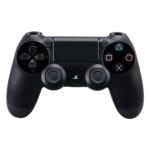
Experience complete control and immersive gameplay with the DualShock 4 Wireless Controller for PlayStation 4. Featuring a responsive touchpad, built-in speaker, ergonomic design, and Share button for seamless streaming and recording.
50 in stock
🔹Key Product Features
- Precision Control: Enhanced analogue sticks and trigger buttons provide superior accuracy, giving you greater control in every movement, shot, and combo across all PlayStation 4 games.
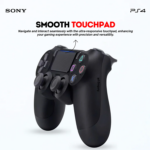
- Responsive Touchpad: The multi-touch, clickable touchpad opens up new ways to interact with your games, bringing an intuitive layer of gameplay.
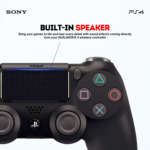
- Built-In Speaker & Stereo Headset Jack: Immerse yourself in high-fidelity sound effects directly from the controller, or plug in your headset for private gaming sessions.
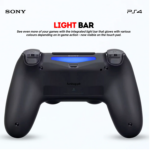
- Light Bar Indicator: The integrated light bar changes colour to reflect in-game actions and player status, adding a visual element to your experience.
- Sharing at Your Fingertips: The Share button lets you instantly capture and share your best moments on social media without interrupting your game.
- Comfortable Design: The ergonomic shape ensures a natural grip and long-lasting comfort, perfect for extended gaming sessions.
- Dual Vibration Motors: Feel every hit, crash, and explosion with realistic vibration feedback that puts you right in the action.
- Wireless & Wired Connectivity: Play wirelessly via Bluetooth or connect with a USB cable for lag-free performance.
- Charge Efficiently: Recharge the DualShock 4 by connecting it to your PlayStation 4 system, even in standby mode, or with any standard micro-USB charger.
Sony DualShock 4 Wireless PS4 Controller with Precision Control for ImmersSony DualShock 4 Wireless Game Controller for PlayStation 4 (PS4)
The Sony DualShock 4 Wireless Game Controller is a PlayStation 4 gaming controller designed to provide precise control, responsive gameplay, and immersive gaming experiences. Featuring precision analogue sticks, responsive triggers, a multi-touch clickable touchpad, built-in speaker, Share button, integrated light bar, and dual vibration motors, it gives PS4 gamers greater control and interactive feedback during gameplay.
Suitable for home gamers, gaming enthusiasts, gaming centres, and customers looking for a PS4 controller in Ghana, the DualShock 4 combines wireless and wired connectivity with an ergonomic ABS construction for comfortable everyday gaming.
Product Overview
The DualShock 4 is Sony’s wireless game controller developed for the PlayStation 4 gaming platform. It provides the physical controls and interactive features required to navigate games, execute commands, control characters, and interact with different gaming environments.
Unlike basic gamepads that provide only standard buttons and directional controls, the DualShock 4 incorporates additional technologies that enhance gameplay. These include a clickable touchpad, motion-related visual feedback through its light bar, built-in speaker, stereo headset connection, and vibration feedback.
Its combination of traditional gaming controls and additional interactive features makes it suitable for different PlayStation 4 gaming genres, including sports, racing, action, adventure, fighting, and shooting games.
For customers searching for a Sony PS4 controller, wireless gamepad, DualShock 4 controller, or affordable game controllers in Ghana, this model offers a combination of practical controls, connectivity options, and immersive gaming features.
Who Is This PS4 Controller For?
The Sony DualShock 4 Wireless Controller is suitable for:
- PlayStation 4 Gamers: Players who need a controller for everyday PS4 gaming.
- Gaming Enthusiasts: Users who enjoy sports, racing, adventure, action, and multiplayer games.
- Home Entertainment Users: Households that use PlayStation 4 consoles for gaming and entertainment.
- Gaming Centres: Businesses that require additional controllers for multiplayer gaming sessions.
- Gaming Shops and Resellers: Retailers sourcing PS4 controllers for resale.
- Casual Gamers: Players looking for comfortable controls for occasional gaming.
- PC Gamers: Users interested in connecting a compatible controller to a computer, subject to operating system and game support.
Whether you are replacing an existing controller or purchasing an additional gamepad for multiplayer gaming, the DualShock 4 provides the essential controls and interactive features associated with the PlayStation 4 gaming experience.
Key Features of the Sony DualShock 4 Wireless Controller
1. Precision Analogue Sticks and Responsive Trigger Buttons
The DualShock 4 features enhanced analogue sticks and trigger buttons designed to provide accurate and responsive control.
Analogue sticks allow players to control movement, direction, camera positioning, and other in-game actions with greater precision than basic directional buttons.
The responsive triggers provide additional control for actions such as acceleration, braking, aiming, and shooting, depending on the game being played.
Why it matters:
Different games require different levels of control. Racing games require accurate steering and acceleration, while shooting and adventure games often depend on controlled movements and precise actions.
The analogue sticks and triggers help provide the responsiveness needed for these activities.
Customer benefits:
- More controlled character movement.
- Accurate directional input.
- Responsive trigger operation.
- Better control during racing and action games.
- More comfortable gameplay across different gaming genres.
2. Responsive Multi-Touch Clickable Touchpad
One of the distinctive features of the DualShock 4 is its integrated touchpad.
The touchpad supports multi-touch interaction and clicking, allowing compatible games to incorporate additional control functions.
Depending on the game, the touchpad can be used for menu navigation, map interaction, gestures, selection, and other gameplay commands.
Why it matters:
The touchpad introduces another method of interacting with compatible PlayStation 4 games without relying exclusively on conventional buttons.
Customer benefits:
- Additional interaction options.
- Convenient control in supported games.
- More flexible gameplay.
- Access to game-specific touchpad functions.
3. Built-In Speaker and Stereo Headset Jack
The controller incorporates a built-in speaker that delivers supported in-game audio directly from the controller.
It also features a stereo headset jack, allowing users to connect a compatible headset for private gaming sessions.
These audio features provide additional flexibility when playing games, particularly when the television volume needs to remain low.
Why it matters:
Some PlayStation 4 games use controller audio for supplementary sound effects, notifications, and interactive audio experiences.
The headset connection also allows players to enjoy supported audio through compatible headphones.
Customer benefits:
- Additional in-game audio feedback.
- Convenient headset connection.
- More private gaming sessions.
- Greater immersion in supported games.
4. Integrated Light Bar Indicator
The Sony DualShock 4 features an integrated light bar that changes colour to reflect supported in-game actions and player status.
The light bar provides a visual indicator that can be used by compatible games and supported PlayStation 4 system functions.
Its changing colours add another interactive element to the controller.
Customer benefits:
- Visual player identification.
- Additional gameplay feedback.
- Colour changes linked to supported game events.
- Improved interaction with compatible gaming experiences.
5. Dedicated Share Button
The DualShock 4 includes a dedicated Share button that allows players to capture and share gaming moments.
Players can use this feature to access supported PlayStation sharing functions, including capturing screenshots and recording gameplay.
It provides a convenient way to share gaming achievements, memorable moments, and entertaining gameplay experiences.
Why it matters:
Gamers increasingly enjoy sharing their gaming experiences with friends and online communities.
The dedicated Share button makes supported capture and sharing functions accessible directly from the controller.
Customer benefits:
- Convenient screenshot capture.
- Gameplay recording through supported system functions.
- Easier access to sharing options.
- Convenient content sharing without leaving the game unnecessarily.
6. Ergonomic Design for Comfortable Gaming
The DualShock 4 features an ergonomic shape designed to provide a natural grip during gameplay.
Its layout places the main gaming controls within convenient reach, allowing players to operate the analogue sticks, buttons, directional pad, and triggers comfortably.
The ergonomic construction is particularly useful during extended gaming sessions.
Customer benefits:
Natural hand positioning.
- Comfortable grip.
- Convenient access to gaming controls.
- Better handling during extended play.
- Suitable for different gaming genres.
7. Dual Vibration Motors for Immersive Feedback
The controller incorporates two vibration motors that provide vibration feedback during compatible gameplay.
This feature allows players to feel supported in-game events through physical feedback from the controller.
Examples include collisions, impacts, explosions, and other supported game actions.
Why it matters:
Vibration feedback adds another layer of interaction beyond visual and audio effects.
It helps create a more engaging gaming experience by allowing players to physically feel certain events happening within a game.
Customer benefits:
- More immersive gameplay.
- Physical feedback during supported actions.
- Improved interaction with compatible games.
- Additional realism during racing, action, and adventure games.
8. Wireless and Wired Connectivity
The Sony DualShock 4 supports wireless connectivity through Bluetooth and wired connectivity using a USB cable.
Wireless connectivity provides freedom of movement without requiring a permanent physical connection to the console.
Wired connectivity provides an alternative when users prefer a direct USB connection.
Wireless connectivity:
- Convenient gaming without a connected USB cable.
- Reduced cable clutter.
- Flexible positioning during gameplay.
- Suitable for ordinary home gaming arrangements.
Wired connectivity:
- Direct USB connection.
- Convenient alternative to wireless operation.
- Useful when charging through a compatible USB connection.
Having both connection options gives users flexibility when setting up their gaming environment.
9. Convenient Charging Options
The DualShock 4 can be recharged by connecting it to a PlayStation 4 system, including when the console is in standby mode with the appropriate power settings enabled.
It can also be charged using a standard compatible micro-USB charger.
This provides convenient charging options for home users and gaming centres.
Customer benefits:
- Charging through a compatible PS4 system.
- Alternative charging through micro-USB.
- Convenient charging arrangements.
- Reduced dependence on a single charging method.
Performance Benefits During Everyday Gaming
The Sony DualShock 4 combines several control and feedback technologies to support different gaming activities.
Sports Games
For football, basketball, and other sports games, the analogue sticks and responsive buttons help players control movement, passing, shooting, and other in-game actions.
The vibration motors provide additional feedback during supported gameplay.
Racing Games
Racing games benefit from the analogue sticks and trigger buttons, which support directional movement and responsive control.
The vibration feature can also provide feedback during supported driving events.
Action and Adventure Games
Action and adventure games frequently require combinations of movement, directional control, button commands, and camera adjustments.
The DualShock 4 provides these controls through its analogue sticks, directional pad, action buttons, and touchpad.
Shooting Games
For compatible shooting games, the analogue sticks and trigger buttons provide the controls required for aiming, movement, and firing.
The headset connection also offers an additional audio option for players who prefer private gaming.
Multiplayer Gaming
An additional PS4 controller makes it possible for more players to participate in supported local multiplayer games.
This is particularly useful for households, gaming centres, and entertainment businesses.
Applications of the PS4 Controller in Ghana
The Sony DualShock 4 Wireless Controller has several practical applications for individual customers and businesses across Ghana.
Home Gaming and Entertainment
For households with PlayStation 4 consoles, an additional controller provides convenience when playing multiplayer games with family and friends.
It is also useful as a replacement when an existing controller becomes damaged or stops functioning correctly.
Gaming Centres and Entertainment Businesses
Gaming centres in Accra, Tema, Kumasi, Takoradi, and other parts of Ghana often require multiple controllers to support different customers.
The DualShock 4 can serve as an additional controller for compatible PS4 gaming setups.
Businesses should consider purchasing sufficient controllers to support their expected number of simultaneous players.
Schools and Youth Entertainment Facilities
Educational and recreational facilities that provide gaming activities can use compatible PS4 controllers for entertainment and supervised recreational sessions.
Retailers and Gaming Accessories Resellers
Electronics retailers and gaming accessory resellers can consider the DualShock 4 when sourcing PlayStation 4 controllers for customers.
COSMIC ELECTRONICS supports retail enquiries and bulk product sourcing where applicable.
Materials, Construction and Design
The Sony DualShock 4 Wireless Controller features an ABS material construction.
ABS, or Acrylonitrile Butadiene Styrene, is a thermoplastic commonly used in electronics housings and consumer products because of its practical combination of rigidity, impact resistance, and mouldability.
In a gaming controller, this material supports the external housing that accommodates the internal electronic components and physical controls.
Design Considerations
The controller combines:
- Ergonomic external housing.
- Integrated analogue sticks.
- Responsive trigger buttons.
- Multi-touch clickable touchpad.
- Built-in speaker.
- Stereo headset jack.
- Integrated light bar.
- Dedicated Share button.
- Dual vibration motors.
- Wireless and wired connectivity support.
Like other electronic gaming accessories, the controller should be handled carefully to maintain its condition.
Avoid excessive pressure on the analogue sticks, exposure to liquids, unnecessary drops, and damage to the USB charging connection.
Technical Specifications
Specification Details
Brand Sony
Product Name DualShock 4 Wireless Game Controller
Model PS4
Product Type Game Controller
Compatibility PlayStation 4; PCs are listed as compatible, subject to software and connection support
Connectivity Wireless Bluetooth and wired USB
Analogue Sticks Precision analogue sticks
Trigger Buttons Responsive triggers
Touchpad Responsive multi-touch clickable touchpad
Speaker Built-in speaker
Audio Connection Stereo headset jack
Light Indicator Integrated color-changing light bar
Sharing Function Dedicated Share button
Vibration Dual vibration motors
Charging Connection Micro-USB
Charging Options Compatible PS4 system or standard micro-USB charger
Material ABS
Design Ergonomic
Color Not specified
How to Connect the DualShock 4 Controller to a PS4
Connecting the controller to a PlayStation 4 console is straightforward.
For initial pairing, follow these steps:
- Turn on your PlayStation 4 console.
- Connect the DualShock 4 controller to the console using a compatible USB cable.
- Press the PS button located between the analogue sticks.
- Allow the console to recognise and pair the controller.
- Once paired, you can disconnect the USB cable and use supported wireless connectivity.
For subsequent wireless connections, the paired controller can normally connect to the console using the PS button.
If pairing fails, check the USB cable, controller charge level, and console connection.
How to Connect a PS4 Controller to a PC
The DualShock 4 can also be used with compatible PCs.
However, PC compatibility depends on the computer’s operating system, Bluetooth support, game compatibility, and controller configuration.
Connecting Through Bluetooth
- Ensure your PC has Bluetooth connectivity.
- Put the controller into pairing mode using the appropriate PS and Share button combination.
- Open the Bluetooth settings on your computer.
- Search for available Bluetooth devices.
- Select the Wireless Controller when it appears.
- Complete the pairing process.
Connecting Through USB
- Connect the controller to your computer using a compatible USB cable.
- Allow the computer to detect the connected controller.
- Open a compatible game or controller configuration application.
- Check whether the game recognises the controller.
Some PC games support the DualShock 4 directly, while others may require additional configuration software.
Customers should verify compatibility with their intended PC games before purchasing.
Choosing the Right Game Controller
When comparing game controllers in Ghana, buyers should consider their gaming platform, preferred connection method, control requirements, and budget.
PS4 Controller
A PS4 controller is designed for PlayStation 4 gaming.
The Sony DualShock 4 provides analogue controls, a touchpad, vibration feedback, a built-in speaker, and a Share button.
It is a suitable choice for customers who primarily use a PS4 console.
PS5 Controller
The PS5 controller is designed for PlayStation 5 gaming and incorporates a different set of features and hardware.
Customers searching for a PS5 controller or PS5 controller price in Ghana should select a controller specifically designed for their console.
The DualShock 4 should not be purchased as a direct replacement for a PS5 controller without checking the supported game and console compatibility.
Xbox Controller
Xbox controllers are designed for Microsoft’s Xbox gaming platforms.
Although some models also support compatible PCs, buyers should confirm their intended platform before purchasing.
Nintendo Switch Controllers
Nintendo Switch controllers are designed for Nintendo gaming systems.
Customers researching Nintendo Switch, Nintendo Switch OLED, Nintendo Switch 2, Nintendo Switch games, or Nintendo Switch prices in Ghana should consider controllers compatible with their specific Nintendo console.
A PS4 DualShock 4 is not a direct substitute for a Nintendo Switch controller.
Other Gamepads
Other options include PS3 gamepads, V8 gamepads, V13 gamepads, Ucom gamepads, X3 gamepads, and other wireless gamepads.
These products differ in their design, connectivity, compatibility, and supported gaming platforms.
The most important consideration is selecting a controller that works with the device and games you intend to use.
Common Mistakes to Avoid When Buying a PS4 Controller
Before purchasing a game controller, consider these common mistakes.
1. Buying the Wrong Controller for Your Console
Not every gamepad works with every gaming platform. Confirm that the controller is suitable for your intended console.
2. Confusing PS4 and PS5 Controllers
The DualShock 4 is a PS4 controller. It should not be treated as a universal replacement for newer PlayStation controllers.
3. Ignoring PC Compatibility
Although PCs are listed among the compatible devices, individual games and operating systems may require different connection methods or additional configuration.
4. Using an Incompatible Charging Cable
The DualShock 4 uses a micro-USB charging connection. Ensure that your charging cable and power source are compatible.
5. Applying Excessive Force to the Controls
Analogue sticks, buttons, and triggers should be operated normally rather than forced.
Proper handling helps reduce unnecessary wear and damage.
Maintenance and Care Tips
Proper handling and maintenance can help preserve the condition of your Sony DualShock 4 controller.
Recommended practices include:
- Keep the controller away from liquids and excessive moisture.
- Clean the external housing using a soft, slightly damp cloth.
- Avoid using harsh cleaning chemicals.
- Do not pull or bend the charging cable excessively.
- Avoid dropping the controller on hard surfaces.
- Store it in a clean, dry location when not in use.
- Avoid applying excessive pressure to the analogue sticks and buttons.
- Recharge using compatible charging equipment.
For gaming centres and commercial environments, regular cleaning is particularly important because controllers may be handled by multiple users throughout the day.
Related Gaming Accessories
Customers purchasing a PS4 controller may also consider complementary gaming accessories.
PS4 Controller Charging Cable: A compatible micro-USB cable provides a convenient charging connection.
Controller Charging Station: A suitable charging station can provide an organised way to recharge compatible controllers.
PS4 Console: The PlayStation 4 console provides the gaming platform for the DualShock 4.
Gaming Headphones: Compatible headphones can be connected through the controller’s stereo headset jack.
Additional Game Controllers: Extra controllers allow multiple players to participate in supported local multiplayer games.
These accessories can help create a more complete gaming setup for home users and gaming businesses.
Frequently Asked Questions About the Sony DualShock 4 Wireless Controller
1. What is a Sony DualShock 4 controller?
The Sony DualShock 4 is a wireless game controller designed for the PlayStation 4. It features analogue sticks, responsive triggers, a touchpad, built-in speaker, light bar, Share button, and dual vibration motors.
2. Is the DualShock 4 a wireless controller?
Yes. The DualShock 4 supports wireless Bluetooth connectivity. It also supports wired connectivity through a compatible USB cable.
3. Can I use a PS4 DualShock 4 controller on a PC?
Yes, it can connect to compatible PCs through Bluetooth or USB. However, compatibility depends on the computer’s operating system, game support, and controller configuration.
4. Does the DualShock 4 have a built-in speaker?
Yes. It includes a built-in speaker that delivers supported in-game audio effects.
5. Does the PS4 controller support headphones?
Yes. The controller features a stereo headset jack for connecting compatible headphones.
6. What does the light bar on the PS4 controller do?
The integrated light bar changes colour to reflect supported in-game actions and player status.
7. Does the DualShock 4 have vibration feedback?
Yes. It incorporates two vibration motors that provide physical feedback during compatible gameplay.
8. How do I charge a Sony DualShock 4 controller?
You can recharge it by connecting it to a compatible PlayStation 4 system, including in standby mode when the appropriate settings are enabled, or by using a standard compatible micro-USB charger.
9. Can I use the DualShock 4 on a PS5?
The DualShock 4 has limited PS5 compatibility. It can be used to play supported PS4 games on a PS5 console, but it is not a general replacement for the PS5 DualSense controller and cannot be used for PS5 games.
10. Is the DualShock 4 suitable for multiplayer gaming?
Yes. It can be used for supported multiplayer games when the appropriate number of compatible controllers is available.
11. What material is the DualShock 4 made from?
The supplied product specifications identify ABS as the controller’s construction material.
12. Where can I buy a PS4 controller in Ghana?
You can enquire about the Sony DualShock 4 Wireless Controller at COSMIC ELECTRONICS. Customers can explore online ordering and product availability through the COSMIC ELECTRONICS website or contact the business for purchasing assistance.
Why Buy the Sony DualShock 4 Controller from COSMIC ELECTRONICS?
COSMIC ELECTRONICS is a Ghanaian electronics supplier serving individual customers, businesses, institutions, and commercial buyers with a range of electronics, gaming accessories, networking equipment, computer accessories, and specialized technology products.
When sourcing a PS4 controller, customers can benefit from the following:
Genuine Product Sourcing
COSMIC ELECTRONICS prioritises product sourcing and accurate product information to help customers make informed purchasing decisions.
Competitive Pricing
Customers can enquire about current PS4 controller prices in Ghana and available purchasing options.
Nationwide Delivery Across Ghana
Online customers can arrange deliveries to supported locations across Ghana, including Accra, Tema, Kumasi, Takoradi, Cape Coast, Tamale, and other selected destinations.
Expert Product Advice
Customers can request assistance when comparing PS4 controllers, PC gamepads, wireless game controllers, and other gaming accessories.
Bulk Supply Support
Gaming centres, retailers, resellers, and other commercial buyers can enquire about bulk purchasing and supply arrangements.
After-Sales Assistance
COSMIC ELECTRONICS provides customer assistance to help buyers with relevant product enquiries after purchase.
Online and Offline Purchasing
Customers can explore available products online or enquire about purchasing through COSMIC ELECTRONICS’ physical store operations in Ghana.
Availability and Procurement Support in Ghana
The Sony DualShock 4 Wireless Controller is relevant to both individual gaming customers and businesses that require PlayStation 4 accessories.
COSMIC ELECTRONICS supports enquiries relating to:
- Individual retail purchases.
- Additional gaming controllers.
- Gaming centre requirements.
- Retailer and reseller sourcing.
- Bulk purchasing enquiries.
- Commercial gaming accessory supply.
- Related gaming accessory sourcing
Businesses requiring multiple controllers can contact COSMIC ELECTRONICS to discuss their quantities and product requirements.
For customers comparing game controllers’ prices in Ghana, selecting the correct controller for the intended gaming platform should remain a priority.
Quick Summary
✔ Product: Sony DualShock 4 Wireless Game Controller for PlayStation 4 (PS4).
✔ Product Type: Wireless and wired gaming controller.
✔ Main Features: Precision analogue sticks, responsive trigger buttons, multi-touch clickable touchpad, built-in speaker, stereo headset jack, integrated light bar, Share button, and dual vibration motors.
✔ Connectivity: Wireless Bluetooth and wired USB connection.
✔ Charging: Compatible PlayStation 4 system or standard micro-USB charger.
✔ Material: ABS.
✔ Model: PS4.
✔ Compatibility: PlayStation 4 and compatible PCs, subject to software and connection support.
✔ Primary Applications: Home gaming, multiplayer entertainment, gaming centres, and compatible PC gaming.
✔ Availability in Ghana: Enquire through COSMIC ELECTRONICS for current availability and purchasing options.
✔ Bulk Supply: Bulk purchasing and commercial supply enquiries are welcome.
Why Buy from COSMIC ELECTRONICS: Product sourcing support, competitive pricing, expert product advice, nationwide delivery across Ghana, and after-sales assistance.ive Gaming
| Brand | Sony |
|---|---|
| Compatibility | PCs |
| Material | ABS |
| Model | PS4 |
| Product Type | Game Controller |



IT'S ALL ABOUT YOU
At COSMIC ELECTRONICS, we strive to process and dispatch orders as quickly as possible. While some orders may be shipped on the same day they are placed, processing times can vary depending on product availability, order volume, and delivery location. Please allow 2–3 business days for order processing before shipment.
IMPORTANT DELIVERY INFORMATION
- Fast Order Processing: Orders are processed and dispatched as quickly as possible, typically within 2–3 business days. A confirmation email will be sent shortly after your order is placed.
- Nationwide Delivery Across Ghana: We deliver to selected regions and cities across Ghana. Please check our delivery options to confirm availability in your location.
- Delivery & Collection Requirements: All deliveries require a signature upon receipt. Orders are not processed or shipped on Sundays, although you may place orders online at any time. If you do not receive your confirmation email, please check your Spam or Junk Mail folder.
For enquiries regarding delivery times, order status, or the lead time of a specific item, please contact COSMIC ELECTRONICS on +233 54 724 0128. Our team will be happy to assist you with any questions before or after your purchase.
Related products


Dell WM126 Wireless Optical Mouse Ergonomic 3-Button Design for Smooth PC Navigation
The Dell WM126 Wireless Mouse features a sleek black design made from durable plastic, combining style and longevity. Its lightweight build ensures comfortable use for work, gaming, or everyday tasks. Perfect for PCs and laptops, this mouse delivers reliable performance with smooth navigation and effortless control.


HP W10 Dual-Mode Wireless Mouse Bluetooth, 1600 DPI for Smooth Laptop Control
The HP W10 Bluetooth Wireless Dual Mode Mouse features an ergonomic design comfortable for both left- and right-handed users. With dual connectivity options—Bluetooth and 2.4GHz wireless—and a high-precision 1600 DPI sensor, it delivers smooth, reliable performance up to 10 meters away. Powered by long-lasting batteries that can last up to six months, it’s ideal for work, study, and everyday entertainment.


Lanjue L600S 2-in-1 Wired Game Pad Controller with Analog and Digital Controls
The Lanjue L600S 2-in-1 Game Pad is a reliable and easy-to-use controller designed for classic and older Windows systems. With broad compatibility and responsive controls, it delivers smooth gameplay for casual and dedicated gamers. Its ergonomic design ensures comfort, making it suitable for long gaming sessions.


Slim Pro LED USB Charging Dock – Premium Stand for PS4 Controllers with Fast & Convenient Charging
The Stand for PS4 Slim/Pro Controller keeps your controllers charged and ready for action with a sleek, durable design. It securely holds and powers two PS4 controllers at the same time for uninterrupted gameplay. Perfect for gamers, it combines convenience, style, and reliable charging in one compact stand.


Sony DualShock 3 Wireless PS3 Controller with Bluetooth and 6-Axis Motion Sensing for Immersive Gaming
Compatible with Sony PlayStation 3 and PC Windows 7/8/10, this wireless controller is plug-and-play for PS3 and includes a USB cable for use on PC. It supports Double Shock 3 vibration and 6-axis motion sensing, delivering immersive gameplay with every explosion, shot, and hand movement with 600mAh battery.


Xbox 360 Wired Game Controller with Dual Vibration Shock for Console & Windows PC Gaming
The Xbox 360 USB controller is compatible with Xbox 360 and Windows PCs, offering smooth plug-and-play performance with no lag for reliable gaming. With upgraded sensitive joysticks, improved trigger buttons, and adjustable dual vibration feedback, it delivers precise control and an immersive experience.


Reviews
There are no reviews yet.