


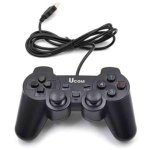


UCOM Ergonomic PC Gamepad with Dual Vibration and 1.8M Cable for Responsive Gaming
₵60.00
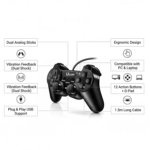
The UCOM USB wired gamepad is designed for PC and laptop gamers, featuring dual vibration motors and dual analog keys for an immersive, responsive gaming experience. With a 1.8-meter cable and ergonomic design, it provides comfort and flexibility for extended play sessions. Compatible with most Windows systems (95/98/ME/2000/XP/Vista/7/8/10), it’s easy to use for both kids and adults, though some games may require joystick-supported titles or JoyToKey software for full functionality.
50 in stock
UCOM Wired USB Gamepad for PC and Laptop: A Practical Guide to Choosing a PC Gaming Controller in Ghana
The UCOM Wired USB Gamepad is a PC and laptop gaming controller designed for players who want physical joystick controls, dual vibration feedback and a comfortable handheld gaming experience. It features dual analogue sticks, vibration motors, an ergonomic ABS construction and a 1.8-metre cable, making it suitable for compatible Windows computers and joystick-supported games.
For gamers in Ghana who prefer using a gamepad instead of relying entirely on keyboard and mouse controls, the UCOM wired controller offers a practical option. Its USB connection provides a direct wired setup, while its dual analogue sticks and vibration functions support a more interactive experience in compatible games.
The controller supports several older and commonly used Windows operating systems, including Windows 95, 98, ME, 2000, XP, Vista, 7, 8 and 10. However, it has important compatibility limitations: it does not support X-Input on PC and is not compatible with Steam or 2K games according to the supplied product information. Some games may require joystick support or JoyToKey software to map controller inputs to keyboard or mouse commands.
Product Overview
The UCOM Wired USB Gamepad is a computer gaming accessory designed to provide physical controls for compatible PC and laptop games.
It connects through a wired USB interface and features two analogue sticks, vibration motors and an ergonomic grip. These controls allow users to interact with supported games through physical movements and button inputs rather than depending exclusively on a computer keyboard.
A gamepad is particularly useful for games that are designed around joystick input. Racing, platform, action and other compatible game categories may offer control arrangements that work naturally with a physical controller.
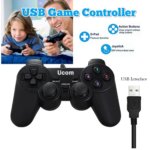
The UCOM controller is designed for both children and adults, with a soft-touch surface and ergonomic grip intended to make handling more comfortable.
Who Is the UCOM Gamepad For?
This controller may be suitable for:
- PC gamers who prefer handheld controls.
- Laptop users who play joystick-supported games.
- Children who enjoy compatible computer games.
- Adults looking for a wired gamepad for home entertainment.
- Casual gamers who want physical analogue controls.
- Users who prefer a direct USB connection.
- Buyers looking for an affordable PC gaming controller.
- Users who need vibration feedback in compatible games.
It is important to check game compatibility before purchasing, particularly if you intend to use the controller with modern PC gaming platforms.
Key Features and Their Benefits
Dual Vibration Motors
The UCOM gamepad features dual vibration motors designed to provide physical feedback during compatible gameplay.
Vibration feedback allows the controller to respond to certain in-game actions. Depending on the game, this may include collisions, impacts and other events that support controller vibration.
Why it matters: Vibration adds physical feedback to the gaming experience, making supported games feel more interactive.
Customer benefit: Players can enjoy vibration effects instead of relying only on visual and audio feedback.
Single Vibration Option
The supplied product information also identifies a single vibration motor option.
It states that customers may need to contact the seller for driver setup if this option requires additional configuration.
This detail is important because the available vibration arrangement and setup requirements may depend on the controller version or configuration supplied.
Customer benefit: Buyers can enquire about the relevant vibration setup before use.
Dual Analogue Sticks
The controller features two analogue sticks designed to provide directional movement and precise input.
Analogue sticks are useful in games where players need to move characters, control direction or perform other actions through joystick movements.
For example, a compatible game may use one stick for movement and another for camera control. The exact function depends on the game’s control arrangement.
Why it matters: Dual analogue controls provide more flexible input than a controller that relies only on basic directional buttons.
Customer benefit: Users can operate supported games through two physical joystick controls.
1.8-Metre Cable
The UCOM controller comes with a 1.8-metre wired cable.
This provides some flexibility when positioning the player in relation to the connected PC or laptop.
A wired connection is useful for users who prefer a direct connection instead of wireless pairing. The cable also eliminates the need to manage a separate wireless controller connection.
Why it matters: Cable length influences how comfortably users can arrange their gaming space.
Customer benefit: The 1.8-metre cable provides room for convenient positioning within a suitable distance of the computer.
Wide Windows Compatibility
The controller is listed as compatible with the following Windows operating systems:
- Windows 95.
- Windows 98.
- Windows ME.
- Windows 2000.
- Windows XP.
- Windows Vista.
- Windows 7.
- Windows 8.
- Windows 10.
This range makes the controller relevant to users operating compatible Windows computers and older PC gaming systems.
However, operating system compatibility does not mean that every game will recognise the controller. Individual games must support joystick input or an appropriate input-mapping method.
Soft-Touch Ergonomic Design
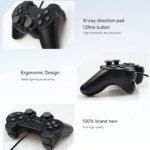
The UCOM controller features a soft-touch surface and ergonomic grip designed to provide comfortable handling.
The shape is intended to make it easier for users to hold the gamepad while reaching its controls.
This can be useful during longer gaming sessions, when grip comfort and convenient access to the analogue sticks influence the overall experience.
Why it matters: A comfortable grip helps users maintain control without constantly adjusting how they hold the controller.
Customer benefit: The ergonomic design provides a more natural handheld gaming arrangement for children and adults.
Joystick-Supported Game Compatibility
The controller is intended for games that support joystick input.
Some PC games recognise gamepads directly, while others are designed primarily for keyboard and mouse controls.
For games that do not directly support the controller, the supplied information identifies JoyToKey software as an option for mapping controller inputs to keyboard or mouse commands.
This can provide an alternative control method in some situations, although it does not guarantee compatibility with every game.
ABS Construction
The controller is made from ABS material.
ABS is commonly used for electronic housings and accessories. It provides a practical construction for a handheld gaming accessory.
The product information describes the controller as sturdy and designed for regular use. Proper handling and storage remain important for maintaining its condition.
Easy Wired Setup
The UCOM gamepad uses a wired USB connection and is described as having a plug-and-play design for compatible games and systems.
A direct USB connection can make the initial setup straightforward because users do not need to establish a wireless connection.
However, the game must support joystick input or an appropriate mapping arrangement for the controller’s functions to work correctly.
Important Compatibility Limitations
Compatibility is one of the most important factors to consider when buying the UCOM USB gamepad.
Although it supports a wide range of listed Windows operating systems, the product information identifies specific limitations that buyers should understand.
No X-Input Support on PC
The controller does not support X-Input on PC.
X-Input is an input standard used by many Windows games to recognise compatible game controllers. Some modern PC games are designed around this standard.
Because the UCOM controller does not support X-Input, buyers should not assume that it will work directly with every modern PC game.
Check the game’s controller requirements before purchasing.
Not Compatible with Steam or 2K Games
The supplied specifications explicitly state that the controller is not compatible with Steam or 2K games.
This is an important limitation for buyers who primarily use Steam or play titles that require the relevant supported input standards.
The controller should not be purchased on the assumption that it will operate with these platforms or games.
Some Games May Require JoyToKey
Some games may require joystick-supported titles or JoyToKey software for full functionality.
JoyToKey is an input-mapping program that can assign controller movements and button presses to keyboard or mouse commands.
For example, a game that expects keyboard input may be more suitable for controller mapping than one that requires an unsupported controller standard.
However, mapping software cannot guarantee that every game will work correctly with the controller.
Check Before Purchasing
Before buying, identify the games you intend to play and confirm whether they support:
- Direct joystick input.
- Compatible USB gamepad input.
- Keyboard or mouse input mapping, if needed.
This is especially important if you intend to use the controller with newer PC games.
Technical Specifications
Specification Details
Brand UCOM
Product type Game Controller
Controller type Wired USB Gamepad / Joystick
Compatibility PCs and laptops
Connection Wired
Interface USB
Cable length 1.8 metres
Analogue controls Dual analogue sticks
Vibration Dual vibration motors
Additional vibration option Single vibration option stated
Design Ergonomic
Surface Soft-touch
Material ABS
Windows compatibility Windows 95, 98, ME, 2000, XP, Vista, 7, 8 and 10
X-Input support Not supported on PC
Steam compatibility Not compatible, according to supplied specifications
2K game compatibility Not compatible, according to supplied specifications
Additional software JoyToKey may be required for some unsupported game controls
Intended users Children and adults
How the UCOM Controller Works
The UCOM gamepad connects to a PC or laptop through its USB cable.
Once connected, the computer and game must recognise the controller’s input method before the user can operate the game through the physical controls.
Understanding Analogue Input
Analogue sticks detect directional movement and allow compatible games to respond to joystick positioning.
For example, a game may use the left stick for character movement and the right stick for another directional function.
The exact controls depend on the game’s design.
Understanding Vibration Feedback
The dual vibration motors provide physical feedback when supported by the game and controller configuration.
The vibration feature can make certain in-game actions more noticeable through physical movement of the controller.
The supplied product information also mentions a single vibration option, with seller assistance potentially required for driver setup.
Understanding Input Mapping
Some computer games do not recognise a controller directly but allow keyboard or mouse commands.
JoyToKey can be used to map selected controller inputs to keyboard or mouse commands where appropriate.
This means the user may be able to operate certain games through the gamepad even when the game does not provide direct joystick support.
However, input mapping is not a substitute for universal compatibility.
Applications of the UCOM Gamepad in Ghana
The UCOM wired controller may be useful in different personal and recreational environments where compatible PCs, laptops and games are available.
Home Gaming
For households with compatible Windows computers, the controller offers a handheld alternative to keyboard-based gaming.
It can be used for supported games in bedrooms, living rooms and home computer setups.
Laptop Gaming
Laptop users who prefer physical controls can consider the UCOM gamepad for compatible joystick-supported games.
Its wired USB connection provides a direct connection without requiring wireless pairing.
Gaming for Children
The product information identifies the controller as suitable for children and adults.
Its ergonomic grip and physical controls may make it useful for children playing compatible computer games under appropriate supervision.
Parents should check the game’s age suitability and controller compatibility before use.
Casual PC Gaming
Casual gamers who play compatible games occasionally may find a wired gamepad convenient.
The dual analogue sticks and vibration motors provide additional physical controls compared with using a keyboard alone.
Computer and Gaming Accessories Retailers
Retailers and computer accessory suppliers in Ghana may consider the UCOM gamepad as part of a range of PC gaming accessories.
Customers should be given accurate compatibility information, especially concerning the lack of X-Input support and the stated Steam and 2K limitations.
Educational and Recreational Settings
Where schools or recreational facilities use compatible computer games for supervised activities, a gamepad can provide a physical input option.
The UCOM controller should only be selected where the installed games and computer systems support its input method.
UCOM Gamepad vs Other Gaming Controllers
The Ghanaian gaming accessories market includes several types of controllers, including PS4 controllers, PS5 controllers, Xbox controllers, Xbox 360 controllers, Nintendo Switch controllers and general-purpose PC gamepads.
These products may look similar, but their intended compatibility and input standards can differ.
UCOM Gamepad
The UCOM controller is designed for compatible PCs and laptops. It uses a wired USB connection, dual analogue sticks and vibration motors.
Its important limitation is that it does not support X-Input on PC and is not compatible with Steam or 2K games according to the supplied information.
PS4 and PS5 Controllers
PlayStation controllers are designed primarily for their respective console ecosystems, with additional PC compatibility depending on the connection method, software and game.
Customers searching for a PS4 controller price in Ghana or PS5 controller price in Ghana should compare the intended console compatibility rather than assuming that a general PC gamepad offers the same functions.
Xbox Controllers
Xbox controllers are another category of gamepad used for console and PC gaming.
Their compatibility depends on the controller model, connection method and game requirements.
Nintendo Switch Controllers
Nintendo Switch controllers are designed for compatible Nintendo Switch systems.
Customers looking for a Nintendo Switch controller should distinguish between console-specific accessories and general-purpose PC gamepads.
The UCOM controller is identified as a PC and laptop gamepad, not a Nintendo Switch controller.
How to Choose the Right PC Game Controller
Choosing the right gamepad requires matching its specifications to your computer and preferred games.
Check the operating system
The UCOM controller lists support for Windows 95, 98, ME, 2000, XP, Vista, 7, 8 and 10.
Confirm that your computer uses a supported system before purchasing.
Check the game’s input requirements
Some games support joystick input directly, while others depend on keyboard and mouse controls.
The controller may require JoyToKey for certain games that do not directly support its input arrangement.
Understand X-Input limitations
The UCOM controller does not support X-Input on PC.
If your preferred game requires X-Input, this controller may not be the right choice.
Check Steam and 2K compatibility
The product information states that the controller is not compatible with Steam or 2K games.
Buyers who mainly play through these platforms should consider another controller with confirmed compatibility.
Consider the cable length
The controller has a 1.8-metre cable.
Make sure this length is suitable for the distance between your gaming position and computer.
Consider vibration features
If vibration feedback is important, check the dual vibration feature and the stated single vibration option.
Contact the seller for clarification or driver setup assistance where required.
Common Buying Mistakes to Avoid
Assuming every PC game supports the controller
A USB connection does not guarantee compatibility with every game.
Always check whether the game supports joystick input or whether a suitable mapping method is available.
Ignoring the lack of X-Input
Some modern PC games require X-Input.
Because this UCOM controller does not support X-Input on PC, buyers should confirm that their preferred games do not depend on it.
Assuming Steam compatibility
The supplied specifications state that the controller is not compatible with Steam.
Do not purchase it specifically for Steam gaming without obtaining reliable confirmation of compatibility.
Confusing UCOM with console-specific controllers
The product is a PC and laptop gamepad.
It should not be assumed to work with PlayStation, Xbox or Nintendo Switch consoles.
Overlooking the 1.8-metre cable
Cable length affects the placement of the controller and computer.
Consider your gaming arrangement before purchasing.
Setup and Usage Guidance
The UCOM controller uses a wired USB connection.
For compatible systems and games, the general setup process is:
- Confirm that the PC or laptop uses a listed supported Windows operating system.
- Check that the intended game supports joystick input or a suitable input-mapping method.
- Inspect the USB cable and controller for visible damage.
- Connect the controller to a suitable USB port.
- Allow the computer to recognize the connected device.
- Open a compatible game and check the controller settings.
- Test the analogue sticks and vibration functions.
- If the game does not support direct joystick input, consider JoyToKey where appropriate.
- Contact the seller for driver setup guidance if the single vibration option requires additional configuration.
The controller’s plug-and-play description applies to supported systems and games. Additional configuration may be necessary for some titles.
Maintenance and Care
Proper care can help keep the UCOM gamepad in good working condition.
- Protect the USB cable: Avoid pulling, twisting or sharply bending the 1.8-metre cable.
- Clean the surface: Use a soft, dry cloth to remove dust and dirt.
- Avoid moisture: Keep the controller away from water and drinks.
- Store carefully: Place the gamepad somewhere safe when not in use.
- Handle the analogue sticks gently: Avoid excessive force or unnecessary twisting.
- Use the correct connection: Connect the controller to a compatible USB port.
- Check the cable regularly: Inspect the cable and connector for visible damage.
- Follow setup instructions: Use the appropriate driver or mapping guidance where required.
The supplied specifications do not provide a specific expected lifespan, so long-term durability should not be expressed as a guaranteed number of years.
Frequently Asked Questions
1. What is the UCOM Wired USB Gamepad?
It is a wired PC and laptop gaming controller with dual analogue sticks, vibration motors, an ergonomic design and a 1.8-metre cable.
2. Does the UCOM controller work with Windows 10?
Yes. Windows 10 is included in the listed supported operating systems.
3. Does it support Windows 7 and Windows 8?
Yes. The supplied compatibility list includes Windows 7 and Windows 8, as well as Windows 8’s listed older operating systems.
4. Does the UCOM gamepad have vibration?
Yes. It features dual vibration motors and also identifies a single vibration option. Driver setup may be required for the single vibration option, according to the supplied information.
5. How long is the cable?
The controller has a 1.8-metre wired cable.
6. Does it support X-Input?
No. The supplied specifications state that it does not support X-Input on PC.
7. Is the UCOM controller compatible with Steam?
No. The supplied product information states that it is not compatible with Steam.
8. Does it work with 2K games?
The supplied specifications state that it is not compatible with 2K games.
9. What is JoyToKey used for?
JoyToKey can map controller inputs to keyboard or mouse commands for certain games that do not directly support joystick input.
10. Can children use the controller
The product information describes it as suitable for both children and adults. The suitability of a particular game should also be considered.
11. Is the UCOM gamepad wireless?
No. It is a wired USB controller.
12. Can I use it with a PlayStation or Xbox console?
The supplied compatibility information identifies PCs and laptops. Compatibility with PlayStation, Xbox or Nintendo Switch consoles is not specified.
Where to Buy a UCOM Gamepad in Ghana
Customers searching for a UCOM gamepad or PC gaming controller for sale in Ghana can enquire at COSMIC ELECTRONICS about product availability and purchasing arrangements.
The UCOM wired USB controller is designed for compatible Windows PCs and laptops. Its dual analogue sticks, vibration motors, ergonomic design and 1.8-metre cable make it an option for users who prefer physical controls for supported computer games.
Before purchasing, confirm that your preferred games support the controller’s input method. Pay particular attention to its lack of X-Input support and the stated incompatibility with Steam and 2K games.
COSMIC ELECTRONICS serves customers through online and physical store channels in Ghana, with delivery arrangements available for selected locations nationwide.
Retail and Bulk Enquiries
Individual customers can enquire about purchasing the controller for personal gaming.
Businesses, retailers and organisations purchasing multiple gaming accessories can also contact COSMIC ELECTRONICS to discuss availability and bulk supply requirements.
Why Buy from COSMIC ELECTRONICS?
COSMIC ELECTRONICS supplies electronics, computer accessories, gaming products, networking equipment, audio devices and other technology products to customers across Ghana.
When choosing a PC controller, accurate compatibility information is essential. Customers should understand the supported Windows versions, connection method, input standards and game limitations before making a purchase.
COSMIC ELECTRONICS aims to support informed purchasing through:
- Genuine products: Product availability and specification enquiries.
- Competitive pricing: Information about current prices and purchasing options.
- Expert product advice: Assistance with understanding compatibility and product features.
- Nationwide delivery: Delivery arrangements for selected locations across Ghana.
- Bulk supply support: Assistance for businesses and other multiple-unit buyers.
- After-sales assistance: Support for product-related enquiries.
- Online and offline shopping: Purchasing options through available business channels.
Whether you are looking for a UCOM gamepad, another PC controller or additional computer accessories, COSMIC ELECTRONICS provides a local electronics sourcing option.
COSMIC ELECTRONICS It’s All About You.
Final Buying Checklist
Before purchasing the UCOM Wired USB Gamepad, confirm that:
- Your intended device is a compatible PC or laptop.
- Your operating system is included in the listed Windows compatibility range.
- Your preferred games support joystick input.
- You understand that the controller does not support X-Input on PC.
- You understand that the supplied information states it is not compatible with Steam or 2K games.
- You are comfortable using a wired USB connection.
- The 1.8-metre cable suits your gaming arrangement.
- You understand the dual vibration and single vibration options.
You can use JoyToKey where appropriate for games requiring keyboard or mouse input mapping.
Quick Summary
✔ Product: UCOM Wired USB Gamepad / Joystick
✔ Brand: UCOM
✔ Product Type: PC and Laptop Game Controller
✔ Connection: Wired USB
✔ Cable Length: 1.8 metres
✔Analogue Controls: Dual analogue sticks
✔ Vibration: Dual vibration motors with a single vibration option also stated
✔ Design: Ergonomic grip with soft-touch surface
✔ Material: ABS
✔ Windows Compatibility: Windows 95, 98, ME, 2000, XP, Vista, 7, 8 and 10
✔ X-Input Support: Not supported on PC
✔ Steam Compatibility: Not compatible according to supplied specifications
✔ 2K Game Compatibility: Not compatible according to supplied specifications
✔ Additional Software: JoyToKey may be required for some games that need keyboard or mouse input mapping
✔ Primary Applications: Compatible PC and laptop gaming, home entertainment and joystick-supported games
✔ Availability in Ghana: Enquire at COSMIC ELECTRONICS
✔ Supply Support: Retail enquiries, bulk supply support and nationwide delivery arrangements
✔ Why Buy from COSMIC ELECTRONICS: Product guidance, competitive pricing, purchasing support and after-sales assistance
| Compatibility | PCs |
|---|---|
| Connection Type/Interface | Wired |
| Features | Ergonomic, Trigger Buttons |
| Material | ABS |
| Product Type | Game Controller |

🔹Key Product Features
- Dual Vibration Motors: Experience enhanced gameplay with dual vibration motors, providing realistic feedback and a more immersive gaming experience.
- Single Vibration Option: Built-in single vibration motor is also available; contact the seller for driver setup if needed.
- Dual Analog Keys: Features dual analog sticks for precise control, ideal for both kids and adults requiring accuracy in gameplay.
- 1.8 Meter Cable: Provides flexibility and comfort, allowing you to play without worrying about cable length.
- Wide Windows Compatibility: Works with Windows 95/98/ME/2000/XP/Vista/7/8/10, making it perfect for PC and laptop gaming.
- User-Friendly Design: Soft-touch surface and ergonomic grip ensure a comfortable, intuitive gaming experience for all ages.
- Joystick-Supported Games: Compatible with games supporting joystick input; for unsupported games, use Joy To Key software to map to keyboard or mouse commands.
- Durable and Reliable: Built with sturdy materials for long-lasting performance and consistent gameplay.
- Easy Setup: Plug-and-play design allows quick installation and use with most PC games without additional software.
- Limitations: Not compatible with Steam or 2K games and does not support X-Input on PC.
- Third-Party Product: This is a high-quality, third-party gamepad, not an original Xbox or brand-specific controller.


IT'S ALL ABOUT YOU
At COSMIC ELECTRONICS, we strive to process and dispatch orders as quickly as possible. While some orders may be shipped on the same day they are placed, processing times can vary depending on product availability, order volume, and delivery location. Please allow 2–3 business days for order processing before shipment.
IMPORTANT DELIVERY INFORMATION
- Fast Order Processing: Orders are processed and dispatched as quickly as possible, typically within 2–3 business days. A confirmation email will be sent shortly after your order is placed.
- Nationwide Delivery Across Ghana: We deliver to selected regions and cities across Ghana. Please check our delivery options to confirm availability in your location.
- Delivery & Collection Requirements: All deliveries require a signature upon receipt. Orders are not processed or shipped on Sundays, although you may place orders online at any time. If you do not receive your confirmation email, please check your Spam or Junk Mail folder.
For enquiries regarding delivery times, order status, or the lead time of a specific item, please contact COSMIC ELECTRONICS on +233 54 724 0128. Our team will be happy to assist you with any questions before or after your purchase.
Related products


Flexible USB Waterproof Silicone Keyboard – Foldable 85-Key with Soft Rubber Cover for PC and Laptop (Black)
This flexible USB silicone keyboard is lightweight, foldable, and portable, making it easy to carry and use anywhere. Its waterproof, washable, and dust-resistant design ensures durability in messy or industrial environments, as well as hygienic use in medical settings. Featuring 109 English and Arabic keys, USB connectivity, and compatibility with Windows 98 through 10, it combines practicality, comfort, and convenience in a compact design.


Fusender 8809 Professional Adjustable Tripod Stand for Photography, Live Streaming, and Video Recording
This light stand features a stable three-leg design for durability and reliable support during shoots. The telescoping rod allows flexible height adjustment up to 2 meters, accommodating various lighting setups. With a standard 1/4-inch screw mount, it supports LED lights, ring lights, soft boxes, and other photography equipment, and folds compactly to 69 cm for easy transport.


Telescopic Adjustable Tablet & Smartphone Holder for Desktop Use (3.5–11″)
The Folding Tablet Stand is a compact and versatile desktop accessory made from durable metal and plastic, available in black, white, and orange. Its foldable design with free lift and adjustable angles allows comfortable viewing for work, study, or entertainment. Silicone protection ensures your device stays stable and scratch-free during use.


Triple Power YD-20 30,000mAh 22.5W Wireless Power Bank for Fast Multi-Device Charging
The Triple Power YD-20 30,000 mAh power bank combines fast charging, wireless charging, and multiple USB outputs to keep all your devices powered on the go. Built with a durable Li-Polymer battery, advanced safety protections, and a sleek portable design, it ensures reliable and safe charging anywhere. Integrated LED light, reverse charging, and compact size make it perfect for travel, outdoor use, or as a practical gift.


V13 Wireless Bluetooth Game Controller with Dual Analog Joysticks for Mobile and PC Gaming
V13 Wireless Bluetooth Game Controller for Android, iPhone, PS3, PC, TV Box, and tablets deliver responsive gameplay with dual analog joysticks, 14 action buttons, and a comfortable grip. Supports popular games like PUBG Mobile, Fortnite, Call of Duty Mobile, Asphalt 9, Garena Free Fire, NBA 2K Mobile, and more.


V8 Bluetooth Wireless Mobile Game Controller for PC, Android and iOS with Dual Joysticks for Precise Gaming
The V8 Bluetooth Mobile Game Controller stably supports multiple devices including smartphones, tablets, TVs, and TV boxes with Android 3.2 and above, offering smooth wireless control within 10 meters. It features dual analog joysticks, precise cross key, and 14 action buttons with an ergonomic design for comfortable and immersive gameplay, supporting multiplayer mode.


Xbox 360 Wired Game Controller with Dual Vibration Shock for Console & Windows PC Gaming
The Xbox 360 USB controller is compatible with Xbox 360 and Windows PCs, offering smooth plug-and-play performance with no lag for reliable gaming. With upgraded sensitive joysticks, improved trigger buttons, and adjustable dual vibration feedback, it delivers precise control and an immersive experience.


Reviews
There are no reviews yet.