


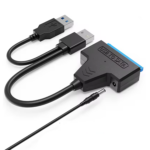
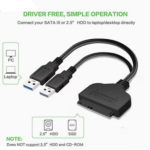
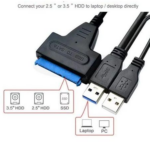
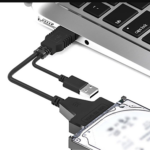


USB 3.0 to SATA III Adapter Cable (7+15 Pin) 22-Pin SATA Cable for 2.5-Inch SSD and HDD Data Transfer
₵85.00
The USB 3.0 to SATA Adapter Cable provides fast and reliable file transfer for 2.5″ and 3.5″ SATA SSDs and HDDs, supporting drives over 2TB.Plug-and-play design with optional DC power makes backups, disk imaging, and data recovery quick and hassle-free. Compatible with Windows, Mac, and Linux, this cable is ideal for professional use, high-definition media, and everyday storage expansion
50 in stock
🔹Key Product Features
- The USB 3.0 to SATA Adapter Cable offers a fast and convenient way to transfer files between multiple hard drives. Designed for 2.5-inch and 3.5-inch SATA SSDs and HDDs, it supports high-speed data transfer, making backups, disk imaging, and data recovery simple and efficient. Ideal for high-definition users, hard disk repair, or professional data management, this plug-and-play cable eliminates the hassle of connecting drives and ensures reliable performance.
- Connects SATA HDD/SSD to USB 3.0 interface. Supports high-speed transfer up to 5 Gbps (USB 3.0) and compatible with USB 2.0/1.1Bus-powered with optional DC power for larger drives
- Portable and plug-and-play for easy file swapping
- Compatible with Windows, Mac OS, and Linux systems
- Interface Type: USB 3.0, SATA port, DC power interface
- Color: Black Supported Transfer Rate: USB 3.0 High Speed 5 Gbps / USB 2.0 480 Mbps / USB 1.1 12 Mbps
- SATA Transfer Rate: SATA III 6 Gbps, SATA II 3 Gbps, SATA I 1.5 Gbps
- Max Drive Capacity: Supports drives over 2TB
- Compatible Devices: 2.5"/3.5" HDD, 5.25" CD/DVD-ROM, CD-RW, COMBO, DVD-RW, DVD-RAM
- Compliance: USB 3.0 Specification Revision 1.0, USB 2.0 Specification Revision 2.0, Universal Serial ATA Spec Revision 2.6Supports ATA/ATAPI Devices
- Material: Plastic
- Innovative Level: Innovative
- Product Name: Easy USB3.0 to SATA Hard Drive Cable/Adapter
- Product Reference: Factory USB 3.0 to SATA 22-Pin Adapter Cable for 2.5 Inch HDD Hard Disk Drive with USB 2.0 Power Cable
- Keywords: Factory, USB 3.0 to SATA, SATA 22-Pin, USB 3.0 to SATA Adapter, USB 3.0 to SATA Cable, SATA Adapter, SATA Cable, 2.5 Inch, HDD, Hard Disk Drive, with USB 2.0 Power Cable, USB to SATA Cable
USB 3.0 to SATA III Adapter Cable (7+15 Pin) 22-Pin SATA Cable for 2.5-Inch SSD and HDD Data Transfer
The USB 3.0 to SATA III Adapter Cable is a convenient storage connectivity accessory designed to connect compatible SATA hard drives (HDDs) and solid-state drives (SSDs) to computers through a USB 3.0 interface. Featuring a 22-pin SATA connector (7+15 pin), support for 2.5-inch and 3.5-inch SATA drives, high-speed data transfer, and optional DC power, this SATA cable provides a practical solution for file transfers, backups, disk imaging, and data recovery.
Whether you are a home user, computer technician, IT professional, business, or data management specialist in Ghana, this USB to SATA adapter cable makes it easier to access compatible storage drives without installing them inside a computer.
Product Overview
The USB 3.0 to SATA Adapter Cable, also known as a USB SATA cable or SATA-to-USB adapter, connects compatible SATA storage devices to a computer through a USB port.
Traditional SATA hard drives and SSDs normally connect directly to a computer’s motherboard through a SATA interface. However, accessing a drive outside the computer can be inconvenient when you need to retrieve files, transfer information, perform backups, or inspect a storage device.
This USB 3.0 to SATA III adapter provides an alternative by allowing supported SATA drives to connect externally through USB.
Its 22-pin SATA connector combines the 7-pin data connection and 15-pin power connection used by compatible SATA drives.
The adapter is particularly useful for:
- Accessing internal SATA hard drives externally.
- Connecting compatible SSDs to computers.
- Transferring files between storage devices.
- Backing up important documents.
- Performing disk imaging operations.
- Supporting compatible data recovery activities.
- Accessing storage drives during computer repairs.
- Expanding available storage connectivity.
The product is designed for Windows, Mac OS, and Linux systems, making it suitable for different computer environments.
What Is a SATA Cable and What Is It Used For?
A SATA cable is a storage connectivity cable associated with Serial ATA (SATA), an interface used to connect storage devices such as hard disk drives, solid-state drives, and certain optical drives to compatible computer systems.
The term SATA stands for Serial Advanced Technology Attachment.
Traditional internal SATA connections use separate data and power connections. The data connection transfers information between the storage device and computer, while the power connection supplies the electricity required by the drive.
A standard internal SATA cable is different from a USB-to-SATA adapter.
The USB 3.0 to SATA Adapter Cable combines the required SATA connectivity in an adapter arrangement that allows compatible storage devices to connect to a computer through USB.
Understanding the 22-Pin SATA Connector
This product features a 22-pin SATA connector consisting of:
- 7-Pin SATA Data Connection: Responsible for data communication.
- 15-Pin SATA Power Connection: Provides the power connection required by compatible drives
Together, these connections form the 22-pin interface used by the adapter to connect supported SATA storage devices.
This configuration is particularly relevant when connecting compatible 2.5-inch SATA HDDs and SSDs.
What Is a USB-to-SATA Adapter?
A USB-to-SATA adapter is a computer accessory that allows a SATA storage device to communicate with a computer through a USB port.
Instead of installing the hard drive or SSD internally, you can connect it externally using the adapter.
This is useful when accessing old computer drives, transferring files, replacing storage devices, or performing maintenance.
Key Features and Benefits of the USB 3.0 to SATA III Adapter Cable
1. USB 3.0 Connectivity
The adapter connects compatible SATA hard drives and SSDs to a computer through a USB 3.0 interface.
USB 3.0 supports data transfer rates of up to 5 Gbps according to the supplied specifications.
It is also compatible with USB 2.0 and USB 1.1 interfaces.
Why it matters: Different computers may support different USB generations.
Customer benefit: You can use the adapter with compatible USB 3.0, USB 2.0, and USB 1.1 ports, although transfer performance will depend on the interface being used.
2. SATA III 22-Pin Connector
The adapter features a 22-pin SATA connector comprising 7 data pins and 15 power pins.
It is designed to connect compatible SATA storage devices.
Why it matters: SATA connectivity is commonly used by internal HDDs and SSDs.
Customer benefit: Access compatible storage drives externally without requiring direct internal installation.
3. Supports 2.5-Inch SATA SSDs and HDDs
The adapter is designed for compatible 2.5-inch SATA solid-state drives and hard disk drives.
This makes it useful for accessing laptop storage drives, replacing old drives, transferring files, and retrieving information.
Why it matters: Laptop storage devices may need to be accessed outside their original computers.
Customer benefit: Connect compatible 2.5-inch SATA drives to your computer through USB.
4. Supports 3.5-Inch SATA HDDs
The supplied product description also identifies compatibility with 3.5-inch SATA hard drives.
These drives are commonly used in desktop computers and other storage applications.
Why it matters: Desktop hard drives often require more power than a standard USB connection can provide.
Customer benefit: The optional DC power interface provides an additional power connection for compatible larger drives when required.
Always ensure that the appropriate power supply is available before connecting a 3.5-inch HDD.
5. High-Speed Data Transfer
The adapter supports different data transfer rates depending on the USB and SATA interfaces.
Its listed specifications include:
- USB 3.0: 5 Gbps.
- USB 2.0: 480 Mbps.
- USB 1.1: 12 Mbps.
- SATA III: 6 Gbps.
- SATA II: 3 Gbps.
- SATA I: 1.5 Gbps.
The product’s headline also identifies support for transfer speeds of up to 6 Gbps.
Actual transfer speeds depend on the adapter implementation, connected storage device, USB port, computer hardware, and other operating conditions.
Why it matters: Data transfer performance is important when copying large files, backing up information, and working with storage devices.
Customer benefit: Supports efficient file transfers when used with compatible equipment.
6. Optional DC Power Interface
The adapter includes a DC power interface for additional power requirements.
This is particularly relevant when connecting compatible larger storage devices that cannot operate reliably using USB bus power alone.
Why it matters: Different SATA drives have different power requirements.
Customer benefit: Provides an additional power connection option for supported drives.
7. Supports Large Storage Drives
The supplied product specifications identify support for drives over 2TB, while the product headline specifies support for storage capacities up to 4TB
This makes the adapter relevant for users working with larger storage devices.
Why it matters: Customers increasingly use high-capacity drives for backups, multimedia storage, and data management.
Customer benefit: Provides an external connection solution for supported large-capacity SATA drives.
Actual maximum capacity depends on the adapter’s supported specifications and the computer’s operating system.
8. Plug-and-Play Convenience
The adapter features a plug-and-play design for convenient connection to compatible computer systems.
This helps simplify the process of accessing supported storage devices without installing the drive internally.
Why it matters: Internal drive installation may require opening a computer and connecting separate SATA cables.
Customer benefit: Connect compatible storage drives externally for convenient access
Some operating systems or drives may still require additional configuration, disk initialisation, or troubleshooting.
9. Windows, Mac OS and Linux Compatibility
The USB 3.0 to SATA Adapter Cable is designed to work with Windows, Mac OS, and Linux systems.
This makes it suitable for users working across different computer platforms.
Why it matters: Technicians and businesses may use different operating systems when managing storage devices.
Customer benefit: Enjoy flexible compatibility across supported computer environments.
10. Portable Black Design
The adapter features a black plastic construction.
Its compact cable-based design makes it convenient to store in a computer accessory bag, technician’s toolkit, or office equipment cabinet.
Why it matters: Storage accessories are often used in different locations.
Customer benefit: Carry the adapter conveniently for computer maintenance, data transfer, and storage management tasks.
Who Needs a USB 3.0 to SATA Adapter Cable?
The adapter is useful for different users who regularly work with SATA storage devices.
Home Computer Users
Home users may have old laptop or desktop hard drives containing personal files, photographs, videos, documents, and other information.
Instead of installing the drive inside another computer, a compatible USB-to-SATA adapter can provide an external connection.
Common applications include:
- Retrieving files from an old computer.
- Transferring documents to a new laptop.
- Accessing an old SSD.
- Backing up personal photographs.
- Copying videos and multimedia files.
- Accessing compatible external storage drives.
Computer Technicians
Computer technicians frequently need to access internal storage devices during repairs and maintenance.
The adapter can support different technical activities, including:
- Testing compatible SATA drives.
- Retrieving customer files.
- Transferring operating system files.
- Accessing removed laptop drives.
- Checking storage device contents.
- Performing supported disk imaging operations.
For technicians working with multiple computers, a USB-to-SATA adapter is a useful addition to their computer repair toolkit.
IT Professionals and System Administrators
IT professionals may need to access internal drives externally when replacing storage devices, performing backups, migrating data, or maintaining computer systems.
The adapter provides a convenient way to connect compatible SATA drives without installing them inside the computer.
Businesses and Corporate Offices
Businesses frequently handle important digital information stored on computers and internal storage drives.
The adapter can assist with compatible storage access during:
- Computer replacement projects.
- Data migration.
- File backup activities.
- Storage troubleshooting.
- Equipment maintenance.
- Computer upgrades.
Data Recovery Professionals
The adapter can support certain data recovery workflows by providing external access to compatible SATA drives.
It is important to understand that the adapter does not independently repair damaged hard drives or recover deleted information.
Successful data recovery depends on the condition of the drive, the nature of the data loss, and the recovery tools being used.
Practical Applications of the SATA-to-USB Adapter in Ghana
Computer storage accessories have practical applications across homes, businesses, educational institutions, and professional technical environments in Ghana.
1. Accessing Old Laptop Hard Drives
When replacing a laptop’s internal HDD with a new SSD, users may still need to retrieve information from the original drive.
The USB 3.0 to SATA adapter provides an external connection for compatible drives.
You can use it to access supported files and transfer information to another storage device
2. Upgrading from HDD to SSD
Solid-state drives are commonly used as storage upgrades for compatible computers.
During an HDD-to-SSD upgrade, users may need to copy information from the existing drive to the replacement drive.
The adapter can provide an external connection for compatible SATA drives during supported migration processes.
3. Computer Repairs and Maintenance
Computer repair shops and IT technicians can use the adapter when working with removed storage devices.
It helps provide external access for troubleshooting, file retrieval, and storage inspection.
4. Business Data Management
Businesses in Accra, Tema, Kumasi, Takoradi, and other commercial locations may need to access old computer drives during equipment upgrades and maintenance.
The adapter can support compatible storage management activities.
5. Educational Institutions
Schools, universities, and training centers may maintain multiple desktop and laptop computers.
Technicians responsible for maintaining these systems can use a USB-to-SATA adapter when accessing compatible storage drives.
6. Multimedia and Large File Management
Photographers, video editors, content creators, and other multimedia users often work with large files.
Compatible SATA SSDs and HDDs can be connected externally for transferring supported files, organizing media libraries, and creating backups.
Understanding SATA I, SATA II and SATA III Transfer Speeds
When purchasing a SATA cable or adapter, understanding SATA generations helps you evaluate the connection requirements of your storage device.
The USB 3.0 to SATA Adapter Cable supports the following SATA transfer specifications.
SATA Generation Listed Transfer Rate
SATA I 1.5 Gbps
SATA II 3 Gbps
SATA III 6 Gbps
SATA I
SATA I is the first generation of the SATA interface.
It supports a listed transfer rate of 1.5 Gbps and is associated with older storage devices.
SATA II
SATA II supports a listed transfer rate of 3 Gbps.
It provides a higher interface transfer rate than SATA I.
SATA III
SATA III supports a listed transfer rate of 6 Gbps.
It is commonly associated with modern SATA SSDs and HDDs.
Why USB Compatibility Matters
Although SATA III supports up to 6 Gbps, the supplied adapter specifications identify USB 3.0 transfer rates of up to 5 Gbps.
Therefore, the USB connection can limit the actual transfer rate when using the adapter.
The computer, storage device, and adapter must all support the relevant specifications for optimal performance.
USB 3.0 vs USB 2.0 vs USB 1.1
The adapter supports backward compatibility with different USB generations.
USB Interface Listed Transfer Rate
USB 3.0 5 Gbps
USB 2.0 480 Mbps
USB 1.1 12 Mbps
USB 3.0 offers the highest listed transfer rate among these supported interfaces.
For customers regularly transferring large files, using a compatible USB 3.0 port is preferable to connecting through an older USB 2.0 or USB 1.1 port.
This is particularly relevant when backing up large storage drives or transferring high-definition multimedia files.
How to Use the USB 3.0 to SATA Adapter Cable
The adapter is designed for convenient external access to compatible SATA storage devices.
Follow these general steps when connecting a supported drive.
- Identify the SATA connector on the storage device.
- Locate the 22-pin connector on the USB-to-SATA adapter.
- Connect the adapter securely to the compatible SATA drive.
- Connect the USB 3.0 end to an available USB port on your computer.
- If the connected drive requires additional power, use the appropriate compatible DC power arrangement.
- Allow the operating system to detect the connected storage device.
- Access the drive through the computer’s file management system if it is recognised and accessible.
- Transfer, copy, or back up supported files as required.
Important: Avoid disconnecting a storage device while data is being transferred. Safely eject the drive through your operating system before disconnecting it.
Also, avoid formatting or initializing a drive if it contains important information that you have not backed up.
Common SATA Cable and USB-to-SATA Adapter Problems
Understanding common connectivity issues can help you troubleshoot your storage setup.
Computer Does Not Recognize the Hard Drive
Possible causes include:
- Loose SATA connections.
- Insufficient power.
- Damaged storage devices.
- Faulty USB ports.
- Unsupported drive configurations.
- Operating system detection issues.
Recommended checks:
- Confirm that the SATA connector is properly attached.
- Check whether the drive requires additional DC power.
- Try another compatible USB port.
- Check the operating system’s disk management utility.
- Test the drive with another compatible computer if available.
Some storage devices require more power than a standard USB connection can supply.
This is particularly relevant to many 3.5-inch desktop hard drives.
Use an appropriate external power supply compatible with the drive and adapter arrangement.
Slow File Transfers
Slow transfer speeds may result from:
- Using a USB 2.0 or USB 1.1 port.
- Storage drive limitations.
- Unsupported USB specifications.
- Computer hardware limitations.
- File system or operating system conditions.
For better transfer performance, use compatible USB 3.0 equipment.
Drive Is Not Accessible
A drive may be detected but not accessible through the file management system.
Possible causes include partition problems, file system incompatibility, drive corruption, or permission restrictions.
Avoid formatting the drive if you need to preserve its existing information.
Important Considerations When Buying a SATA Cable
Before purchasing a USB-to-SATA adapter, consider the following factors.
Storage Drive Compatibility
Confirm whether your drive uses a SATA interface.
This product is specified for 2.5-inch and 3.5-inch SATA HDDs and SSDs.
It also lists compatibility with selected optical devices, including CD/DVD-ROM, CD-RW, COMBO, DVD-RW, and DVD-RAM devices that support ATA/ATAPI connections.
Connector Configuration
Confirm that your drive supports the 22-pin SATA connection.
The adapter uses a 7+15-pin configuration.
Power Requirements
Check whether your drive can operate using USB bus power or requires additional DC power.
This is particularly important for larger drives.
Storage Capacity
The product headline specifies support for drives up to 4TB, while the detailed specifications state support for drives over 2TB.
Confirm the adapter’s supported capacity and your operating system’s storage compatibility before using larger drives.
Operating System Compatibility
The adapter is designed for Windows, Mac OS, and Linux.
Check that your operating system supports the connected drive’s file system and partition format.
Why Buy the USB 3.0 to SATA Adapter Cable from COSMIC ELECTRONICS?
COSMIC ELECTRONICS is a trusted electronics supplier in Ghana, serving individuals, businesses, computer technicians, IT professionals, institutions, and commercial buyers.
When sourcing SATA cables, USB-to-SATA adapters, and other computer accessories, customers can benefit from:
Genuine Products: Access to electronics and computer accessories sourced to meet different customer requirements.
Nationwide Delivery: Delivery support for customers across Ghana.
Expert Product Advice: Assistance with identifying suitable connectivity accessories and checking storage device compatibility.
Bulk Supply Support: Enquiries for businesses, computer retailers, technicians, and institutions requiring multiple units.
After-Sales Assistance: Support with product-related enquiries following purchase.
Competitive Pricing: Purchasing options for individual and commercial customers.
Convenient Ordering: Online and offline purchasing and enquiry options.
COSMIC ELECTRONICS supports customers looking for practical computer connectivity products, storage accessories, and specialized technology solutions.
Bulk SATA Cable Supply for Businesses and IT Professionals in Ghana
Organisations and technical service providers may require multiple USB-to-SATA adapters for their computer maintenance and storage management activities.
- Potential bulk buyers include:
- Computer repair shops.
- IT support companies.
- Corporate IT departments.
- Computer retailers.
- Data management professionals.
- Educational institutions.
- Technology service providers.
- Computer installation contractors.
COSMIC ELECTRONICS supports product enquiries for individual purchases, bulk orders, and institutional supply requirements.
For businesses managing multiple storage devices, having suitable SATA connectivity accessories available can make routine maintenance and storage access more convenient.
Where to Buy a USB 3.0 to SATA Adapter Cable in Ghana
If you are looking for a SATA cable, USB-to-SATA adapter, or SATA cable for HDD and SSD connectivity in Ghana, COSMIC ELECTRONICS provides an option for sourcing computer accessories and storage connectivity products.
The USB 3.0 to SATA III Adapter Cable is suitable for customers who need to connect compatible SATA drives externally for file transfers, backups, disk imaging, and supported data recovery activities.
COSMIC ELECTRONICS operates online and offline retail channels, serving customers in Accra and other locations across Ghana.
Customers can enquire about product availability, compatibility, and other computer accessories required for their storage management needs.
Whether you are a home user, computer technician, IT professional, business, or institution, COSMIC ELECTRONICS can assist with product enquiries and supply requirements.
Frequently Asked Questions About SATA Cables and USB-to-SATA Adapters
-
What is a SATA cable used for?
A SATA cable is used to establish connectivity between compatible SATA storage devices and computer systems. A USB-to-SATA adapter allows compatible SATA drives to connect externally to computers through USB.
-
What is a USB-to-SATA cable?
A USB-to-SATA cable is a computer accessory that connects a SATA HDD or SSD to a computer’s USB port. It allows users to access compatible storage devices externally without installing them inside the computer.
-
Can I use this SATA cable for an SSD?
Yes. The adapter is designed to support compatible 2.5-inch SATA SSDs and HDDs.
-
Can I use the adapter with a laptop hard drive?
Yes. It is suitable for compatible 2.5-inch SATA laptop HDDs and SSDs, allowing external access through USB.
-
Can I connect a 3.5-inch desktop hard drive?
The supplied specifications identify compatibility with 3.5-inch SATA HDDs. However, larger drives may require additional DC power rather than relying solely on USB bus power.
-
Does this adapter support USB 3.0?
Yes. It supports USB 3.0 with a listed transfer rate of up to 5 Gbps and is also compatible with USB 2.0 and USB 1.1.
-
What is the difference between SATA II and SATA III?
SATA II has a listed transfer rate of 3 Gbps, while SATA III supports up to 6 Gbps. The actual transfer speed also depends on the connected devices and USB interface.
-
Can I use this adapter for data recovery?
The adapter can provide external access to compatible SATA drives during supported data recovery activities. However, it does not independently repair physically damaged drives or guarantee data recovery.
-
Does the adapter work with Windows and Mac?
Yes. The supplied specifications identify compatibility with Windows, Mac OS, and Linux systems.
-
Can I connect a drive larger than 2TB?
The detailed product specifications identify support for drives over 2TB, while the product headline specifies support up to 4TB. Confirm the supported capacity and operating system compatibility before purchasing.
-
Does the adapter require an external power supply?
It is bus-powered and includes an optional DC power interface. Larger drives, particularly many 3.5-inch HDDs, may require additional power.
-
Where can I buy a USB-to-SATA adapter in Ghana?
You can enquire about the USB 3.0 to SATA III Adapter Cable at COSMIC ELECTRONICS. Online and offline purchasing options and nationwide delivery support are available across Ghana.
Technical Specifications
Specification Details
Product Name Easy USB 3.0 to SATA Hard Drive Cable/Adapter
Product Type USB 3.0 to SATA III Adapter Cable
Connector Configuration SATA 22-Pin (7+15 Pin)
Interface Type USB 3.0, SATA Port, DC Power Interface
Material Plastic
Colour Black
USB 3.0 Transfer Rate 5 Gbps
USB 2.0 Transfer Rate 480 Mbps
USB 1.1 Transfer Rate 12 Mbps
SATA III Transfer Rate 6 Gbps
SATA II Transfer Rate 3 Gbps
SATA I Transfer Rate 1.5 Gbps
Maximum Drive Capacity Over 2TB; headline specifies up to 4TB
Compatible Drives 2.5-inch and 3.5-inch SATA HDDs and SSDs
Other Compatible Devices 5.25-inch CD/DVD-ROM, CD-RW, COMBO, DVD-RW, DVD-RAM
Power USB Bus-Powered with Optional DC Power
Operating Systems Windows, Mac OS, Linux
Installation Plug and Play
Compliance USB 3.0 Specification Revision 1.0, USB 2.0 Specification Revision 2.0, Universal Serial ATA Specification Revision 2.6
Device Support ATA/ATAPI Devices
Application File Transfer, Backup, Disk Imaging and Data Recovery
Quick Summary
- Product: USB 3.0 to SATA III Adapter Cable.
- Product Category: SATA Cable and USB-to-SATA Adapter.
- Connector: 22-Pin SATA (7+15 Pin).
- Main Function: Connecting compatible SATA storage devices to computers through USB.
- Compatible Drives: 2.5-inch and 3.5-inch SATA HDDs and SSDs.
- Additional Compatibility: Supported CD/DVD-ROM and other ATA/ATAPI devices.
- USB 3.0 Transfer Rate: Up to 5 Gbps.
- SATA III Transfer Rate: Up to 6 Gbps.
- Storage Capacity: Detailed specifications state over 2TB; product headline specifies up to 4TB.
- Power: USB bus-powered with optional DC power.
- Material: Plastic.
- Color: Black.
- Operating Systems: Windows, Mac OS, and Linux.
- Applications: File transfers, backups, disk imaging, data recovery, and storage management.
- Availability in Ghana: Enquire at COSMIC ELECTRONICS.
- Delivery: Nationwide delivery support across Ghana.
- Bulk Supply: Enquiries supported for businesses, technicians, and institutions.
- Why Buy from COSMIC ELECTRONICS: Genuine products, competitive pricing, expert product advice, bulk supply support, and after-sales assistance.
- The USB 3.0 to SATA III Adapter Cable is a practical storage connectivity accessory for anyone who needs convenient external access to compatible SATA hard drives and SSDs.
For SATA cables, USB-to-SATA adapters, HDD accessories, SSD connectivity products, and other computer accessories in Ghana, enquire at COSMIC ELECTRONICS It’s All About You.
| Material | Plastic |
|---|---|
| Interface Type | USB 3.0, SATA Port, DC Power Interface |
| Color | Black |
| Supported Transfer Rate | USB 3.0 High Speed 5 Gbps / USB 2.0 480 Mbps / USB 1.1 12 Mbps |
| SATA Transfer Rate | SATA III 6 Gbps / SATA II 3 Gbps / SATA I 1.5 Gbps |
| Max Drive Capacity | Over 2TB |
| Compatible Devices | 2.5″/3.5″ HDD, 5.25″ CD/DVD-ROM, CD-RW, COMBO, DVD-RW, DVD-RAM |


IT'S ALL ABOUT YOU
At COSMIC ELECTRONICS, we strive to process and dispatch orders as quickly as possible. While some orders may be shipped on the same day they are placed, processing times can vary depending on product availability, order volume, and delivery location. Please allow 2–3 business days for order processing before shipment.
IMPORTANT DELIVERY INFORMATION
- Fast Order Processing: Orders are processed and dispatched as quickly as possible, typically within 2–3 business days. A confirmation email will be sent shortly after your order is placed.
- Nationwide Delivery Across Ghana: We deliver to selected regions and cities across Ghana. Please check our delivery options to confirm availability in your location.
- Delivery & Collection Requirements: All deliveries require a signature upon receipt. Orders are not processed or shipped on Sundays, although you may place orders online at any time. If you do not receive your confirmation email, please check your Spam or Junk Mail folder.
For enquiries regarding delivery times, order status, or the lead time of a specific item, please contact COSMIC ELECTRONICS on +233 54 724 0128. Our team will be happy to assist you with any questions before or after your purchase.
Related products


20m Premium High-Speed HDMI Cable with 4K Ultra HD Support for TVs and Projectors
Enjoy clear 4K Ultra HD video and high-quality digital audio with this 20-meter high-speed HDMI cable. Its extra-long length makes it ideal for connecting TVs, projectors, monitors and other HDMI-enabled devices over longer distances. Perfect for home entertainment, gaming setups, presentations and other extended HDMI connections.


Digital to Analog Audio Converter – Black Stereo DC 5V/2A Portable Fiber Optic to 3.5mm Sound Adapter for Mobile Phones
Enjoy clear and stable sound conversion with this Digital to Analog Audio Converter featuring Bluetooth 5.0 connectivity. It supports optical, coaxial, U disk, and 3.5mm inputs with RCA and AUX outputs for versatile audio connections. Built with a durable metal shell and volume control knob, it delivers reliable performance with simple plug-and-play operation.


Lanjue L600S 2-in-1 Wired Game Pad Controller with Analog and Digital Controls
The Lanjue L600S 2-in-1 Game Pad is a reliable and easy-to-use controller designed for classic and older Windows systems. With broad compatibility and responsive controls, it delivers smooth gameplay for casual and dedicated gamers. Its ergonomic design ensures comfort, making it suitable for long gaming sessions.


Universal SATA to USB 3.0 & Type-C Adapter Cable 6Gbps SATA Cable for 2.5-Inch and 3.5-Inch HDD/SSD
The USB 3.0 to SATA III Adapter Cable allows high-speed data transfer of up to 5Gbps for 2.5" SSDs and HDDs. Plug-and-play design provides quick, hassle-free access to files without additional drivers, perfect for laptops and desktops. Compact and portable with UASP support, it’s ideal for backups, data recovery, and external drive use on Windows, Mac, or Linux systems.


Universal SATA to USB 3.0 & Type-C Adapter Cable for 2.5-Inch HDD/SSD (6Gbps)
The Universal SATA to USB 3.0 & Type-C Adapter Cable provides a simple and reliable way to connect 2.5-inch and 3.5-inch SATA HDDs and SSDs to your computer or compatible device. With high-speed USB 3.0 data transfer, Type-C compatibility, and a stable 12V 2A power supply, it is ideal for data backup, file transfer, drive cloning, and external storage access.


Reviews
There are no reviews yet.