


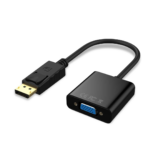
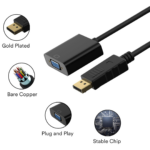


DisplayPort to VGA Adapter Converter Cable Male-to-Female Video Adapter for PC, Laptop, Monitor and Projector
₵80.00
Connect your DisplayPort-enabled PC or laptop to a VGA monitor, projector, or HDTV with this compact and portable DP to VGA adapter. Its lightweight design and quality workmanship make it an ideal solution for home, office, presentations, and travel.
1 in stock
🔹Key Product Features
- DisplayPort to VGA Conversion: Easily connects DisplayPort-enabled devices to VGA displays for seamless video output.
- Male to Female Adapter Design: Features a DisplayPort male connector and VGA female port for convenient device compatibility.
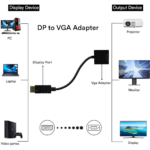
- Wide Device Compatibility: Works with computers, laptops, desktops, and other devices equipped with a DisplayPort interface.
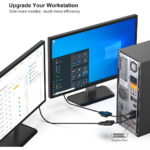
- Supports Multiple Displays: Compatible with monitors, projectors, HDTVs, and televisions with VGA input ports.
- Plug-and-Play Operation: No external power supply or additional software installation required for setup.
- Reliable Signal Transmission: Built with quality shielding to help reduce interference and maintain stable video performance.
- Compact and Portable Design: Lightweight construction makes it easy to carry for presentations, travel, office, and home use.
- Durable Connector Construction: Designed with sturdy connectors for secure connections and long-lasting performance.
DisplayPort to VGA Adapter Converter Cable Product Description
The DisplayPort to VGA Adapter Converter Cable connects a DisplayPort-enabled computer or laptop to a VGA-compatible monitor, projector, HDTV, or television. With a DisplayPort male connector and a VGA female port, this compact, plug-and-play adapter provides a practical solution for using VGA displays with compatible computers at home, in offices, schools, and presentation environments.
For customers looking for a DisplayPort to VGA adapter in Ghana, COSMIC ELECTRONICS provides electronics and computer accessories for individual users, businesses, schools, institutions, and other organisations. This adapter is particularly useful when a computer has a DisplayPort output but the available display uses a VGA input.
Product Overview
The DisplayPort to VGA Adapter Converter Cable is a male-to-female video adapter designed to convert a compatible DisplayPort video output into a VGA connection. It allows users to connect supported desktop computers and laptops to VGA-equipped display devices without requiring a separate external power supply or additional software installation.
VGA remains in use in many offices, classrooms, meeting rooms, presentation spaces, and older display systems. This adapter can help users continue using compatible VGA monitors and projectors instead of replacing them simply because their computer has a DisplayPort connector.
Its compact and lightweight construction makes it convenient to carry between workstations, offices, classrooms, and meeting venues.
Who Is This DisplayPort to VGA Adapter For?
This adapter is suitable for users who need to connect DisplayPort-enabled devices to displays with VGA inputs.
- Home users: Connect a compatible computer to a VGA monitor or television for everyday computing and supported multimedia applications.
- Office workers: Use existing VGA monitors with compatible desktop computers and laptops.
- Teachers and lecturers: Connect supported computers to VGA projectors for lessons, lectures, and presentations.
- Students: Use compatible computers with available VGA monitors in educational environments.
- Businesses: Maintain access to existing VGA display equipment in offices, meeting rooms, and workstations.
- IT technicians: Support computer and display installations involving DisplayPort outputs and VGA inputs.
- Institutions: Connect compatible computers to existing VGA display systems where the equipment and connection requirements match.
Before purchasing, confirm that the computer has a DisplayPort output and the intended display has a VGA input. The adapter is designed for DisplayPort-to-VGA connections, not for every possible combination of video ports.
Key Features and Benefits
1. DisplayPort-to-VGA Video Conversion
The adapter connects a DisplayPort-enabled computer to a VGA display. It is useful when the computer’s available video output and the monitor or projector’s input use different connector types.
Why it matters: You can make use of compatible existing display equipment without necessarily purchasing a new monitor or projector.
2. DisplayPort Male Connector and VGA Female Port
The adapter features a DisplayPort male connector on one end and a VGA female port on the other. This configuration allows the adapter to plug into a compatible DisplayPort output while accepting a VGA cable or connection.
Why it matters: The male-to-female design provides a straightforward way to bridge the two connector types. Check your existing cable and display ports before ordering to ensure that the connection arrangement is correct.
3. Compatibility with Desktop Computers and Laptops
The adapter is intended for computers equipped with a DisplayPort interface, including compatible desktops, PCs, and laptops.
Why it matters: Users can connect supported computers to VGA displays in a variety of working environments. Compatibility depends on the actual output port and the computer’s video-output capabilities.
4. Support for VGA Monitors and Projectors
Compatible display devices include monitors, projectors, HDTVs, and televisions that provide a VGA input.
Why it matters: The adapter can be useful in classrooms, offices, meeting rooms, and homes where VGA display equipment is still available.
The display must have a suitable VGA input, and its supported resolutions and operating requirements must be compatible with the connected computer and adapter.
5. Plug-and-Play Operation
The adapter is designed for straightforward installation without an external power supply or additional software installation.
Why it matters: Users can avoid complicated setup procedures and reduce the time needed to connect compatible computer and display equipment.
Actual operation still depends on the computer recognising and supporting the connected display.
6. Shielding for Reliable Signal Transmission
The product description specifies quality shielding intended to help reduce interference and maintain stable video performance.
Why it matters: Shielding can help limit unwanted electrical interference affecting a video connection. However, the final display result can also depend on the computer, VGA cable, display, cable length, and surrounding electrical conditions.
7. Compact and Lightweight Construction
The adapter is designed to be portable, making it convenient for travel, office use, home computing, and presentations.
Why it matters: Users can keep the adapter with their computer accessories and carry it when working between different locations.
8. Sturdy Connector Construction
The adapter is described as having sturdy connectors designed to provide secure connections and support long-term use.
Why it matters: Properly seated connectors help reduce accidental disconnections during normal operation. Careful handling and avoiding unnecessary strain on the ports can help maintain the connection.
Technical Specifications
Specification Details
Product type DisplayPort to VGA Adapter
Common name Adapter
Connector A DisplayPort male
Connector B VGA female
Connection type Male to female
Cable type Video adapter cable
Compatibility DisplayPort-enabled devices
Supported computers PC, computer, laptop, desktop
Compatible displays Monitor, projector, HDTV, television with VGA input
Application Computer
Application support Multimedia, monitor, projector, television
Installation Plug and play
External power Not required according to the supplied product details
Software installation Not required according to the supplied product details
Portability Compact and lightweight
Durability Sturdy connector construction
Signal protection Shielding designed to help reduce interference
The supplied product details do not specify a maximum resolution, refresh rate, supported operating systems, cable length, or exact adapter dimensions. Confirm these requirements if your installation depends on a particular display resolution or technical specification.
Practical Applications in Ghana
Home Computing and Entertainment
A DisplayPort to VGA adapter can help connect a compatible home computer to an existing VGA monitor or television. It may be useful for general computing, displaying supported multimedia content, and extending the usefulness of older display equipment.
Before connecting to a television, confirm that it has a VGA input. Not all HDTVs or modern televisions include this port.
Offices and Corporate Workstations
Businesses may have a mixture of newer computers and older monitors. This adapter can help bridge that difference when the computer has DisplayPort output and the monitor has VGA input.
For offices in Accra, Tema, Kumasi, and other parts of Ghana, it may be a practical accessory for workstation setup, replacement connections, and routine IT support.
Schools, Colleges, and Universities
Educational institutions may use VGA-equipped projectors or monitors for classroom teaching, staff training, and presentations.
A compatible adapter allows a DisplayPort computer to connect to suitable VGA equipment, helping institutions continue using existing resources where the equipment remains functional.
Meetings, Training, and Presentations
Professionals who deliver presentations can carry the adapter as part of their computer accessories. It may be useful when a meeting room or training venue provides a VGA projector but the presenter’s laptop uses DisplayPort.
Users should test the complete setup before an important presentation, including the computer output, adapter, VGA cable, projector input, and display settings.
IT Support and Technical Installations
IT technicians may use this adapter when setting up compatible computers, replacing faulty accessories, or connecting a DisplayPort workstation to an existing VGA display.
For business installations, check the number of computers and displays involved, the available port types, and whether the same adapter configuration is needed across multiple workstations. These checks help prevent ordering incompatible connectors.
Performance Benefits and Limitations
The main benefit of a DisplayPort to VGA adapter is that it enables a compatible computer with a DisplayPort output to connect to a VGA display. This can help reduce unnecessary equipment replacement and make existing display systems more useful.
Other practical benefits include:
- Simple connectivity: A straightforward way to connect two different video interface types.
- Convenient installation: Plug-and-play operation without an additional power supply or software installation, according to the supplied product details.
- Portability: A compact accessory for users who move between workstations and presentation rooms.
- Equipment reuse: Helps users continue using compatible VGA monitors and projectors.
- Flexible applications: Suitable for supported home, office, classroom, and presentation setups.
However, this adapter also has limitations that buyers should understand.
It does not make every computer compatible with every display. The computer must provide a suitable DisplayPort output, and the display must accept VGA input.
It is not an HDMI-to-VGA adapter. HDMI and DisplayPort are different interfaces. If your computer only has HDMI output, you need an adapter designed for HDMI-to-VGA conversion instead.
It does not guarantee a particular resolution. The supplied specifications do not state a maximum resolution or refresh rate. Confirm these details when connecting to a display that requires a specific output setting.
It is designed for video connectivity. Do not assume that it transfers audio or supports additional functions unless those capabilities are specifically confirmed for the product.
How to Connect the DisplayPort to VGA Adapter
Follow these basic steps to connect compatible equipment.
- Check the ports: Identify the DisplayPort output on your computer and the VGA input on your monitor, projector, or other display.
- Connect the adapter: Insert the DisplayPort male connector into the computer’s DisplayPort output.
- Attach the VGA connection: Connect a suitable VGA cable to the adapter’s VGA female port and the display’s VGA input.
- Select the display input: If necessary, use the monitor or projector controls to select VGA as the input source.
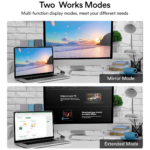
- Configure the computer: Open the display settings and select the appropriate display mode, such as extending or duplicating the desktop.
- Test the connection: Confirm that the image appears correctly and that the selected resolution is supported by the connected equipment.
If the screen remains blank, check that all connectors are secure, the correct input is selected, and the computer is configured to output video through DisplayPort.
How to Choose the Right Computer Adapter
The word adapter covers many different products. Buyers searching for an adapter in Ghana should identify the ports and conversion direction required before selecting a product.
DisplayPort to VGA vs HDMI to VGA
A DisplayPort-to-VGA adapter is intended for a computer with DisplayPort output and a display with VGA input. An HDMI-to-VGA adapter is intended for a compatible HDMI source and a VGA display.
These adapters are not interchangeable simply because both connect to VGA equipment. Choose according to the output port on the source device.
DisplayPort to VGA vs USB to VGA
A DisplayPort-to-VGA adapter uses a DisplayPort video output. USB-to-VGA solutions may use different hardware and software arrangements, depending on the product.
If the computer has an available DisplayPort output, this adapter may be suitable. If it does not, check the capabilities of the available USB ports and choose a compatible solution.
Adapter vs Cable
A video adapter changes the connector interface, while a video cable provides the connection between compatible ports. This product has a DisplayPort male connector and a VGA female port, so a separate VGA cable may be required to complete the connection, depending on the display setup.
Common Buying Mistakes to Avoid
Before ordering a DisplayPort to VGA adapter, avoid these common mistakes:
- Choosing the wrong port: Confirm that the computer has DisplayPort output rather than HDMI, USB, or another interface.
- Ignoring the connector direction: This product connects DisplayPort output to VGA input. It should not be assumed to work in reverse.
- Forgetting the VGA cable: The VGA female port may require a separate VGA cable to connect to the display.
- Assuming every television supports VGA: Check the television’s available inputs before purchasing.
- Expecting an unspecified resolution: Verify the supported resolution and refresh rate if these are important to your setup.
- Assuming audio support: The supplied details describe a video adapter. Confirm audio requirements separately.
- Buying without checking the display: A working adapter cannot resolve a faulty monitor, incompatible input, or unsupported computer video output
Care and Maintenance
Proper handling helps preserve the adapter and its connectors.
- Insert and remove the adapter by holding its connector body rather than pulling forcefully on the attached cable.
- Avoid bending, twisting, or placing excessive pressure on the connectors.
- Keep the ports free from dust and moisture.
- Store the adapter in a dry place when it is not in use.
- Disconnect it carefully before moving equipment or rearranging a workstation.
- Inspect the connectors periodically for visible damage or looseness.
The supplied product details do not specify a guaranteed service life or environmental protection rating. Avoid assuming that the adapter is waterproof or suitable for harsh outdoor conditions.
Buying DisplayPort to VGA Adapters in Ghana
If you are looking to buy a DisplayPort to VGA adapter in Ghana, first confirm the connection required for your computer and display. The important details are the DisplayPort male connector, VGA female port, intended display, and any resolution requirements.
COSMIC ELECTRONICS supplies electronics and computer accessories to individual customers and organisations in Ghana. Customers can enquire about product availability, pricing, and suitable connection accessories for home, office, educational, and business use.
The product may be relevant for:
- Individual customers connecting a computer to an existing VGA display.
- Offices requiring adapters for compatible workstations.
- Schools and training centres connecting computers to VGA projectors.
- IT support teams sourcing computer connection accessories.
- Businesses that need multiple adapters for a compatible equipment setup.
For bulk orders, provide the required quantity and the connector details of the computers and displays involved. This helps the supplier assess the requested configuration and availability.
COSMIC ELECTRONICS offers online ordering and operates physical stores in Ghana, with nationwide delivery options. Contact the business to confirm current availability, pricing, delivery arrangements, and any technical details that are important to your installation.
Frequently Asked Questions
1. What is a DisplayPort to VGA adapter?
A DisplayPort to VGA adapter is a video accessory that connects a compatible computer’s DisplayPort output to a display’s VGA input. This product features a DisplayPort male connector and a VGA female port.
2. Can I use this adapter with a laptop?
Yes, provided the laptop has a compatible DisplayPort output and the intended display has a VGA input. Check the laptop’s actual port before purchasing.
3. Does the adapter work with desktop computers?
It is designed for DisplayPort-enabled PCs, desktop computers, and other compatible devices. The computer must support video output through its DisplayPort connection.
4. Can I connect it to a projector?
Yes, if the projector has a compatible VGA input and the computer provides DisplayPort output. You may also need a separate VGA cable.
5. Does it require external power?
According to the supplied product details, the adapter does not require an external power supply.
6. Do I need to install drivers?
The supplied product details describe the adapter as plug-and-play, with no additional software installation required. Actual operation still depends on the computer and its supported video output.
7. Can I use it with an HDMI-only laptop?
Not as intended. This adapter is designed for DisplayPort output. An HDMI-to-VGA adapter is generally the appropriate type for a compatible HDMI-only source.
8. Does it work in reverse, from VGA to DisplayPort?
Do not assume that it works in reverse. The specified conversion is DisplayPort output to VGA input. A reverse connection may require a different solution.
9. What resolution does the adapter support?
The supplied product information does not specify a maximum resolution or refresh rate. Confirm the supported output with the supplier if you need a particular resolution for your monitor or projector.
10. Can I use it with a television?
Yes, if the television has a suitable VGA input and the source computer has DisplayPort output. Many modern televisions do not include VGA, so check the available ports first.
11. Is a separate VGA cable required?
The adapter has a VGA female port. A compatible VGA cable may therefore be needed to connect it to the display, depending on your existing equipment.
12. Where can I buy a DisplayPort to VGA adapter in Ghana?
You can enquire with COSMIC ELECTRONICS about the DisplayPort to VGA Adapter Converter Cable, its current price, availability, and delivery options across Ghana.
Why Buy from COSMIC ELECTRONICS?
COSMIC ELECTRONICS serves customers looking for electronics, computer accessories, networking equipment, and other technology products in Ghana.
Customers can enquire about:
- Product advice: Assistance identifying the appropriate connector type for a computer and display.
- Online ordering: A convenient way to enquire about and order available products.
- Physical store access: An option for customers who prefer to visit a store.
- Nationwide delivery: Delivery options for customers in different parts of Ghana.
- Bulk supply enquiries: Support for businesses, schools, institutions, and IT teams requiring multiple units.
- Product sourcing assistance: Help identifying suitable accessories for a specific connection requirement.
- After-sales assistance: Support enquiries relating to product use and connection requirements.
For the best buying experience, provide your computer model or output port, the display type, and any resolution requirements when making an enquiry.
Quick Summary
The DisplayPort to VGA Adapter Converter Cable is a compact, male-to-female video adapter for connecting compatible DisplayPort-enabled computers and laptops to VGA-equipped monitors, projectors, HDTVs, and televisions.
- Product type: DisplayPort to VGA adapter.
- Connector A: DisplayPort male.
- Connector B: VGA female.
- Installation: Plug and play, with no external power supply or additional software installation required according to the supplied details.
- Main benefits: Convenient video connectivity, portable design, and continued use of compatible VGA display equipment.
- Typical applications: Home computing, offices, classrooms, meetings, and presentations.
- Availability in Ghana: Enquire with COSMIC ELECTRONICS about current price, stock, and delivery options.
- Bulk supply: Businesses and institutions can enquire about quantities and sourcing requirements.
Choose this adapter when your computer has a compatible DisplayPort output and your intended display accepts VGA input.
| Product Type | DisplayPort to VGA Adapter |
|---|---|
| Connector A | DisplayPort (DP) Male |
| Connector B | VGA Female |
| Connection Type | Male to Female |
| Cable Type | Video Adapter Cable |
| Compatibility | DisplayPort Enabled Devices |
| Supported Devices | PC, Computer, Laptop, Desktop |
| Compatible Displays | Monitor, Projector, HDTV, Television |
| Application | Computer |
| Application Support | Multimedia, Monitor, Projector, Television |
| Installation | Plug and Play |
| Portability | Compact and Lightweight |
| Durability | Sturdy Connector Construction |


IT'S ALL ABOUT YOU
At COSMIC ELECTRONICS, we strive to process and dispatch orders as quickly as possible. While some orders may be shipped on the same day they are placed, processing times can vary depending on product availability, order volume, and delivery location. Please allow 2–3 business days for order processing before shipment.
IMPORTANT DELIVERY INFORMATION
- Fast Order Processing: Orders are processed and dispatched as quickly as possible, typically within 2–3 business days. A confirmation email will be sent shortly after your order is placed.
- Nationwide Delivery Across Ghana: We deliver to selected regions and cities across Ghana. Please check our delivery options to confirm availability in your location.
- Delivery & Collection Requirements: All deliveries require a signature upon receipt. Orders are not processed or shipped on Sundays, although you may place orders online at any time. If you do not receive your confirmation email, please check your Spam or Junk Mail folder.
For enquiries regarding delivery times, order status, or the lead time of a specific item, please contact COSMIC ELECTRONICS on +233 54 724 0128. Our team will be happy to assist you with any questions before or after your purchase.
Related products


4K HDMI Splitter 1×2 – Distribute One HDMI Source to Two Displays, Supports Dual Monitor Duplication and Mirroring, HDMI 2.0b, 60Hz, Full HD 1080P, 3D, 18.5Gbps, Compatible with Xbox, PS4, Blu-Ray Player, and HDTV – Black
The 4K HDMI Splitter 1 in 2 out mirrors a single HDMI source to two screens simultaneously, supporting Full HD 1080P, 3D, and 4K × 2K resolutions. It amplifies and splits HDMI signals without any loss of audio or image quality, providing stable and clear output on both displays. Compact and USB-powered, it is plug-and-play, compatible with TVs, monitors, projectors, gaming consoles, and Blu-Ray players.


85W MagSafe 2 Power Adapter for MacBook Pro | Compatible with MacBook Pro 13″, 15″, & 17″ (2012–2017 Models)
Delivers reliable 85W power via MagSafe 2 T-Tip connector for fast and consistent charging of MacBook Pro and MacBook Air models from 2012–2017.Compatible with MacBook Pro 13", 15", & 17", as well as MacBook Air 11", 13.3", and 15" models, with a secure magnetic T-Tip design.Features LED indicator lights: amber for charging, green for full charge, and supports universal AC 100–240V input for global use.


LEERFEI YST-1017 Wooden Multimedia USB Speaker 6W Stereo Sound for Computers and Laptops
The LEERFEI YST-1017 Wooden Multimedia USB Speaker combines elegant wooden design with clear, balanced stereo sound for an enhanced listening experience. Powered via USB and supporting AUX connectivity, it offers convenient plug-and-play use with laptops and other devices. With dual 52mm speakers and 6W output, it delivers rich audio performance perfect for music, movies, and everyday entertainment.


USB-C to USB-C Video Cable, 4K UHD Display, Audio Transmission, 100W PD Fast Charging & 10Gbps High-Speed Data Transfer
Experience stunning 4K UHD video and audio transmission with this high-performance USB-C to USB-C cable. Supports up to 100W Power Delivery fast charging and 10Gbps high-speed data transfer for efficient connectivity. The 6.6ft length offers flexibility for work, entertainment, presentations, and everyday device connections.


YST-1005 Multimedia Digital Speaker with 8-Inch Subwoofer for Deep Bass
Enjoy clear and powerful audio with the YST-1005 Multimedia Digital Speaker, designed for desktop and personal computer use. It features a 2-piece stereo setup with an 8-inch subwoofer for deep bass and rich sound quality. With wired connectivity and a durable tabletop design, it delivers stable performance for home or office use.


Reviews
There are no reviews yet.