


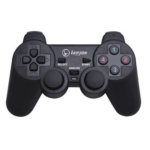
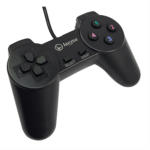


Lanjue L600 USB Wired Gamepad Controller with Ergonomic Grip for Smooth PC Gaming
₵60.00
Charges your gaming setup with ergonomic design and reliable wired USB connectivity for seamless plug-and-play gaming on compatible PCs and laptops. Features responsive multi-button layout and directional controls for precise gameplay across genres, with lightweight, comfortable grip for extended sessions.
50 in stock
🔹Key Product Features
- Ergonomic Wired USB Connectivity: Easy plug-and-play USB interface connects directly to PCs and laptops without drivers, offering reliable wired gaming control.
- Multi-Button Layout: Equipped with multiple responsive action buttons and directional pad for precise control in a variety of games and genres.
- Comfort-Focused Design: Lightweight controller with ergonomic grip designed for comfortable handling during extended gaming sessions.
- Broad Compatibility: Compatible with USB-enabled computers and gaming systems that support standard USB game controllers.
- Plug & Play Simplicity: No extra software or drivers required — simply insert into a USB port and play.
Lanjue L600 USB Gamepad Controller: Wired PC and Laptop Joystick for Comfortable Gaming
The Lanjue L600 USB Gamepad Controller is a wired gaming joystick designed for compatible USB-enabled PCs and laptops. It features an ergonomic grip, responsive multi-button layout, directional pad and plug-and-play USB connectivity, making it a practical option for computer users who prefer physical gamepad controls during compatible gaming sessions.
Whether you are setting up a home gaming station, looking for a simple PC joystick or choosing an affordable CONTROLLER for everyday computer gaming, the Lanjue L600 provides a straightforward wired connection and familiar gamepad layout. Its lightweight construction and comfort-focused design make it suitable for different users, including children and adults.
Product Overview
The Lanjue L600 is a wired USB gamepad manufactured under the Lanjue brand. It connects to compatible computers through a USB cable and is designed to provide directional and button-based control in games that support standard USB game controllers.
Unlike a keyboard and mouse setup, a gamepad places its main controls within reach of both hands. Players can use the directional pad and action buttons to interact with supported games without relying entirely on individual keyboard keys.
The Lanjue L600 combines a multi-button arrangement with an ergonomic grip to support convenient handling. Its plug-and-play design is intended to make connection straightforward: connect the USB cable to a compatible computer and use the controller with a game that recognises standard USB gamepad input.
The product is intended for USB-enabled PCs and laptops. Although the supplied description mentions compatibility with USB-enabled computers and gaming systems that support standard USB game controllers, compatibility with a particular console or gaming platform is not confirmed. Buyers should verify device and game support before purchasing.
Who Is the Lanjue L600 USB Gamepad For?
The Lanjue L600 is intended for people who want a wired joystick for compatible computer gaming.
PC and Laptop Gamers
Computer gamers who prefer physical controls may find a USB gamepad convenient for games that support standard game controller input. Instead of using only a keyboard, players can operate the directional pad and action buttons through a dedicated controller.
Casual Gamers
Casual players who enjoy compatible games during their free time may prefer the familiar layout of a traditional gamepad. The Lanjue L600 provides a simple wired option without requiring wireless pairing.
Children and Adult Users
The product is intended for both children and adults. Its ergonomic grip and lightweight design are intended to support comfortable handling across different gaming sessions.
Actual comfort depends on the user’s hand size, grip preference and length of use.
Home Gaming Setups
For a home desktop or laptop gaming arrangement, the Lanjue L600 provides a direct USB connection. It can be considered by users who want a dedicated game controller for supported computer games.
Buyers Seeking a Wired Gamepad
Some users prefer wired accessories because they do not want to manage wireless pairing. The Lanjue L600 connects through USB, making it suitable for buyers who prefer a direct connection to their computer.
Key Features of the Lanjue L600 USB Controller
1. Wired USB Connectivity
The Lanjue L600 uses a USB wired connection to communicate with a compatible computer. This allows the controller to connect directly to a USB port without requiring a separate wireless receiver or Bluetooth pairing process.
A wired connection can be useful for desktop computers and laptops used in fixed gaming positions. Once connected, the controller can be used with games that recognise and support its standard USB gamepad input.
Why it matters: A direct USB connection provides a straightforward way to connect the controller to a compatible computer.
Customer benefit: Users can avoid the additional pairing steps associated with wireless controllers.
2. Plug-and-Play Simplicity
The Lanjue L600 is described as a plug-and-play controller. Its USB interface is designed to allow users to connect it directly to a compatible computer without installing additional drivers or software.
This can make the initial setup easier, particularly for users who want a simple PC gaming accessory.
However, plug-and-play connectivity does not guarantee that every game will recognise the controller. The computer and game must support the relevant USB game controller input.
Why it matters: A straightforward connection can reduce the steps involved in setting up a gaming accessory.
Customer benefit: Users can get started more easily when using a compatible computer and supported game.
3. Multi-Button Layout
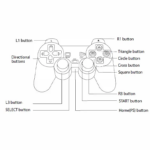
The controller features multiple responsive action buttons and a directional pad. These controls allow players to perform different actions and navigate supported games through a familiar gamepad arrangement.
A multi-button layout is useful because games often require players to move, select options and perform actions using different controls.
The exact function assigned to each button depends on the game. Some games allow users to customise their controller layout, while others use predefined controls.
Why it matters: A dedicated button arrangement provides several physical input options in one controller.
Customer benefit: Players can operate supported games using a familiar handheld control layout.
4. Directional Pad for Navigation
The directional pad provides directional input for games that support this type of control.
It can be useful for navigating menus, moving between options and controlling characters or objects in compatible games.
Its practical function depends on the game’s control configuration. Buyers should check whether their preferred games support a directional pad or standard USB gamepad input.
5. Ergonomic Grip for Comfortable Handling
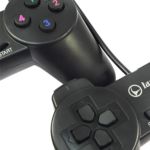
The Lanjue L600 features a comfort-focused ergonomic design. Its lightweight body and grip shape are intended to make the controller comfortable to hold during gaming sessions.
An ergonomic design helps position the controller’s main controls within reach of the hands. This can make it easier for players to operate the directional pad and action buttons without constantly changing their grip.
Comfort is subjective, so users should consider their hand size and preferred controller shape when selecting a gamepad.
6. Lightweight Construction
The controller is described as lightweight. This makes it convenient to handle and position during everyday gaming.
A lightweight controller may also be easier to store when not in use. Users should still handle the USB cable and controller carefully to help maintain the condition of the accessory.
7. Compatibility with Supported USB Devices
The Lanjue L600 is intended for USB-enabled PCs and laptops. Its compatibility is based on computers and games that support standard USB game controllers.
The supplied product information does not identify specific PlayStation, Xbox or Nintendo console compatibility. It is therefore important not to assume that a standard USB connection makes the controller compatible with every gaming device.
Technical Specifications of the Lanjue L600
Specification Details
Brand Lanjue
Model L600
Product type USB gamepad / joystick
Connection type USB wired
Intended compatibility USB-enabled PCs and laptop
Button layout Multi-button layout
Directional control Directional pad
Design Ergonomic grip
Construction Lightweight design
Color Black
Plug-and-play Yes
Drivers No additional drivers required for the stated plug-and-play use
Main application Compatible gaming sessions
The specifications above reflect the supplied product information. Specific operating system versions, cable length, vibration functions, battery specifications and console compatibility have not been provided and should not be assumed.
How the Lanjue L600 Improves the PC Gaming Experience
A game controller gives users another way to interact with computer games. For titles that support gamepad input, a physical controller can make movement and button-based actions more convenient.
A Dedicated Control Layout
The Lanjue L600 brings multiple action buttons and a directional pad into one handheld accessory. This can be useful for games that are designed around a traditional controller layout.
Instead of remembering several keyboard combinations, players can use the controls provided by the gamepad.
Direct Connection to a Computer
The wired USB interface allows the controller to connect directly to a compatible PC or laptop. Users do not need to establish a Bluetooth connection or pair a wireless receiver for the stated wired setup.
Convenient Handling
Its ergonomic grip and lightweight design are intended to make the controller comfortable to hold. This is useful for players who prefer holding a dedicated gamepad instead of keeping their hands on a keyboard.
Simple Setup for Supported Games
The plug-and-play design is intended to simplify connection. For compatible computers and games, users can connect the controller and begin playing without installing additional drivers.
The game’s own controller support remains important. A USB connection alone cannot make an unsupported game compatible.
Where Can You Use the Lanjue L600 in Ghana?
The Lanjue L600 is primarily a PC and laptop gaming accessory. Its practical applications depend on the computer and software being used.
Home Gaming
Home users in Accra, Tema, Kumasi, Takoradi and other parts of Ghana can consider the Lanjue L600 for compatible computer games.
It can be used as part of a home gaming setup where a player prefers a dedicated controller instead of keyboard-only input.
Student and Personal Laptop Setups
Students and other laptop users who enjoy compatible games may find a wired USB gamepad convenient.
Because it connects directly through USB, it can be used without a separate wireless pairing process, provided the laptop and game support the controller.
Gaming and Computer Accessory Retailers
Retailers and resellers looking to source computer gaming accessories may consider this type of wired gamepad for customers who use compatible PCs and laptops.
Before purchasing in bulk, retailers should confirm the intended customer base and communicate the controller’s compatibility requirements accurately.
Schools and Training Environments
Where computer-based recreational activities are offered, a compatible gamepad may be used with supported games.
Institutions should first check the software, computer configuration and intended use. The product should not be assumed to work with every educational application or computer game.
Choosing the Right Game Controller in Ghana
The market includes different types of controllers, including wired USB gamepads, wireless gamepads, PlayStation controllers, Xbox controllers and Nintendo controllers.
The right choice depends on the device you intend to use and the games you play.
1. Identify Your Gaming Device
First, determine whether you need a controller for a desktop PC, laptop or dedicated gaming console.
The Lanjue L600 is described for USB-enabled PCs and laptops. If you need a controller for a PlayStation, Xbox or Nintendo console, choose a product with confirmed compatibility for that platform.
2. Check Game Compatibility
Not every computer game supports standard USB gamepad input.
Before purchasing, check whether the game recognises USB controllers and whether it allows the control layout to be configured.
3. Decide Between Wired and Wireless
A wired controller connects directly to the computer through a cable. A wireless gamepad uses a supported wireless connection and may require pairing.
The Lanjue L600 is a wired model. It is appropriate for users who are comfortable connecting their controller directly to the computer.
4. Consider the Button Layout
Look at the controls available on the gamepad and compare them with the requirements of your preferred games.
The Lanjue L600 provides multiple action buttons and a directional pad. These controls are useful when supported by the game.
5. Consider Comfort
The shape and grip of a controller can influence how comfortable it feels during use.
The Lanjue L600 has a lightweight ergonomic design. Buyers should consider whether this style of controller suits their hands and gaming preferences.
Lanjue L600 vs PlayStation, Xbox and Nintendo Controllers
When shopping for a CONTROLLER in Ghana, customers may come across search terms such as PS4 controller, PS5 controller, Xbox controller, Xbox 360 controller and Nintendo Switch controller.
These products belong to different gaming ecosystems. Their compatibility should not be assumed to be interchangeable.
Lanjue L600 vs PS4 Controller
A PS4 controller is designed for the PlayStation 4 platform, with additional compatibility depending on the device and connection method.
The Lanjue L600 is described as a USB gamepad for compatible PCs and laptops. Its supplied specifications do not confirm PS4 console compatibility.
Lanjue L600 vs PS5 Controller
A PS5 controller is designed for PlayStation 5 gaming. The Lanjue L600 is not identified as a PS5 controller, and its supplied information does not establish PS5 compatibility.
If your main requirement is a PS5 controller, select a model specifically confirmed for that console.
Lanjue L600 vs Xbox Controller
Xbox controllers are designed for Xbox systems and supported PC configurations. The Lanjue L600 is a separate wired USB gamepad intended for compatible PCs and laptops.
A standard USB connection does not establish Xbox console compatibility.
Lanjue L600 vs Nintendo Switch Controller
Nintendo Switch controllers are designed for Nintendo Switch systems. The supplied Lanjue L600 specifications do not confirm compatibility with Nintendo Switch or Nintendo Switch 2.
Customers looking for a Nintendo controller should choose a model with confirmed support for their console.
Common Mistakes to Avoid When Buying a PC Gamepad
Choosing a controller without checking its intended use can lead to compatibility problems.
Assuming Every USB Controller Works with Every Game
USB describes the connection type, not universal game compatibility.
A game must support the controller’s input method before the controls can work as intended.
Buying a PC Gamepad for a Console Without Checking
A controller designed for PC use should not automatically be treated as a PlayStation, Xbox or Nintendo controller.
Check the manufacturer’s compatibility information before buying.
Ignoring the Control Layout
Some games use particular button arrangements or require analogue controls. Compare the controller’s layout with the game’s requirements.
Assuming Plug-and-Play Means Universal Compatibility
Plug-and-play describes the intended connection and setup process for supported devices. It does not mean that every operating system, game or console will recognise the controller.
Overlooking the Intended Connection
The Lanjue L600 uses a wired USB connection. Buyers who specifically need wireless gaming should consider a wireless model instead.
Care and Handling Recommendations
Taking care of a wired gamepad can help maintain its condition during everyday use.
- Connect and disconnect the USB plug carefully.
- Avoid pulling the controller by its cable.
- Keep food and liquids away from the controller.
- Store it in a clean, dry place when not in use.
- Avoid placing heavy objects on the buttons or directional pad.
- Do not twist or sharply bend the cable.
- Clean the exterior gently with a soft, dry cloth.
- Keep the controller away from excessive heat and moisture.
These are general handling recommendations. The supplied specifications do not state a particular water-resistance rating or environmental protection level.
Buying the Lanjue L600 USB Gamepad in Ghana
Customers searching for a Lanjue gamepad, Lanjue L600 controller or wired USB joystick in Ghana should first confirm that the product matches their computer and intended games.
The Lanjue L600 is designed for compatible USB-enabled PCs and laptops. Its multi-button layout, directional pad, ergonomic grip and plug-and-play connection make it an option for users who want a straightforward wired gaming accessory.
COSMIC ELECTRONICS serves customers through online and physical offline stores in Ghana. Customers can enquire about product availability, purchasing arrangements and suitable computer accessories.
Whether you are shopping from Accra, Tema, Kumasi, Takoradi, Cape Coast or another part of the country, you can contact COSMIC ELECTRONICS to enquire about ordering and nationwide delivery arrangements.
Retail and Bulk Purchasing
The Lanjue L600 may be considered by individual customers purchasing a gamepad for personal computer gaming.
Businesses, retailers, schools and organisations interested in multiple units can enquire about bulk supply and procurement requirements.
For bulk orders, it is useful to confirm:
- Required quantity.
- Intended computers and operating environments.
- Games or applications the controllers will be used with.
- Product availability.
- Delivery arrangements.
This helps buyers make purchasing decisions based on actual requirements rather than assuming that every gamepad works with every system.
Why Buy from COSMIC ELECTRONICS?
COSMIC ELECTRONICS supplies electronics, computer accessories, gaming products and technology equipment to customers across Ghana.
When buying a game controller, product suitability is important. Customers should understand the intended connection, supported devices and game compatibility before choosing a model.
COSMIC ELECTRONICS supports customers with product enquiries and purchasing assistance. Individual buyers, businesses and institutional customers can enquire about available products and supply arrangements.
Customers can shop online or visit the physical store to enquire about electronics and accessories. Nationwide delivery arrangements are available across Ghana.
For customers considering the Lanjue L600, the important first step is to confirm that their PC or laptop and preferred games support standard USB game controllers.
Frequently Asked Questions About the Lanjue L600 USB Gamepad
1. What is the Lanjue L600 USB Gamepad?
The Lanjue L600 is a wired USB joystick or gamepad designed for compatible PCs and laptops. It features a multi-button layout, directional pad and ergonomic grip.
2. Is the Lanjue L600 a wired or wireless controller?
It is a wired USB controller. It connects directly to a compatible computer through its USB cable.
3. Does the Lanjue L600 work with laptops?
Yes, it is intended for compatible USB-enabled laptops. The laptop and game must support standard USB game controller input.
4. Does the Lanjue L600 require additional drivers?
The product is described as plug-and-play and does not require additional drivers for its stated supported use. Actual recognition can depend on the computer and game.
5. What buttons does the Lanjue L600 have?
It features multiple action buttons and a directional pad. The supplied product information does not specify the exact number of buttons.
6. Is the Lanjue L600 comfortable to hold?
It has a lightweight ergonomic design intended to provide a comfortable grip during gaming sessions. Individual comfort may vary.
7. What colour is the Lanjue L600?
The supplied product details identify the colour as black.
8. Is the Lanjue L600 compatible with PS4?
PS4 compatibility is not confirmed in the supplied product specifications. The controller is described for USB-enabled PCs and laptops.
9. Can I use the Lanjue L600 with PS5?
PS5 compatibility is not confirmed. Customers who need a PS5 controller should select a model specifically identified as compatible with that console.
10. Does the Lanjue L600 work with Xbox 360?
Xbox 360 compatibility is not established by the supplied specifications. It should be treated as a PC and laptop gamepad unless compatibility is independently confirmed.
11. Is the Lanjue L600 compatible with Nintendo Switch?
Nintendo Switch compatibility is not confirmed in the supplied product information. Do not assume that its USB connection makes it suitable for Nintendo consoles.
12. Can I use the Lanjue L600 for all PC games?
No controller should be assumed to work with every PC game. The game must support standard USB game controller input for the controller to function as intended.
13. Is the Lanjue L600 suitable for children?
The product is described as suitable for gaming sessions involving children and adults. Users should choose games appropriate for the player’s age and experience.
14. Is the Lanjue L600 suitable for desktop computers?
Yes, it is intended for compatible USB-enabled PCs, including desktop computer setups.
15. Where can I buy the Lanjue L600 in Ghana?
You can enquire about the Lanjue L600 USB Gamepad at COSMIC ELECTRONICS. Confirm availability and compatibility with your computer and intended games before purchasing.
Quick Summary
✔ Product: Lanjue L600 USB Gamepad Controller
✔ Brand: Lanjue
✔ Model: L600
✔ Product type: Wired USB gamepad / joystick
✔ Connection: USB wired
✔ Intended compatibility: USB-enabled PCs and laptops
✔ Button layout: Multiple responsive action buttons and directional pad
✔ Design: Lightweight ergonomic grip
✔ Color: Black
✔ Setup: Plug-and-play for supported devices and games
✔ Main benefit: Provides physical gamepad controls for compatible PC and laptop gaming
✔ Primary applications: Home gaming, casual PC gaming and compatible laptop gaming
✔ Availability: Enquire at COSMIC ELECTRONICS in Ghana
✔ Purchasing support: Online and offline enquiries, retail purchasing and bulk supply enquiries
COSMIC ELECTRONICS It’s All About You.
| Connector Type | USB Wired |
|---|---|
| Compatibility | USB-enabled PCs and Laptops |
| Button Layout | Multi-Button & Directional Pad |
| Design | Ergonomic Grip |
| Plug & Play | Yes |
| Usage | Gaming Sessions |
| Color | Black |
| Brand | Lanjue |
| Model | L600 |


IT'S ALL ABOUT YOU
At COSMIC ELECTRONICS, we strive to process and dispatch orders as quickly as possible. While some orders may be shipped on the same day they are placed, processing times can vary depending on product availability, order volume, and delivery location. Please allow 2–3 business days for order processing before shipment.
IMPORTANT DELIVERY INFORMATION
- Fast Order Processing: Orders are processed and dispatched as quickly as possible, typically within 2–3 business days. A confirmation email will be sent shortly after your order is placed.
- Nationwide Delivery Across Ghana: We deliver to selected regions and cities across Ghana. Please check our delivery options to confirm availability in your location.
- Delivery & Collection Requirements: All deliveries require a signature upon receipt. Orders are not processed or shipped on Sundays, although you may place orders online at any time. If you do not receive your confirmation email, please check your Spam or Junk Mail folder.
For enquiries regarding delivery times, order status, or the lead time of a specific item, please contact COSMIC ELECTRONICS on +233 54 724 0128. Our team will be happy to assist you with any questions before or after your purchase.
Related products


HP X500 USB Wired Optical Mouse with Ergonomic Design for Smooth Everyday Computer Use
The HP X500 USB Wired Optical Mouse features a simple and reliable design with 3 buttons and a scroll wheel for smooth navigation. Compatible with all laptops and desktops, it offers plug-and-play functionality via a USB 2.0 interface. Perfect for everyday work, browsing, and casual use, this wired mouse combines comfort and precision in a compact design.


Lanjue L600S 2-in-1 Wired Game Pad Controller with Analog and Digital Controls
The Lanjue L600S 2-in-1 Game Pad is a reliable and easy-to-use controller designed for classic and older Windows systems. With broad compatibility and responsive controls, it delivers smooth gameplay for casual and dedicated gamers. Its ergonomic design ensures comfort, making it suitable for long gaming sessions.


Sony DualShock 3 Wireless PS3 Controller with Bluetooth and 6-Axis Motion Sensing for Immersive Gaming
Compatible with Sony PlayStation 3 and PC Windows 7/8/10, this wireless controller is plug-and-play for PS3 and includes a USB cable for use on PC. It supports Double Shock 3 vibration and 6-axis motion sensing, delivering immersive gameplay with every explosion, shot, and hand movement with 600mAh battery.


Soulion Tracer 30 USB Gaming Headset with Virtual 7.1 Surround Sound and RGB Lighting for PC
The Soulion Tracer 30 is a professional USB gaming headset featuring powerful 50mm speakers with virtual 7.1 surround sound for immersive gameplay on Windows PCs.Its noise-cancelling microphone delivers clear voice communication, while vibrant RGB rainbow lighting adds a bold gaming atmosphere.With a wide 20Hz–20KHz frequency range, it produces rich bass, clear highs, and precise audio detail for competitive gaming.


Reviews
There are no reviews yet.