




1×8 HDMI Splitter with 8 Output Ports, 4K@2K and 1080P Support for Multiple Displays
₵50.00
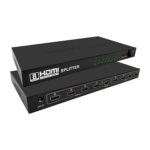
1×8 HDMI Splitter allows you to connect one HDMI source to up to eight displays at the same time without any loss in audio or video quality. It supports HDMI 1.4, 4K@2K resolution, Full HD 1080P, and 3D formats with high bandwidth up to 10.2Gbps for smooth and stable performance.
50 in stock
🔹Key Product Features
- 8-Port HDMI Output: Distributes one HDMI input signal to up to 8 HDMI displays simultaneously with identical audio and video quality.
- 4K@2K Resolution Support: Delivers ultra-high-definition video output up to 4K x 2K for sharp and detailed visuals.
- Full HD 1080P Compatible: Supports 1080P resolution for clear and smooth high-definition display.
- 3D Video Support: Transmits 3D video formats for an immersive viewing experience on compatible displays.
- HDMI 1.4 Version: Fully compliant with HDMI 1.4 standards for stable signal transmission and wide device compatibility.
- 10.2Gbps High Bandwidth: Ensures fast and reliable data transfer without signal delay or quality loss.
- Lossless Signal Transmission: Maintains original audio and video quality across all connected screens.
- Plug and Play Design: Easy setup with no additional software or drivers required.
- Wide Device Compatibility: Works with DVD players, gaming consoles, TV boxes, laptops, projectors, and HDTVs.
- Durable Black Housing: Strong and heat-resistant casing designed for long-lasting performance.


4K HDMI Splitter 1×2 – Distribute One HDMI Source to Two Displays, Supports Dual Monitor Duplication and Mirroring, HDMI 2.0b, 60Hz, Full HD 1080P, 3D, 18.5Gbps, Compatible with Xbox, PS4, Blu-Ray Player, and HDTV – Black
The 4K HDMI Splitter 1 in 2 out mirrors a single HDMI source to two screens simultaneously, supporting Full HD 1080P, 3D, and 4K × 2K resolutions. It amplifies and splits HDMI signals without any loss of audio or image quality, providing stable and clear output on both displays. Compact and USB-powered, it is plug-and-play, compatible with TVs, monitors, projectors, gaming consoles, and Blu-Ray players.


HDMI Splitter 1×4 – 1 Input to 4 Outputs, Supports Full HD 1080p, 4K & 3D, Compatible with Xbox, PS3/PS4, Roku, Blu-ray Player and HDTV (Includes High-Speed HDMI Cable) – Black
The HDMI Splitter 1x4 allows you to distribute one HDMI signal to four displays simultaneously with stable and clear output. It supports 4K x 2K@30Hz, 1080P, and 3D resolution for sharp, high-definition video performance. Designed for easy plug-and-play use, it is compatible with gaming consoles, Blu-ray players, PCs, and HDTVs.


LCD Display Video Wall 1×2 4K HDMI Splitter – High-Definition Signal Distributor for Dual Screen Display
The HDMI Splitter 1x2 lets you split a single HDMI source to two HDMI-compatible monitors or projectors. It supports resolutions up to 3840 × 2160 @ 30Hz with 8/10/12-bit deep color for clear, high-definition video. Ideal for multimedia setups, it can also regenerate HDMI signals at the end of long cables for stable performance.


HDMI Splitter Adapter – 1080P HDMI Male to Dual HDMI Female 1-to-2 Cable, Connect One HDMI Source to Two Displays Simultaneously, Compatible with HDTVs, LED/LCD Monitors, and Projectors, Supports Two TVs at the Same Time
1×8 HDMI Splitter 8 Output Ports, 4K@2K, 1080P and 3D Support for Multiple Displays
The 1×8 HDMI Splitter is a video distribution device that allows one HDMI source to send the same audio and video signal to up to eight HDMI displays simultaneously. Supporting HDMI 1.4, 4K x 2K resolution, Full HD 1080P, 3D video and bandwidth up to 10.2Gbps, it is suitable for homes, offices, schools, churches, retail environments and businesses that need to display one source across multiple screens. If you need an HDMI splitter in Ghana for connecting a decoder, laptop, gaming console, DVD player or TV box to several displays, this 8-port HDMI splitter provides a practical distribution solution.
What Is a 1×8 HDMI Splitter?
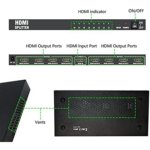
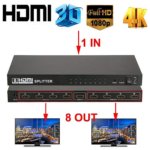
An HDMI splitter is a device that takes one HDMI input signal and distributes it to multiple HDMI output ports. The 1×8 HDMI Splitter has one HDMI input and eight HDMI outputs, allowing a single source device to connect to as many as eight compatible displays.
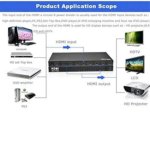
For example, you can connect a laptop to the splitter’s HDMI input and connect up to eight televisions or projectors to its output ports. The connected displays receive the same source content, allowing viewers in different locations to watch the same presentation, video or programme.
This makes an HDMI splitter useful wherever the same visual information needs to appear on several screens at the same time.
The 1×8 configuration is particularly useful when two, four or even eight displays need to show identical content. Instead of repeatedly connecting and disconnecting an HDMI cable between screens, the splitter provides a central connection point for distributing the signal.
How Does the 1×8 HDMI Splitter Work?
The splitter works by receiving an HDMI signal from a source device through its single input port and distributing that signal through its eight HDMI output ports.
The connection arrangement is straightforward:
- Connect your HDMI source device to the splitter’s HDMI input.
- Connect the HDMI output ports to your televisions, monitors or projectors using suitable HDMI cables.
- Ensure the source device and connected displays are properly connected and powered.
- Select the appropriate HDMI input on each display.
- Display your source content across the connected screens.
Once the connections are established, the displays can show the same content from the connected source.
For example, a business can connect a decoder to the splitter and distribute its output to eight televisions. A school can connect a laptop or presentation source and send the same visual material to multiple displays.
The important distinction is that an HDMI splitter duplicates one source signal. It does not create eight independent video sources or allow eight different programmes to be displayed from one input.
Key Features and Benefits of the 1×8 HDMI Splitter
1. One HDMI Input with Eight HDMI Outputs
The main feature of this device is its 1-input, 8-output configuration.
It accepts one HDMI source and distributes the signal to up to eight connected displays. This reduces the need for separate source devices for every screen when the intention is to show identical content.
Why it matters: Businesses, institutions and entertainment environments can distribute one video source to several screens through a central device.
Customer benefit: You can connect one compatible HDMI source to multiple displays without manually switching the source connection between screens.
2. 4K@2K Resolution Support
The splitter supports video output up to 4K x 2K resolution.
4K refers to a high-resolution video format that provides more image detail than standard Full HD. This can be useful in environments where clear visual presentation is important, provided the source device, connected displays and HDMI cables support the selected resolution.
Why it matters: A splitter used with modern televisions, monitors and projectors needs to support the resolution required by the connected equipment.
Customer benefit: The 4K@2K support makes the splitter suitable for compatible high-definition display arrangements.
Actual output resolution depends on the capabilities of the source, displays, cables and the complete connection setup.
3. Full HD 1080P Compatibility
In addition to 4K@2K support, the device supports Full HD 1080P and 720P resolutions.
This makes it suitable for installations using compatible Full HD televisions, monitors and projectors.
Many existing display systems still use 1080P equipment. A splitter that supports both 4K@2K and Full HD provides flexibility when connecting different compatible display systems.
Customer benefit: You can use the splitter in display arrangements that require 1080P or 720P output, subject to the connected equipment’s capabilities.
4. 3D Video Support
The 1×8 HDMI Splitter supports 3D video formats for compatible source devices and displays.
This feature is relevant to installations that use 3D-capable entertainment equipment. The source and receiving displays must support the required 3D format for the feature to work as intended.
Customer benefit: The splitter can distribute compatible 3D video content to connected displays.
5. HDMI 1.4 Compatibility
The device uses the HDMI 1.4 standard.
HDMI, short for High-Definition Multimedia Interface, is a connection standard used to transmit digital audio and video between compatible electronic devices.
HDMI 1.4 supports the video capabilities stated for this splitter, including 4K x 2K and 3D compatibility.
Why it matters: Checking the HDMI version helps buyers understand the capabilities of the splitter and whether it is appropriate for their source devices and displays.
Customer benefit: The HDMI 1.4 interface supports common HDMI-based entertainment, presentation and display equipment.
6. Up to 10.2Gbps Bandwidth
The splitter supports bandwidth up to 10.2Gbps.
Bandwidth describes the amount of digital information that can be transmitted over a connection within a given period. In an HDMI system, the available bandwidth is important for supporting the required video formats and resolutions.
The stated 10.2Gbps bandwidth is relevant to the device’s HDMI 1.4 specification.
Customer benefit: It provides the bandwidth capability required for the supported video formats, subject to the capabilities of the complete HDMI installation.
7. Lossless Audio and Video Signal Distribution
The product is designed to distribute the original HDMI audio and video signal to connected displays without intentional reduction in picture or sound quality.
This is important in environments where several screens need to display the same content consistently.
For example, a shop may want multiple televisions to show the same promotional video, while a church may need several displays to show the same presentation.
The quality experienced in an actual installation can depend on cable quality, cable length, source compatibility and the connected displays.
8. Plug-and-Play Design
The splitter features a plug-and-play design, meaning it does not require additional software or drivers to perform its stated HDMI distribution function.
This makes the installation process more straightforward for users who want to connect HDMI equipment without configuring specialised software.
Users still need to make the physical connections correctly and ensure that the source device and displays are configured to use the appropriate HDMI inputs.
9. Wide Device Compatibility
The splitter is designed to work with common HDMI source devices and displays.
Compatible source equipment listed for this product includes:
- DVD players.
- Gaming consoles.
- TV boxes.
- Laptops.
- Other compatible HDMI source devices.
Compatible receiving equipment includes HDMI televisions, HDTVs, monitors and projectors.
This range of applications makes the splitter useful for both entertainment and professional display arrangements.
10. Durable Black Plastic Housing
The device features a black plastic housing.
The casing provides an enclosure for the splitter’s internal components and gives it a practical appearance for placement alongside other electronic equipment.
Its compact electronic-device form makes it suitable for installations where HDMI connections need to be organised around a central distribution point.
Applications of the 1×8 HDMI Splitter in Ghana
An 8-port HDMI splitter can be useful in several Ghanaian environments where one video source needs to be displayed on multiple screens.
Home Entertainment Systems
Home users may want to distribute content from a decoder, DVD player or compatible TV box to multiple televisions.
For example, a household with televisions in different rooms may use an HDMI splitter where the intention is to display the same source on the connected screens.
Possible applications include:
- Distributing compatible decoder output to multiple televisions.
- Displaying content from a DVD player on several screens.
- Sharing a compatible TV box source across multiple displays.
- Connecting a single entertainment source to several HDMI displays.
Remember that all connected displays receive the same source content. The splitter does not provide independent channel selection for each television.
Churches and Places of Worship
Churches frequently use televisions, monitors and projectors to display presentations, announcements, lyrics and other visual content.
A church can use an HDMI splitter to distribute a presentation or video source to multiple screens in different viewing areas.
For example, a laptop connected to the splitter can send the same presentation to several compatible displays around the auditorium or other areas.
This is useful where the same visual material needs to be visible to people in different parts of a building.
Schools, Colleges and Universities
Educational institutions use projectors and displays for lessons, presentations, training and demonstrations.
An 8-port HDMI splitter can help distribute one laptop or other compatible HDMI source to multiple displays.
Potential applications include:
- Classroom presentation distribution.
- Training room displays.
- Educational video demonstrations.
- Conference and lecture presentations.
- Shared visual content in computer and multimedia rooms.
The splitter is especially relevant where several displays need to show identical teaching material at the same time.
Retail Shops and Shopping Environments
Retail businesses can use multiple televisions and screens to display promotional videos, advertisements and product information.
A single HDMI source connected to an 8-port splitter can distribute the same content to multiple compatible displays.
This can be useful for:
- Electronics shops.
- Supermarkets.
- Shopping centres.
- Showrooms
- Customer waiting areas.
- Promotional display installations.
For example, an electronics shop in Accra can distribute a product demonstration video to several televisions so customers can view the same content from different positions.
Hotels, Restaurants and Hospitality Businesses
Hotels, restaurants, lounges and other hospitality businesses may use multiple screens to display entertainment or promotional content.
An HDMI splitter can distribute one compatible source to several televisions where identical content is required.
This may be useful in reception areas, shared entertainment spaces and other locations with multiple displays.
The specific installation should be planned around the source equipment, display locations and cable requirements.
Offices and Conference Rooms
Businesses use screens and projectors for meetings, presentations, staff training and demonstrations.
An 8-port HDMI splitter can distribute one presentation source to several screens in a meeting or training environment.
For example, a laptop displaying a presentation can be connected to the splitter, with the output distributed to several monitors or projectors.
This is useful when participants need to view the same presentation across a larger space.
Events and Presentation Venues
Event organisers and technicians may need to distribute one video source to several displays during presentations, exhibitions and other organised events.
The splitter can serve as part of an HDMI distribution setup where multiple screens must show identical content.
It is important to plan the HDMI cable routes and confirm that the connected displays support the intended resolution.
Technical Specifications of the 1×8 HDMI Splitter
Specification Details
Product Name 1×8 HDMI Splitter
Product Type HDMI Video Splitter
Input Ports 1 x HDMI
Output Ports 8 x HDMI
HDMI Version HDMI 1.4
Maximum Resolution 4K x 2K
Supported Resolutions 1080P, 720P
3D Support Yes
Bandwidth Up to 10.2Gbps
Signal Distribution One source to up to eight displays
Audio and Video HDMI audio and video transmission
Installation Plug and Play
Device Compatibility DVD players, gaming consoles, TV boxes, laptops and compatible HDMI displays
Colour Black
Material Plastic
Important Things to Check Before Buying an HDMI Splitter
Before purchasing an HDMI splitter in Ghana, consider the following factors to ensure that the product matches your requirements.
1. Number of Displays
Count how many screens you intend to connect.
If you need to distribute one source to eight displays, a 1×8 HDMI splitter is appropriate for that connection arrangement.
If you only need two or four displays, a smaller splitter may be sufficient.
2. Resolution Requirements
Check the resolution supported by your source device and displays.
This splitter supports 4K x 2K, 1080P and 720P. However, the resolution achieved depends on the complete system.
If one or more connected devices do not support the selected resolution, the system may need to operate at a lower compatible resolution.
3. HDMI Version Compatibility
The device uses HDMI 1.4.Check whether this version is suitable for your source device, displays and intended content. If your installation requires specifications beyond HDMI 1.4, you should compare the requirements before purchasing.
4. HDMI Cable Quality and Length
The HDMI cables used in an installation can affect signal reliability.
Long cable runs, poor-quality cables and unsuitable connections may result in display problems. For installations involving several screens across a large building, plan the cable routes carefully.
Use suitable HDMI cables for the resolution and distance required.
5. Same Content or Different Content
This is one of the most important buying considerations.
The 1×8 HDMI splitter distributes one source to multiple screens. It does not allow each screen to display a separate HDMI source independently.
If you need eight different videos or channels on eight televisions, this product alone will not provide that function.
6. Power and Installation Requirements
Before installation, check the product’s physical connection and power requirements.
The supplied product information does not specify whether a power adapter is included or provide its electrical rating. Confirm the package contents and operating requirements before installation.
How to Connect a 1×8 HDMI Splitter
Setting up an HDMI splitter is generally straightforward because the device is designed for plug-and-play operation.
Follow these steps:
Step 1: Identify the HDMI source
Choose the device that will supply the video and audio signal. This may be a laptop, decoder, gaming console, DVD player or compatible TV box.
Step 2: Locate the HDMI input
Connect the source device to the splitter’s single HDMI input port.
Step 3: Connect the displays
Use HDMI cables to connect the eight output ports to the receiving televisions, monitors or projectors.
You do not need to use all eight output ports if your installation requires fewer displays.
Step 4: Check the connections
Ensure that the HDMI cables are properly inserted into the relevant input and output ports.
Step 5: Power the equipment
Make sure the source device and displays are powered. Follow the splitter’s supplied power requirements and instructions.
Step 6: Select the HDMI input on each display
Use the television, monitor or projector controls to select the HDMI input connected to the splitter.
Step 7: Test the display output
Play content from the source device and confirm that the connected displays receive the signal.
If a screen does not display correctly, check the cable connections, selected HDMI input, source resolution and compatibility of the connected equipment.
Common HDMI Splitter Problems and How to Troubleshoot Them
Even when using a plug-and-play device, an HDMI installation may sometimes experience connection or display problems.
Understanding common causes can help users identify where to check.
No Picture on a Connected Display
Possible causes include:
- A loose HDMI cable.
- The wrong HDMI input selected on the display.
- The source device not outputting a signal.
- An incompatible resolution setting.
- An issue with the connected HDMI cable.
Check the connections and confirm that the source device is operating correctly.
Some Displays Work While Others Do Not
If only some connected screens receive a picture, check the HDMI cables and individual display inputs.
You can also test the displays one at a time to help identify whether the issue is related to a particular cable, screen or connection.
Picture Quality Is Lower Than Expected
Check whether the source device and receiving displays support the desired resolution.
Also consider HDMI cable quality and length. A splitter supporting 4K does not automatically make a connected 1080P television display 4K content.
The Displays Show Different Results
The splitter is designed to distribute one source signal to multiple displays. Differences in what appears on screens may relate to the individual displays, their settings or compatibility.
Check the input selection and display settings on each connected device.
Maintenance and Best Practices of the 1×8 HDMI Splitter
An HDMI splitter is an electronic accessory that should be handled and installed properly to support reliable operation.
Consider these practical recommendations:
- Keep the device in a clean, dry and suitable location.
- Avoid placing heavy objects on the splitter or its HDMI cables.
- Do not pull HDMI cables out by their wires.
- Insert and remove connectors carefully.
- Keep the connection area organised to prevent accidental cable disconnection.
- Avoid bending HDMI cables sharply.
- Use suitable cables for the required connection distance.
- Follow the manufacturer’s operating and power instructions.
- Check cable connections if the display signal becomes unstable.
Proper installation and handling can help reduce unnecessary connection problems.
Frequently Asked Questions About the 1×8 HDMI Splitter
1. What is a 1×8 HDMI splitter used for?
A 1×8 HDMI splitter distributes one HDMI source signal to up to eight HDMI displays. It is used when multiple screens need to show the same video and audio content.
2. How many TVs can I connect to this 1×8 HDMI Splitter ?
The device has eight HDMI output ports, allowing you to connect up to eight compatible televisions, monitors or projectors.
3. Does the 1×8 HDMI splitter support 4K?
Yes. The product supports a maximum resolution of 4K x 2K. Actual output depends on the source device, displays and HDMI cables used.
4. Does this 1×8 HDMI Splitter support 1080P?
Yes. It supports Full HD 1080P as well as 720P.
5. Can I connect a laptop to the HDMI splitter?
Yes. A compatible laptop with an HDMI output can be connected to the splitter’s HDMI input, allowing its output to be distributed to connected displays.
6. Can I use the HDMI splitter with a gaming console?
Yes. The product lists gaming consoles among its compatible HDMI source devices. The console’s output must be compatible with the splitter and connected displays.
7. Can I connect a decoder to an 8-port HDMI splitter?
Yes. A compatible decoder can serve as the HDMI source. The splitter can then distribute its output to up to eight connected displays.
8. Will all eight televisions show the same content?
Yes. The splitter distributes the same source signal to the connected displays. It does not provide independent content selection for each television.
9. Does the splitter support 3D video?
Yes. It supports 3D video formats when used with compatible source equipment and displays.
10. What is the bandwidth of this 1×8 HDMI Splitter?
The stated bandwidth is up to 10.2Gbps.
11. What is the difference between a 1×8 HDMI splitter and an HDMI switch?
A splitter distributes one source to multiple displays. An HDMI switch allows multiple source devices to connect to one display, with the user selecting which source to view.
12. Can I use the splitter with a projector?
Yes. A projector with a compatible HDMI input can be connected to one of the splitter’s output ports.
13. Do I need to install software to use the 1×8 HDMI Splitter?
No additional software or drivers are required according to the product’s plug-and-play design. You still need to connect the equipment correctly and follow the product’s operating requirements.
14. Where can I buy an 8-port HDMI splitter in Ghana?
You can enquire about the 1×8 HDMI Splitter from COSMIC ELECTRONICS. Contact the business for current pricing, availability and purchasing options.
Why Buy the 1×8 HDMI Splitter from COSMIC ELECTRONICS?
COSMIC ELECTRONICS supplies electronics, computer accessories, networking equipment and specialised technology products to customers across Ghana.
Whether you are purchasing an HDMI splitter for a home entertainment setup, office presentation system, school, church, retail shop or commercial display installation, choosing the correct equipment is important.
COSMIC ELECTRONICS serves individual customers, businesses, institutions, technicians and commercial buyers looking for suitable electronics and accessories.
When purchasing the 1×8 HDMI Splitter, customers can enquire about:
- Product availability: Check the availability of the 8-port HDMI splitter.
- Expert product advice: Get assistance understanding the difference between HDMI splitters, HDMI switches and other display connection accessories.
- Competitive pricing: Enquire about current product pricing.
- Nationwide delivery: Ask about delivery options across Ghana.
- Bulk supply support: Businesses and institutions can enquire about multiple units.
- After-sales assistance: Get support with product-related enquiries after purchase.
- Online and offline purchasing: Make enquiries through COSMIC ELECTRONICS’ online and physical store channels.
For businesses planning larger display installations, it is useful to identify the number of screens, required resolution, source equipment and cable distances before purchasing.
COSMIC ELECTRONICS can assist with product enquiries and sourcing support to help customers identify suitable electronics accessories for their requirements.
Quick Summary of the 1×8 HDMI Splitter
✔ 1×8 HDMI Splitter with 1 HDMI input and 8 HDMI output ports
✔ Distributes one HDMI source to up to eight displays simultaneously\
✔ Supports 4K x 2K, Full HD 1080P and 720P resolutions
✔ HDMI 1.4 standard with bandwidth up to 10.2Gbps
✔ Supports 3D video formats on compatible equipment
✔ Plug-and-play operation without additional software or drivers
✔ Compatible with DVD players, gaming consoles, TV boxes, laptops, HDTVs and projectors
✔ Black plastic housing
✔ Suitable for homes, offices, schools, churches, retail businesses and multiple-screen installations
✔ Available for enquiry from COSMIC ELECTRONICS, Ghana, with bulk supply support and nationwide delivery options
| Input Ports | 1 X Hdmi |
|---|---|
| Output Ports | 8 X Hdmi |
| Hdmi Version | 1.4 |
| Max Resolution | 4k X 2k |
| Supported Resolution | 1080p, 720p |
| 3d Support | Yes |
| Bandwidth | Up To 10.2gbps |
| Material | Plastic |


IT'S ALL ABOUT YOU
At COSMIC ELECTRONICS, we strive to process and dispatch orders as quickly as possible. While some orders may be shipped on the same day they are placed, processing times can vary depending on product availability, order volume, and delivery location. Please allow 2–3 business days for order processing before shipment.
IMPORTANT DELIVERY INFORMATION
- Fast Order Processing: Orders are processed and dispatched as quickly as possible, typically within 2–3 business days. A confirmation email will be sent shortly after your order is placed.
- Nationwide Delivery Across Ghana: We deliver to selected regions and cities across Ghana. Please check our delivery options to confirm availability in your location.
- Delivery & Collection Requirements: All deliveries require a signature upon receipt. Orders are not processed or shipped on Sundays, although you may place orders online at any time. If you do not receive your confirmation email, please check your Spam or Junk Mail folder.
For enquiries regarding delivery times, order status, or the lead time of a specific item, please contact COSMIC ELECTRONICS on +233 54 724 0128. Our team will be happy to assist you with any questions before or after your purchase.
Related products


1.5m HDMI to RCA Cable for DVD Players, Gaming Consoles and Multimedia Devices
The HDMI to AV 3RCA Cable 1.5M is designed to connect HDMI devices with AV/RCA-supported televisions and display systems. It provides reliable audio and video transmission through its red, white, and yellow RCA connectors for smooth multimedia playback. With a compact 1.5-meter design, it is ideal for home entertainment, gaming, and video setups.
4K HDMI Splitter 1×2 – Distribute One HDMI Source to Two Displays, Supports Dual Monitor Duplication and Mirroring, HDMI 2.0b, 60Hz, Full HD 1080P, 3D, 18.5Gbps, Compatible with Xbox, PS4, Blu-Ray Player, and HDTV – Black
The 4K HDMI Splitter 1 in 2 out mirrors a single HDMI source to two screens simultaneously, supporting Full HD 1080P, 3D, and 4K × 2K resolutions. It amplifies and splits HDMI signals without any loss of audio or image quality, providing stable and clear output on both displays. Compact and USB-powered, it is plug-and-play, compatible with TVs, monitors, projectors, gaming consoles, and Blu-Ray players.


Generic High-Speed 4-Port Mini USB 2.0 Hub for Laptop and Desktop Computers Black
Expand your connectivity with this high-speed 4-Port USB 2.0 hub designed for laptops and desktop computers. It supports plug and plays installation, hot swapping, and wide compatibility with Windows, Mac, Linux, and Raspberry Pi systems. Compact and lightweight with built-in over-current protection, it ensures safe and reliable performance for everyday USB devices.


HDMI to VGA Adapter Gold-Plated 1080p Converter for Clear Display on Monitors and Projectors
Connects HDMI devices to VGA monitors or projectors easily, supporting Full HD 1080p resolution for clear display output. Gold-plated connectors ensure stable signal transmission with improved durability and corrosion resistance. Built-in active IC chip enhances compatibility, lowers power consumption, and reduces heat for longer lifespan.


Lanjue L600 USB Wired Gamepad Controller with Ergonomic Grip for Smooth PC Gaming
Charges your gaming setup with ergonomic design and reliable wired USB connectivity for seamless plug-and-play gaming on compatible PCs and laptops. Features responsive multi-button layout and directional controls for precise gameplay across genres, with lightweight, comfortable grip for extended sessions.
LCD Display Video Wall 1×2 4K HDMI Splitter – High-Definition Signal Distributor for Dual Screen Display
The HDMI Splitter 1x2 lets you split a single HDMI source to two HDMI-compatible monitors or projectors. It supports resolutions up to 3840 × 2160 @ 30Hz with 8/10/12-bit deep color for clear, high-definition video. Ideal for multimedia setups, it can also regenerate HDMI signals at the end of long cables for stable performance.


Leerfei D-09 Wired Monitor Speakers with Deep Bass Sound for PC Gaming and Entertainment
Experience premium sound with the Leerfei D-09 wooden speaker set, featuring a stylish brown & black design.Compact tabletop speakers with 10-inch subwoofers deliver clear, balanced audio and deep bass for music, movies, and gaming.Durable mixed-material construction and a sleek modern design make them perfect for any home or office setup.


USB External 7.1 Channel 3D Virtual Audio Sound Card Adapter for PC with Dual Headset and Microphone Support
Dual Headset Dual Microphone USB Sound Card adds virtual 7.1 channel surround sound for immersive gaming and audio experience. Plug & Play design works instantly with Windows and Linux PCs or laptops without requiring drivers. Built-in volume and mute controls with stereo output and mono microphone input jack make audio management easy.


USB-C Charging and Data Sync Adapter with USB-A Male Interface
Upgrade your existing USB-A ports with this USB-C Female to USB-A Male Adapter, designed for reliable charging and data transfer. Featuring a durable aluminum alloy construction, plug-and-play functionality, and broad device compatibility, it offers a simple solution for connecting modern USB-C accessories. Its compact and lightweight design makes it perfect for travel, work, and everyday use.


Reviews
There are no reviews yet.