


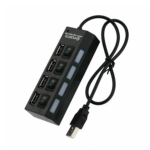


Generic High-Speed 4-Port Mini USB 2.0 Hub for Laptop and Desktop Computers Black
₵60.00
Expand your connectivity with this high-speed 4-Port USB 2.0 hub designed for laptops and desktop computers. It supports plug and plays installation, hot swapping, and wide compatibility with Windows, Mac, Linux, and Raspberry Pi systems. Compact and lightweight with built-in over-current protection, it ensures safe and reliable performance for everyday USB devices.
50 in stock
🔹Key Product Features
- Wide System Compatibility: Ideal for Windows PC, Apple Mac, Raspberry Pi, Retropie, and Linux systems.4 USB 2.0 Ports: Includes 1 upstream port and 4 downstream ports for connecting multiple devices at once.
- High-Speed Data Transfer: Supports USB 2.0 with full backward compatibility for USB 1.0 and 1.1 devices.
- Optional External Power Support: Features a 5V DC power socket (3.5mm x 1.35mm, center positive) for connecting an optional 2A or higher power adapter to support high-power devices.
- Bus-Powered Design: Draws power directly from the connected computer, no external power required for standard devices.
- Maximum 500mA Per Port: Provides stable power output suitable for flash drives, keyboards, mice, and other USB peripherals.
- Plug And Play: No drivers required for installation, quick and easy setup.
- Hot Swappable: Allows devices to be connected or removed without shutting down the system.
- Built-In Over-Current Protection: Protects both the hub and connected devices from power surges and overloads.
- Compact And Lightweight: Small size design makes it easy to carry and ideal for travel or office use.
- Color And Condition: Black finish, brand new unit, bulk packaging.
Generic High-Speed 4-Port Mini USB 2.0 Hub for Laptop and Desktop Computers
The Generic High-Speed 4-Port Mini USB 2.0 Hub is a compact connectivity accessory designed to expand the number of available USB ports on laptops and desktop computers. It provides four downstream USB 2.0 ports for connecting compatible peripherals such as flash drives, keyboards, mice and other standard USB devices. With plug-and-play operation, hot-swapping support, built-in over-current protection and compatibility with Windows, Apple Mac OS, Linux, Raspberry Pi and RetroPie systems, it is a practical solution for home, office and everyday computer use.
If your computer has limited USB ports, this 4-port USB hub helps you connect multiple accessories through a single upstream USB connection. Its compact, lightweight black design makes it convenient for desktop workstations, laptop setups, offices, classrooms and travel.
Product Overview
Modern computers often have several accessories that need USB connectivity. A keyboard, mouse, flash drive, printer cable, USB receiver or other peripheral may occupy one of the available ports.
When you run out of USB connections, repeatedly unplugging and reconnecting accessories can become inconvenient. A USB hub provides a simple way to expand connectivity by allowing multiple compatible devices to connect through one computer USB port.
This Generic High-Speed 4-Port Mini USB 2.0 Hub features one upstream USB connection and four downstream USB ports. It is designed to make everyday computer connectivity more convenient without requiring complicated installation.
The hub supports USB 2.0 and is backward compatible with USB 1.0 and USB 1.1 devices. It also features an optional 5V DC power socket for users who need additional external power support for compatible high-power USB devices.
For standard USB peripherals, the hub operates using power supplied directly from the connected computer. Each port has a maximum specified power output of 500mA.
Who Should Use This 4-Port USB Hub?
This USB hub is suitable for individuals and organisations that need additional USB connections for compatible computer accessories.
Laptop Users
Laptop computers may have fewer USB ports than users need for their daily activities. A USB hub helps expand the available connections so you can attach multiple compatible peripherals.
It is useful for connecting a mouse, keyboard, flash drive and other standard USB accessories without constantly switching cables.
Desktop Computer Users
Desktop users often connect several USB devices to the same computer. This hub provides four downstream ports through one upstream connection, helping organise everyday peripheral connectivity.
It can be useful for office desks, home workstations and general computer setups.
Office Workers and Businesses
Office employees may use keyboards, mice, USB storage devices and other peripherals throughout the working day.
A 4-port USB hub can provide additional connectivity for compatible accessories, helping make a workstation more convenient to use.
Students and Educational Institutions
Students using laptops or desktop computers for assignments, research and digital learning may need to connect several USB accessories.
Schools, training centres and computer laboratories can also use USB hubs where additional peripheral connections are required.
Raspberry Pi and RetroPie Users
The product is specified for compatibility with Raspberry Pi and RetroPie systems.
Users working with supported setups can use the hub to connect compatible USB peripherals, such as keyboards, mice and other devices required by their configuration.
Actual compatibility depends on the connected system, available power and the USB requirements of individual peripherals.
Key Features and Benefits
1. Four USB 2.0 Downstream Ports
Connect up to four compatible USB peripherals: The hub provides four downstream USB 2.0 ports for connecting compatible devices through one upstream USB connection to your computer.
This helps expand the number of available USB connections when your laptop or desktop does not have enough ports for all your accessories.
You can use the ports for standard peripherals such as:
- USB keyboards.
- Computer mice.
- USB flash drives.
- Compatible USB receivers.
Other standard USB peripherals.
The hub is designed for convenient everyday connectivity. The actual ability to operate multiple devices simultaneously depends on their power requirements and the available USB power.
2. One Upstream USB Connection
Connect the hub to your computer: The product has one upstream USB port that connects to the host computer or compatible system.
The four downstream ports then provide additional connections for compatible USB devices.
This arrangement allows several peripherals to share one computer USB connection, reducing the need to repeatedly disconnect accessories when switching between tasks.
3. USB 2.0 High-Speed Connectivity
Supports USB 2.0 data communication: The hub uses the USB 2.0 standard for connecting compatible peripherals and transferring data.
USB 2.0 is commonly used by computer accessories such as flash drives, keyboards, mice and other everyday USB devices.
The hub also supports backward compatibility with USB 1.0 and USB 1.1 devices. This makes it suitable for connecting compatible older USB peripherals.
When using older devices, data communication operates according to the capabilities of the connected device and the USB standard it supports.
4. Optional External Power Support
Provides an option for additional power: The hub features an optional 5V DC power socket with a 3.5mm x 1.35mm connector and centre-positive polarity.
This socket allows the connection of an optional 2A or higher power adapter to support compatible high-power USB devices.
The external power adapter is not specified as included with the hub. Users who need external power should obtain a compatible adapter with the correct voltage, connector dimensions and polarity.
Always confirm the power requirements of the hub and connected devices before connecting an external adapter.
5. Bus-Powered Operation
Uses power from the connected computer: For standard USB devices, the hub draws power directly from the computer through its upstream USB connection.
This bus-powered design means you do not need an external power adapter for ordinary compatible peripherals within the available power limits.
It is convenient for laptop users and people who prefer a simple desktop setup with fewer power accessories.
The maximum specified power output per downstream port is 500mA. Devices requiring more power may need a suitable external power arrangement or a different powered USB hub.
6. Maximum 500mA Power Output Per Port
Supports standard USB peripherals: Each downstream port provides a maximum specified power output of 500mA.
This is suitable for many standard low-power USB accessories, including flash drives, keyboards and mice.
However, not every USB device has the same power requirements. Some external drives, high-power accessories and other demanding peripherals may require more power than the hub can provide through its standard bus-powered operation.
Check the power requirements of your accessories before connecting them.
7. Plug-and-Play Installation
Simple setup without complicated driver installation: The hub supports plug-and-play operation and does not require drivers for its stated installation process.
Connect the upstream USB cable to a compatible computer or supported system, then connect your USB peripherals to the downstream ports.
The operating system should recognise supported devices when the hub and peripherals are functioning correctly.
This makes the product suitable for users who want additional USB connectivity without installing complicated software.
8. Hot-Swapping Support
Connect or remove compatible devices while the system is running: Hot-swapping support allows compatible USB devices to be connected or removed without shutting down the computer.
This is convenient when switching between flash drives, USB accessories and other removable peripherals during normal use.
For storage devices, use the operating system’s safe removal or eject function where supported before disconnecting them. This helps reduce the risk of data loss or file corruption.
9. Built-In Over-Current Protection
Helps protect against excessive current: The hub includes built-in over-current protection designed to protect the hub and connected devices from power overload conditions.
This is an important feature when multiple peripherals share a USB connection.
Over-current protection does not replace correct power management. Users should still ensure that connected devices operate within the hub’s specified power limits.
10. Wide Operating System Compatibility
Supports multiple computer platforms: The hub is specified for compatibility with:
- Windows.
- Apple Mac OS.
- Linux.
- Raspberry Pi.
- RetroPie.
This broad compatibility makes it useful for different computer environments.
The actual operation of connected peripherals may depend on the operating system, device drivers where required by the peripheral, hardware configuration and power availability.
11. Compact and Lightweight Design
Convenient for desks, offices and travel: The mini USB hub has a compact and lightweight construction that makes it easy to carry and store.
It can fit into a laptop bag, computer accessory case or workstation storage area without taking up significant space.
Its black finish gives it a simple appearance that fits naturally into common computer setups.
Understanding USB 2.0 and Its Compatibility
USB 2.0 is a widely used USB standard designed for connecting computer peripherals and transferring digital information.
It is commonly found in accessories such as keyboards, mice, flash drives, printers and other computer devices.
This 4-port hub supports USB 2.0 and is backward compatible with USB 1.0 and USB 1.1 devices.
What Does Backward Compatibility Mean?
Backward compatibility means that the hub can support compatible devices using older USB standards.
For example, a supported USB 1.1 peripheral can connect through the hub even though the hub uses USB 2.0.
However, the connected device will operate according to its own supported USB standard. Connecting an older peripheral does not automatically upgrade its performance to USB 2.0.
Is USB 2.0 Suitable for Everyday Computer Accessories?
USB 2.0 is suitable for many ordinary computer peripherals, including:
- Keyboards.
- Mice.
- USB receivers.
- Flash drives.
- Compatible controllers.
- Other standard USB accessories.
For devices that require newer USB standards or higher data-transfer performance, a more advanced hub may be more suitable.
Practical Applications in Ghana
The Generic High-Speed 4-Port Mini USB 2.0 Hub can support everyday computer connectivity needs across homes, offices, schools and other environments in Ghana.
Home Computer Setups
Home users may need to connect several accessories to a laptop or desktop computer.
For example, a computer setup may include a keyboard, mouse, flash drive and another compatible USB accessory.
The hub provides four downstream ports, making it easier to connect these devices through one upstream USB connection.
Office Workstations
In offices across Accra, Tema, Kumasi and other parts of Ghana, employees may use multiple USB peripherals during their daily work.
The hub can help provide additional connections for standard accessories used for typing, navigation and file access.
It is particularly useful where a computer has limited available USB ports.
Schools and Computer Laboratories
Educational institutions may use desktop and laptop computers for teaching, research and administrative activities.
A USB hub can provide additional connections for compatible peripherals where the computer’s available ports are insufficient.
Schools and training centres can consider it as part of their computer accessory requirements.
Businesses and Retail Offices
Retail businesses and administrative offices may use USB accessories alongside their computers for everyday operations.
The hub can provide additional connectivity for compatible low-power peripherals used at workstations.
Raspberry Pi and RetroPie Projects
Raspberry Pi and RetroPie users may need to connect several USB peripherals to their systems.
This hub is specified for compatibility with these platforms and can provide additional connections for supported accessories.
Check the power requirements of the connected system and peripherals, particularly when multiple devices are used together.
Personal Computing and Travel
For people who move between home, office and school, the compact design makes the hub convenient to carry.
It can be stored with a laptop and used when additional USB connections are needed.
Technical Specifications
Specification Details
Product Type USB Hub
Product Name Generic High-Speed 4-Port Mini USB 2.0 Hub
Input Ports 1 Upstream USB
Output Ports 4 Downstream USB
USB Version USB 2.0
Backward Compatibility USB 1.0 and USB 1.1
Maximum Power Output Per Port 500mA
Power Supply Bus-Powered
Optional External Power 5V DC Socket
DC Socket Size 3.5mm x 1.35mm
DC Polarity Centre Positive
Optional Power Adapter 2A or Higher, Compatible Adapter
Operating System Compatibility Windows, Apple Mac OS, Raspberry Pi, RetroPie and Linux
Installation Plug and Play
Hot Swapping Supported
Over-Current Protection Built-In
Colour Black
Design Mini, Compact and Lightweight
Condition New
Packaging Bulk Packaging
Important Power and Compatibility Considerations
A USB hub allows multiple peripherals to share one upstream connection, but the available power is still limited by the hub’s design and power source.
Understanding these limitations helps you choose the right device for your setup.
Bus-Powered vs Externally Powered USB Hubs
A bus-powered USB hub draws its operating power from the computer’s USB port.
This product supports bus-powered operation for standard USB devices, making it convenient for keyboards, mice and other compatible low-power peripherals.
An externally powered USB hub uses a separate power adapter to supply additional power to connected devices.
This product includes an optional 5V DC power socket for a compatible external power adapter. The adapter is not specified as included.
When Should You Consider External Power?
External power may be necessary when the connected devices require more power than the computer’s USB connection can provide.
The hub’s optional power socket is specified for a compatible 5V adapter rated at 2A or higher.
Before connecting an external adapter, verify:
- The output voltage is 5V DC.
- The connector measures 3.5mm x 1.35mm.
- The connector polarity is centre positive.
- The adapter’s current rating meets the stated requirement.
- The connected peripherals are compatible with the hub.
Using an adapter with an incorrect voltage or polarity may damage equipment.
Understanding the 500mA Per-Port Limit
The maximum specified output per port is 500mA.
This makes the hub suitable for many ordinary USB peripherals, but it should not be treated as a high-power charging hub.
Devices that require more current may not operate correctly through standard bus-powered operation.
USB Hub vs Type-C USB Hub: Which Should You Choose?
When searching for the best USB hubs in Ghana, you may come across USB 2.0 hubs, USB 3.0 hubs, Type-C USB hubs and multifunctional hubs with HDMI.
These products have different purposes.
Standard USB 2.0 Hub
A USB 2.0 hub expands the number of available USB connections and is suitable for compatible everyday peripherals.
This 4-port mini USB 2.0 hub is designed for users who need additional ports for standard accessories.
USB 3.0 Hub
A USB 3.0 hub supports a newer USB standard and is generally more appropriate for devices where faster data transfer is important.
If you frequently transfer large files using high-speed storage devices, consider whether USB 3.0 connectivity better matches your requirements.
Type-C USB Hub
A Type-C USB hub connects through a USB Type-C port.
Depending on its design, it may provide USB ports and other connections. Check the specifications of the individual model before purchasing.
This product is a USB 2.0 hub; it should not be confused with a Type-C USB hub.
HDMI USB Hub
A USB hub with HDMI provides video connectivity in addition to USB expansion, subject to the capabilities of the particular model and host device.
The Generic High-Speed 4-Port Mini USB 2.0 Hub does not list HDMI connectivity. If you need to connect an external monitor through HDMI, choose a compatible HDMI USB hub or suitable docking accessory instead.
Common USB Hub Buying Mistakes to Avoid
Before buying a USB hub, consider the following mistakes.
- Choosing the wrong USB standard: USB 2.0 is suitable for many standard peripherals, but high-speed storage users may prefer USB 3.0 or newer.
- Ignoring the number of ports: This product has four downstream USB ports. Count the devices you need to connect before purchasing.
- Assuming every device will receive enough power: Each port has a maximum specified output of 500mA.
- Confusing USB 2.0 with USB Type-C: USB 2.0 is a USB standard, while Type-C describes a connector design.
- Assuming HDMI is included: This product does not specify HDMI connectivity.
- Using an incorrect external power adapter: The optional power socket requires compatible 5V DC power, a 3.5mm x 1.35mm connector and centre-positive polarity.
- Expecting unlimited device support: The hub has four downstream ports, and its power and USB capabilities determine which combinations of devices can operate properly.
Best Practices for Using and Maintaining Your USB Hub
Correct use helps maintain reliable connectivity.
- Connect the upstream USB cable securely to the computer.
- Insert compatible peripherals carefully.
- Avoid forcing USB connectors into the ports.
- Keep the hub away from liquids and excessive dust.
- Do not exceed the specified power output per port.
- Use only a compatible external power adapter when additional power is required.
- Safely eject removable storage devices before disconnecting them where supported.
- Disconnect unused accessories when they are not needed.
- Store the hub in a clean, dry location when travelling.
If a connected peripheral is not recognised, check the USB connection, device compatibility, power availability and operating-system settings.
Where to Buy USB Hubs in Ghana
If you are searching for USB hubs for sale in Ghana, a 4-port USB hub for a laptop or an affordable USB hub for everyday computer accessories, choosing the right specifications is important.
COSMIC ELECTRONICS supplies computer accessories and electronic products to individuals, businesses, schools, technicians and institutions across Ghana.
The Generic High-Speed 4-Port Mini USB 2.0 Hub is a practical option for customers who need additional USB connections for compatible everyday peripherals.
Buy USB Hubs Online From COSMIC ELECTRONICS
Customers can shop online through COSMIC ELECTRONICS and enquire about available USB hubs and other computer accessories.
Online ordering provides a convenient way to explore products and make purchasing enquiries from different locations in Ghana.
Visit COSMIC ELECTRONICS’ Physical Stores
COSMIC ELECTRONICS also operates physical offline stores in Ghana.
Customers who prefer in-person shopping can enquire about product availability and get assistance in selecting suitable computer accessories.
Bulk USB Hub Supply for Businesses and Institutions
Businesses, schools, computer laboratories, offices and other institutions may require multiple USB hubs for their computer setups.
COSMIC ELECTRONICS supports bulk supply and procurement enquiries, subject to product availability. Organisations can enquire about quantities, sourcing and supply arrangements.
Why Choose COSMIC ELECTRONICS?
COSMIC ELECTRONICS is a trusted Ghanaian supplier of electronics, computer accessories, networking equipment and specialised technology products.
We serve individuals, businesses, schools, institutions, technicians and other customers looking for practical technology solutions.
When purchasing a USB hub from COSMIC ELECTRONICS, customers can benefit from:
- Genuine product sourcing.
- Nationwide delivery arrangements across Ghana.
- Expert product advice.
- Bulk supply support.
- After-sales assistance.
- Competitive pricing.
- Online ordering and physical store purchasing options.
Whether you need a compact USB hub for your laptop or multiple units for an office or computer laboratory, COSMIC ELECTRONICS can assist with product enquiries and supply requirements.
Frequently Asked Questions
1. What is a 4-port USB hub used for?
A 4-port USB hub is used to expand one computer USB connection into four downstream USB ports. It allows you to connect multiple compatible peripherals, such as keyboards, mice and flash drives.
2. How many devices can I connect to this USB hub?
The hub provides four downstream USB ports. You can connect up to four compatible USB devices, subject to their power requirements and the capabilities of the connected computer.
3. Is this USB hub compatible with laptops and desktop computers?
Yes. It is designed for laptop and desktop computer use and supports Windows, Apple Mac OS and Linux systems.
4. Does it work with Raspberry Pi?
Yes. Raspberry Pi and RetroPie are included in the stated compatibility list. Actual operation depends on the system configuration and connected peripherals.
5. Does the USB hub require drivers?
No complicated driver installation is required. The hub supports plug-and-play operation for compatible systems and peripherals.
6. Does it support USB 3.0?
No. This is a USB 2.0 hub. It is backward compatible with USB 1.0 and USB 1.1 devices, but USB 3.0 connectivity is not specified.
7. Does the hub need an external power adapter?
It operates as a bus-powered hub for standard USB devices. It also includes an optional 5V DC power socket for connecting a compatible 2A or higher external power adapter when additional power is needed. The external adapter is not specified as included.
8. What is the maximum power output per port?
The maximum specified power output is 500mA per downstream port.
9. Can I connect a keyboard and mouse at the same time?
Yes. Keyboards and mice are examples of standard USB peripherals suitable for the hub, provided their power requirements are within the available limits.
10. Does it support hot swapping?
Yes. Hot-swapping support allows compatible USB devices to be connected or removed while the computer is running. Use the safe removal function for storage devices where supported.
11. Does it have over-current protection?
Yes. The hub has built-in over-current protection designed to protect the hub and connected devices from power overload conditions.
12. Is this a USB hub with HDMI?
No. The product provides four USB 2.0 downstream ports and does not specify HDMI connectivity. If you need video output, choose a compatible USB hub or docking accessory with HDMI.
Quick Summary
- Product: Generic High-Speed 4-Port Mini USB 2.0 Hub
- Main Function: Expands one upstream USB connection into four downstream USB ports.
- Who It Is For: Laptop users, desktop users, offices, students, businesses and compatible Raspberry Pi or RetroPie users.
- USB Standard: USB 2.0, backward compatible with USB 1.0 and USB 1.1.
- Input: 1 upstream USB port.
- Output: 4 downstream USB ports.
- Maximum Power Output: 500mA per port.
- Power: Bus-powered, with an optional 5V DC external power socket.
- External Power Socket: 3.5mm x 1.35mm, centre positive; compatible 2A or higher adapter.
- Protection: Built-in over-current protection.
- Installation: Plug and Play.
- Additional Features: Hot swapping, compact and lightweight design.
- Colour: Black.
- Condition: New.
- Availability in Ghana: Online and physical store enquiries through COSMIC ELECTRONICS.
- Bulk Supply: Available for business and institutional enquiries, subject to stock availability.
- Why Buy From COSMIC ELECTRONICS: Product advice, sourcing support, competitive pricing, after-sales assistance and delivery arrangements across Ghana.
| Input Ports | 1 Upstream USB |
|---|---|
| Output Ports | 4 Downstream USB |
| Usb Version | 2.0 |
| Max Power Output Per Port | 500mA |
| Compatibility | Windows, Apple Mac OS, Raspberry Pi, Retropie, Linux |
| Power Supply | Optional 5V DC Socket (3.5mm x 1.35mm, Center Positive) |
| Plug And Play | Yes |
| Over-Current Protection | Built-In |
| Color | Black |
| Condition | New |
| Lightweight | Yes |


IT'S ALL ABOUT YOU
At COSMIC ELECTRONICS, we strive to process and dispatch orders as quickly as possible. While some orders may be shipped on the same day they are placed, processing times can vary depending on product availability, order volume, and delivery location. Please allow 2–3 business days for order processing before shipment.
IMPORTANT DELIVERY INFORMATION
- Fast Order Processing: Orders are processed and dispatched as quickly as possible, typically within 2–3 business days. A confirmation email will be sent shortly after your order is placed.
- Nationwide Delivery Across Ghana: We deliver to selected regions and cities across Ghana. Please check our delivery options to confirm availability in your location.
- Delivery & Collection Requirements: All deliveries require a signature upon receipt. Orders are not processed or shipped on Sundays, although you may place orders online at any time. If you do not receive your confirmation email, please check your Spam or Junk Mail folder.
For enquiries regarding delivery times, order status, or the lead time of a specific item, please contact COSMIC ELECTRONICS on +233 54 724 0128. Our team will be happy to assist you with any questions before or after your purchase.
Related products


Flexible USB Waterproof Silicone Keyboard – Foldable 85-Key with Soft Rubber Cover for PC and Laptop (Black)
This flexible USB silicone keyboard is lightweight, foldable, and portable, making it easy to carry and use anywhere. Its waterproof, washable, and dust-resistant design ensures durability in messy or industrial environments, as well as hygienic use in medical settings. Featuring 109 English and Arabic keys, USB connectivity, and compatibility with Windows 98 through 10, it combines practicality, comfort, and convenience in a compact design.


HP X500 USB Wired Optical Mouse with Ergonomic Design for Smooth Everyday Computer Use
The HP X500 USB Wired Optical Mouse features a simple and reliable design with 3 buttons and a scroll wheel for smooth navigation. Compatible with all laptops and desktops, it offers plug-and-play functionality via a USB 2.0 interface. Perfect for everyday work, browsing, and casual use, this wired mouse combines comfort and precision in a compact design.


Retractable 4-Port USB HUB with USB-C PD Fast Charging and Built-In Phone Stand
Keep your workspace organized with this retractable desktop power strip featuring 2 USB-A ports and 2 USB-C PD fast charging ports. Charge multiple devices simultaneously while enjoying fast, efficient power delivery and convenient cable management. Its compact design with a built-in phone stand makes it perfect for home, office, dorm rooms, and travel use.


Slim Pro LED USB Charging Dock – Premium Stand for PS4 Controllers with Fast & Convenient Charging
The Stand for PS4 Slim/Pro Controller keeps your controllers charged and ready for action with a sleek, durable design. It securely holds and powers two PS4 controllers at the same time for uninterrupted gameplay. Perfect for gamers, it combines convenience, style, and reliable charging in one compact stand.


T-WOLF G510 Gaming Mouse 3200 DPI, RGB Lighting, 6 Buttons for Precise Gaming Control
The T-WOLF G510 Gaming Mouse in sleek black features 6 responsive buttons and adjustable DPI settings from 800 to 3200 for precise control. With a 1.35-meter USB cable, it ensures a stable and lag-free connection for gaming or everyday use. Designed for comfort and performance, this wired mouse is perfect for both casual and professional gamers.


Wireless 2.4GHz Keyboard & Mouse Combo – Ultra-Thin Slim Design with USB/Bluetooth Receiver for PC, Tablet, and Android TV
The Money Plus 2.4GHz wireless keyboard and mouse set is ideal for PCs, laptops, desktops, and gaming setups running Windows. Its soft-touch keyboard and compact optical mouse provide comfort and precision for typing, gaming, emailing, and chatting. With a mini-USB Bluetooth dongle and Smart Link auto-connect, you can set up and use the keyboard and mouse quickly, even up to 10 meters away, keeping your workspace clutter-free.


Reviews
There are no reviews yet.