


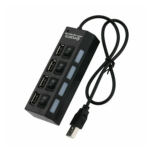
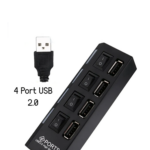
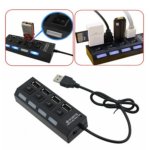
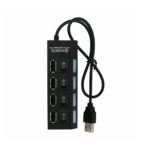


Generic 4-Port High-Speed USB 3.0 Hub with LED Indicators and SuperSpeed Data Transfer
₵60.00
Expand your connectivity with this high-speed 4-Port USB 2.0 hub designed for laptops and desktop computers. It supports plug and plays installation, hot swapping, and wide compatibility with Windows, Mac, Linux, and Raspberry Pi systems. Compact and lightweight with built-in over-current protection, it ensures safe and reliable performance for everyday USB devices.
50 in stock
🔹Key Product Features
- Wide System Compatibility: Ideal for Windows PC, Apple Mac, Raspberry Pi, Retropie, and Linux systems.4 USB 2.0 Ports: Includes 1 upstream port and 4 downstream ports for connecting multiple devices at once.
- High-Speed Data Transfer: Supports USB 2.0 with full backward compatibility for USB 1.0 and 1.1 devices.
- Optional External Power Support: Features a 5V DC power socket (3.5mm x 1.35mm, center positive) for connecting an optional 2A or higher power adapter to support high-power devices.
- Bus-Powered Design: Draws power directly from the connected computer, no external power required for standard devices.
- Maximum 500mA Per Port: Provides stable power output suitable for flash drives, keyboards, mice, and other USB peripherals.
- Plug And Play: No drivers required for installation, quick and easy setup.
- Hot Swappable: Allows devices to be connected or removed without shutting down the system.
- Built-In Over-Current Protection: Protects both the hub and connected devices from power surges and overloads.
- Compact And Lightweight: Small size design makes it easy to carry and ideal for travel or office use.
- Color And Condition: Black finish, brand new unit, bulk packaging.
High-Speed USB 3.0 Hub with Individual Power Swit4-Portches and LED Indicators
The 4-Port High-Speed USB 3.0 Hub is a compact, portable connectivity accessory designed to expand one computer USB port into four USB 3.0 connections. With data transfer speeds of up to 5Gbps, individual on/off switches, blue LED indicators, plug-and-play installation and a reinforced cable, it is suitable for laptop users, desktop computer owners, gamers and professionals who need convenient access to multiple USB devices.
Available from COSMIC ELECTRONICS in Ghana, this slim USB HUB supports compatible USB drives, keyboards, mice, card readers, hard drives, printers, cameras, mobile devices and other USB peripherals. Its lightweight 60g design makes it convenient for everyday desk use, office work and travel.
Product Overview
The 4-Port High-Speed USB 3.0 Hub is designed to solve a common computer connectivity problem: having more USB devices than available computer ports.
Modern computer users often need to connect several accessories at once. You may need a mouse, keyboard, flash drive, external storage device, printer or camera connected to your computer while working.
When the available USB ports are insufficient, a USB hub provides a practical way to expand connectivity.
This model converts one USB connection into four downstream USB 3.0 ports. It supports SuperSpeed data transfer of up to 5Gbps for compatible USB 3.0 devices and is backward compatible with USB 2.0 and USB 1.0 devices.
One of its distinguishing features is the inclusion of individual power switches for each port. Each switch has a blue LED indicator, allowing users to control and monitor the power status of individual connections.
Its ultra-slim construction, reinforced cable, heat-resistant connectors and lightweight 60g body make it a convenient accessory for workstations, home computers and mobile setups.
Who Is This USB HUB Designed For?
Laptop Users
Laptop users often need additional USB connections for accessories used during work, study and entertainment.
This four-port USB hub can provide additional connections for compatible devices such as:
USB mouse.
- Keyboard.
- Flash drive.
- Card reader.
- Compatible mobile devices.
- Other standard USB peripherals.
Its slim and lightweight design makes it convenient to carry alongside a laptop.
Desktop Computer Users
Desktop users may have several accessories connected to their computers throughout the day.
The four downstream ports provide additional connections for compatible USB devices, helping reduce the need to repeatedly unplug and reconnect accessories.
Gamers
The hub is specified for compatibility with Xbox and PS4 systems.
It can be useful for connecting compatible USB accessories, including controllers and other supported peripherals. Actual compatibility depends on the gaming console, device and intended function.
Office Workers and Businesses
Office employees may use keyboards, mice, flash drives, card readers and other USB accessories during everyday work.
Individual port switches provide convenient control over the power status of connected devices.
Students and Educational Institutions
Students using computers for assignments, research, presentations and digital learning may require several USB connections.
Schools, training centres and computer laboratories can also consider USB hubs when expanding connectivity for compatible computer peripherals.
Technicians and IT Support Professionals
Technicians may work with different computer systems, storage devices and USB accessories.
A four-port USB 3.0 hub can provide additional connectivity for compatible devices during computer setup, file transfers and routine technical work.
Key Features and Benefits
1. Four High-Speed USB 3.0 Ports
- What it is: The hub provides four downstream USB 3.0 ports through one upstream USB connection.
- Why it matters: A single computer USB port may not be enough when several accessories are required.
- Customer benefit: You can connect up to four compatible USB peripherals through the hub, subject to the computer’s available power and device compatibility.
Common applications include connecting:
- USB flash drives.
- Keyboards.
- Computer mice.
- Card readers.
- Compatible external hard drives.
- Printers.
- Cameras.
- Other supported USB accessories.
The four-port arrangement makes this hub useful for users who need additional connections without installing internal computer hardware.
2. SuperSpeed USB 3.0 Data Transfer
What it is: The hub supports USB 3.0 data transfer speeds of up to 5Gbps.
Why it matters: Faster data-transfer capability can make a difference when working with compatible storage devices and transferring large files.
Customer benefit: You can transfer data using the higher-speed capabilities of USB 3.0 devices and compatible computer connections.
The stated maximum speed is a theoretical interface capability. Actual transfer performance depends on the computer, connected device, file type, storage performance and other operating conditions.
3. Backward Compatibility With USB 2.0 and USB 1.0
What it is: The hub supports older USB devices using USB 2.0 and USB 1.0 standards.
Why it matters: Many users still rely on peripherals that do not support USB 3.0.
Customer benefit: You can connect supported older USB devices without needing a separate hub for each USB standard.
USB 2.0 data transfer is specified at up to 480Mbps, while USB 1.1 is listed at up to 240Mbps in the supplied product specifications.
When using older devices, the connection operates according to the capabilities of the device and the supported USB standard.
4. Individual On/Off Switches
- What it is: Each of the four USB ports has its own on/off power switch.
- Why it matters: Users may not need every connected peripheral to remain powered at all times.
- Customer benefit: Individual switches provide a convenient way to control the power status of connected devices without repeatedly removing their USB connectors.
For example, you may keep your keyboard and mouse connected while switching off another connected accessory when it is not needed.
The switches control the individual port power status; they do not replace the operating system’s safe removal procedure for storage devices.
5. Blue LED Power Indicators
What it is: Each port has a blue LED indicator associated with its individual power switch.
Why it matters: Visual indicators make it easier to identify the power status of the ports.
Customer benefit: You can monitor the status of individual connections more conveniently while using the hub.
The LED indicators complement the individual switches and make the four-port arrangement easier to manage.
6. Plug-and-Play Installation
What it is: The hub supports plug-and-play operation and does not require a separate installation process.
Why it matters: Users can expand their USB connections without dealing with complicated setup procedures.
Customer benefit: Connect the hub to a compatible computer, allow the system to recognise it, and connect your supported peripherals.
The operation of individual devices may still depend on their own compatibility and driver requirements.
7. Hot-Swappable Connectivity
What it is: The hub supports hot swapping, allowing compatible USB devices to be connected or disconnected while the computer is running.
Why it matters: Users often need to switch between USB accessories during work.
Customer benefit: You can connect or remove supported peripherals without shutting down your computer.
For flash drives and other storage devices, use the operating system’s safe removal or eject function where supported before disconnecting them. This helps reduce the risk of data loss.
8. Reinforced Cable and Durable Construction
What it is: The product features a reinforced cable, heat-resistant connectors and a sturdy exterior.
Why it matters: A USB hub used regularly may experience repeated handling, connection and disconnection.
Customer benefit: These construction features are intended to support everyday handling and provide a more durable accessory for regular computer use.
The product specifications do not state a guaranteed service life or a specific impact-resistance rating.
9. Ultra-Slim and Lightweight Design
What it is: The hub has a slim, compact body measuring 10.5 x 3.6 x 2.5 cm and weighing approximately 60g.
Why it matters: Large accessories can be inconvenient for people who frequently move between workstations.
Customer benefit: Its lightweight construction makes it easy to store in a laptop bag, computer accessory case or office drawer.
It is suitable for people who need additional USB connections at home, at work or while travelling.
10. Wide Device Compatibility
The product is specified for use with:
- Windows computers.
- Mac computers.
- Linux systems.
- Laptops and desktop PCs.
- Xbox.
- PS4.
- Flash drives.
- Keyboards and mice.
- Card readers.
- Compatible hard drives
- Printers.
- Cameras.
- Mobile devices.
- Tablets.
- USB fans and USB cables.
Compatibility with individual peripherals depends on their USB requirements, operating system support and power needs.
Understanding USB 3.0 SuperSpeed Technology
USB 3.0 is a USB standard designed to provide higher data-transfer capabilities than USB 2.0.
This hub supports transfer speeds of up to 5Gbps for compatible USB 3.0 devices.
That capability makes it useful for users who regularly transfer files between computers and compatible USB storage devices.
Individual Port Switching: Why It Is Useful
One of the practical features of this USB hub is the inclusion of four individual on/off switches.
Many standard USB hubs provide multiple ports but do not offer separate switches for each connection.
With individual controls, users can manage the power status of connected peripherals more conveniently.
Example: Office Workstation
An office worker may connect a keyboard, mouse, flash drive and another USB accessory.
The individual switches provide a convenient way to control the ports without repeatedly unplugging devices.
Example: Home Computer Setup
A home user may connect several USB accessories but only need certain devices active at particular times.
Individual switches provide a simple way to manage the power status of the connected ports.
Example: Gaming Setup
A gamer using compatible USB accessories can benefit from having additional connections and individual port controls.
Always confirm that the console and accessory support the intended connection and operation.
Technical Specifications
Specification Details
Product Name 4-Port High-Speed USB 3.0 Hub
Product Type Multiport USB Hub
Number of Ports 4
USB Version USB 3.0
USB 3.0 Maximum Speed Up to 5Gbps
USB 2.0 Maximum Speed Up to 480Mbps
USB 1.1 Maximum Speed Up to 240Mbps
Backward Compatibility USB 2.0 and USB 1.0
Individual Power Switches Yes, one per port
LED Indicators Blue LED indicators
Plug and Play Yes
Hot Swappable Yes
Cable Length 1.2m as listed in the specifications
Dimensions 10.5 x 3.6 x 2.5 cm
Weight Approximately 60g
Construction Reinforced cable, heat-resistant connectors and sturdy exterior
Design Ultra-slim and lightweight
Compatibility Windows, Mac, Linux, Xbox, PS4, laptops, PCs, mobile devices and tablets
Color Black
Package Contents 1 USB 3.0 Hub and 1 User Manual
Cable-length note: The supplied product name describes a 1-foot cable, while the detailed specifications list a cable length of 1.2m. Confirm the actual cable measurement with the product packaging or supplier before relying on either measurement.
Performance Benefits for Everyday Use
More Convenient Computer Connectivity
Four downstream ports allow users to connect several compatible peripherals through one upstream connection.
This is useful for people who regularly work with multiple USB accessories.
Faster Compatible File Transfers
The USB 3.0 interface supports up to 5Gbps, providing higher theoretical data-transfer capability than USB 2.0.
This can benefit users working with compatible flash drives and external storage devices.
Better Control Over Connected Ports
Individual switches and blue LED indicators make it easier to manage and monitor the power status of each port.
Portable Connectivity
The approximately 60g body and compact dimensions make the hub convenient to carry between locations.
Reduced Cable Reconnection
By keeping compatible peripherals connected through one hub, users can reduce the need to repeatedly switch accessories directly on their computers.
Important Usage Notes and Limitations
The product includes specific usage recommendations that buyers should understand before connecting their devices.
2.4GHz Wireless Device Interference
Some 2.4GHz wireless devices may not work reliably when used close to USB 3.0 hubs.
If you experience interference with a wireless mouse, keyboard or receiver, try connecting the affected device to a USB 2.0 port where available.
You can also reposition the wireless receiver away from the USB 3.0 hub to see whether operation improves.
Avoid Connecting More Than Two Hard Drives Simultaneously
The supplied product guidance recommends avoiding the connection of more than two hard drives simultaneously.
This is an important consideration for users who intend to connect multiple external storage devices.
The actual operation of hard drives depends on their power requirements, the computer’s available USB power and the hub’s design.
If your setup requires several external hard drives, consider a suitable externally powered USB hub designed for that workload.
Actual Transfer Speeds May Vary
The advertised USB 3.0 speed of up to 5Gbps is a maximum interface specification, not a guaranteed file-transfer speed.
Actual performance depends on:
- The computer’s USB port.
- The connected device’s USB standard.
- Storage read and write performance.
- File size and file type.
- Operating system and system configuration.
- Other devices sharing the connection.
Applications in Ghana
The 4-Port High-Speed USB 3.0 Hub can support a variety of computing needs in Ghana.
Home and Personal Computing
Home users may connect keyboards, mice, flash drives and compatible mobile devices through a single computer connection.
The compact design is convenient for home desks and personal laptop setups.
Offices and Commercial Workstations
Businesses may use USB hubs to provide additional connections for everyday office peripherals.
The individual port switches can also help users manage the power status of connected accessories.
Schools and Training Centres
Educational institutions may require additional USB connectivity for computer laboratories, training rooms and administrative workstations.
This hub can support compatible computer peripherals where additional connections are needed.
Gaming Setups
The product is specified for Xbox and PS4 compatibility.
Gamers can consider it for compatible USB accessories, while checking that the intended device and function are supported by the gaming system.
Photography and Content Creation
Photographers and content creators may use USB flash drives, card readers, cameras and other compatible accessories when working with computers.
The USB 3.0 interface can be useful when transferring data from compatible devices.
Technical Support and IT Work
IT technicians and computer support professionals may need to connect several USB peripherals during computer setup, maintenance and routine support activities.
A portable four-port hub can provide additional connectivity in these environments.
Retail and Business Administration
Retail businesses and other commercial organisations may use computers for administration, documentation and everyday operations.
A USB hub can provide additional connections for compatible accessories used at workstations.
How to Choose the Best USB HUB for Your Needs
When comparing the best USB hubs, consider the following factors rather than choosing based on port count alone.
1. Check the USB Version
Choose USB 3.0 if you need higher data-transfer capabilities for compatible devices.
USB 2.0 hubs may be sufficient for basic accessories such as keyboards and mice.
2. Consider the Number of Ports
This model provides four downstream USB ports.
If your setup requires more connections, compare it with larger multiport hubs.
3. Look for Individual Switches,
Individual switches are useful when you want to control the power status of connected peripherals separately.
This model provides one switch for each port.
4. Check Device Compatibility
Confirm that the hub supports your operating system, computer and intended peripherals.
The supplied compatibility list includes Windows, Mac, Linux, Xbox, PS4, laptops, PCs, mobile devices and tablets.
5. Consider Portability
If you travel frequently or move between workstations, the approximately 60g weight and slim dimensions make this model convenient to carry.
6. Consider Your Storage Requirements
If you intend to connect external hard drives, consider their power requirements and observe the product’s recommendation not to connect more than two hard drives simultaneously.
Common USB Hub Buying Mistakes to Avoid
- Buying the wrong USB standard: A USB 2.0 hub does not provide the same maximum data-transfer capability as USB 3.0.
- Ignoring the computer’s USB port: Connecting a USB 3.0 hub to an older USB 2.0 port limits the connection to the older standard’s capabilities.
- Overlooking individual power switches: If separate port control is important, confirm that the hub has individual switches rather than one general power control.
- Ignoring wireless interference: Some 2.4GHz wireless devices may experience interference near USB 3.0 hubs.
- Connecting too many hard drives: Follow the supplied recommendation to avoid connecting more than two hard drives simultaneously.
- Assuming maximum transfer speed is guaranteed: Actual speeds depend on the computer, peripheral and storage performance.
- Ignoring cable requirements: Check the supplied cable measurement and packaging details before purchasing if cable length is critical.
Installation and Maintenance Best Practices
The hub supports plug-and-play installation.
To set it up:
- Locate an available compatible USB port on your computer.
- Connect the hub to the computer using its upstream cable.
- Allow the computer to recognise the hub.
- Connect compatible USB devices to the four downstream ports.
- Use the individual switches to control the power status of the connected ports.
- Check the blue LED indicators to monitor port status.
Maintenance Recommendations
- Keep the hub in a clean, dry environment.
- Avoid pulling or twisting the reinforced cable.
- Disconnect devices carefully.
- Do not force connectors into the USB ports.
- Avoid placing heavy objects on the hub.
- Keep the connectors free from dust and moisture.
- Use the individual switches appropriately.
- Safely eject storage devices before disconnecting them where supported.
- Store the hub in a protective laptop or accessory bag when travelling.
Frequently Asked Questions
1. What is a 4-port USB 3.0 hub used for?
It expands one computer USB connection into four downstream USB ports, allowing users to connect several compatible USB peripherals.
2. What is the maximum transfer speed of this USB hub?
It supports USB 3.0 data transfer speeds of up to 5Gbps. Actual speeds depend on the computer, connected device and operating conditions.
3. Is this USB hub backward compatible with USB 2.0?
Yes. It supports backward compatibility with USB 2.0 and USB 1.0 devices.
4. Does it have individual power switches?
Yes. Each of the four ports has an individual on/off switch.
5. What do the blue LED indicators do?
The blue LED indicators provide a visual indication of the power status of the individual ports.
6. Does the hub require driver installation?
No separate installation process is required for the hub’s stated plug-and-play operation. Individual connected peripherals may have their own software or driver requirements.
7. Can I use it with a PS4 or Xbox?
The product is specified for Xbox and PS4 compatibility. The operation of individual accessories depends on the console and the accessory’s compatibility.
8. Can I connect an external hard drive?
Yes, compatible external hard drives are included in the product’s compatibility list. However, the supplied usage guidance recommends avoiding connections involving more than two hard drives simultaneously.
9. Why might my 2.4GHz wireless mouse or keyboard experience interference?
Some 2.4GHz wireless devices may experience interference when used near USB 3.0 hubs. Try using a USB 2.0 connection where available or repositioning the wireless receiver.
10. Is this USB hub suitable for travel?
Yes. Its compact dimensions and approximately 60g weight make it convenient for carrying with a laptop and other computer accessories.
11. What comes in the package?
The listed package contents are one USB 3.0 hub and one user manual.
12. Where can I buy this USB hub in Ghana?
You can enquire about this four-port USB 3.0 hub through COSMIC ELECTRONICS, which supplies electronics and computer accessories through online and physical store purchasing options in Ghana.
Where to Buy USB Hubs in Ghana
If you are searching for USB hubs price in Ghana, affordable USB hubs, a USB hub for laptop use or a USB hubs shop in Ghana, it is important to compare the technical specifications and features of available models.
The 4-Port High-Speed USB 3.0 Hub is listed at 50.00 and offers four USB 3.0 connections, individual switches, blue LED indicators and a compact design.
COSMIC ELECTRONICS supplies computer accessories and electronics to individuals, businesses, technicians, schools and institutions across Ghana.
Buy USB Hubs Online From COSMIC ELECTRONICS
Customers can enquire about available USB hubs and other computer accessories through COSMIC ELECTRONICS’ online store.
Online ordering provides a convenient option for customers who want to explore products and make purchasing enquiries.
Physical Store Availability
COSMIC ELECTRONICS also operates physical offline stores in Ghana.
Customers who prefer in-person shopping can enquire about product availability and receive assistance when selecting suitable computer accessories.
Nationwide Delivery Across Ghana
Customers in Accra and other parts of Ghana can enquire about available delivery arrangements.
COSMIC ELECTRONICS serves customers across the country, including Tema, Adenta, Madina, Kasoa, Kumasi, Takoradi, Cape Coast, Tamale, Sunyani, Koforidua and Ho.
Bulk Supply and Procurement Support
Businesses, schools, institutions, offices and commercial buyers may require multiple USB hubs for their computer setups.
COSMIC ELECTRONICS supports bulk supply and procurement enquiries, subject to product availability.
Customers can enquire about quantities, product sourcing and suitable computer accessories for their requirements.
Why Buy From COSMIC ELECTRONICS?
COSMIC ELECTRONICS is a Ghanaian supplier of electronics, computer accessories, networking equipment, drones, professional audio solutions and specialised technology products.
We serve individual customers, businesses, schools, institutions, technicians and commercial buyers.
Customers shopping with COSMIC ELECTRONICS can benefit from:
- Genuine product sourcing.
- Competitive pricing.
- Nationwide delivery arrangements across Ghana.
- Expert product advice.
- Bulk supply support.
- After-sales assistance.
- Online ordering and physical store purchasing options.
Whether you need one USB hub for your laptop or several units for business and institutional use, COSMIC ELECTRONICS can assist with product enquiries and supply support.
Quick Summary
- Product: 4-Port High-Speed USB 3.0 Hub.
- Price: 50.00.
- Main Function: Expands one USB connection into four downstream USB 3.0 ports.
- USB Version: USB 3.0.
- Maximum Transfer Speed: Up to 5Gbps.
- Backward Compatibility: USB 2.0 and USB 1.0.
- USB 2.0 Maximum Speed: 480Mbps.
- USB 1.1 Maximum Speed: 240Mbps as listed in the supplied specifications.
- Individual Power Control: Four individual on/off switches.
- Indicators: Blue LED indicators.
- Installation: Plug and Play.
- Hot Swapping: Supported.
- Construction: Reinforced cable, heat-resistant connectors and sturdy exterior.
- Dimensions: 10.5 x 3.6 x 2.5 cm.
- Weight: Approximately 60g.
- Cable Length: 1.2m in the detailed specifications; the product name separately states 1 foot.
- Compatibility: Windows, Mac, Linux, Xbox, PS4, laptops, PCs, mobile devices and tablets.
- Package Contents: One USB 3.0 hub and one user manual.
- Important Usage Notes: Some 2.4GHz wireless devices may experience interference near USB 3.0 hubs; avoid connecting more than two hard drives simultaneously.
- Primary Applications: Home computing, offices, gaming setups, education, photography, content creation and technical work.
- Availability in Ghana: Online and physical store enquiries through COSMIC ELECTRONICS.
- Bulk Supply: Procurement and bulk supply enquiries supported, subject to availability.
Why Buy From COSMIC ELECTRONICS: Competitive pricing, product advice, sourcing support, after-sales assistance and delivery arrangements across Ghana.
| Input Ports | 1 Upstream USB |
|---|---|
| Output Ports | 4 Downstream USB |
| Usb Version | 2.0 |
| Max Power Output Per Port | 500mA |
| Compatibility | Windows, Apple Mac OS, Raspberry Pi, Retropie, Linux |
| Power Supply | Optional 5V DC Socket (3.5mm x 1.35mm, Center Positive) |
| Plug And Play | Yes |
| Over-Current Protection | Built-In |
| Color | Black |
| Condition | New |
| Lightweight | Yes |


IT'S ALL ABOUT YOU
At COSMIC ELECTRONICS, we strive to process and dispatch orders as quickly as possible. While some orders may be shipped on the same day they are placed, processing times can vary depending on product availability, order volume, and delivery location. Please allow 2–3 business days for order processing before shipment.
IMPORTANT DELIVERY INFORMATION
- Fast Order Processing: Orders are processed and dispatched as quickly as possible, typically within 2–3 business days. A confirmation email will be sent shortly after your order is placed.
- Nationwide Delivery Across Ghana: We deliver to selected regions and cities across Ghana. Please check our delivery options to confirm availability in your location.
- Delivery & Collection Requirements: All deliveries require a signature upon receipt. Orders are not processed or shipped on Sundays, although you may place orders online at any time. If you do not receive your confirmation email, please check your Spam or Junk Mail folder.
For enquiries regarding delivery times, order status, or the lead time of a specific item, please contact COSMIC ELECTRONICS on +233 54 724 0128. Our team will be happy to assist you with any questions before or after your purchase.
Related products


Apple 35W Dual USB-C Power Socket with 4-Port USB HUB and LCD Display for iPhone Charging
Enjoy Fast And Efficient Multi-Device Charging With 35W Power Output And Dual USB + Dual Type-C PD Ports. Wide Voltage Support And Stable Performance Ensure Safe Charging For iPhones And Other USB Devices Anywhere. Compact 4-Port Design With 1M Cable Offers Convenient And Organized Power Access For Home Or Office Use.


Digital to Analog Audio Converter – Black Stereo DC 5V/2A Portable Fiber Optic to 3.5mm Sound Adapter for Mobile Phones
Enjoy clear and stable sound conversion with this Digital to Analog Audio Converter featuring Bluetooth 5.0 connectivity. It supports optical, coaxial, U disk, and 3.5mm inputs with RCA and AUX outputs for versatile audio connections. Built with a durable metal shell and volume control knob, it delivers reliable performance with simple plug-and-play operation.


Slim Pro LED USB Charging Dock – Premium Stand for PS4 Controllers with Fast & Convenient Charging
The Stand for PS4 Slim/Pro Controller keeps your controllers charged and ready for action with a sleek, durable design. It securely holds and powers two PS4 controllers at the same time for uninterrupted gameplay. Perfect for gamers, it combines convenience, style, and reliable charging in one compact stand.


Soulion Tracer 30 USB Gaming Headset with Virtual 7.1 Surround Sound and RGB Lighting for PC
The Soulion Tracer 30 is a professional USB gaming headset featuring powerful 50mm speakers with virtual 7.1 surround sound for immersive gameplay on Windows PCs.Its noise-cancelling microphone delivers clear voice communication, while vibrant RGB rainbow lighting adds a bold gaming atmosphere.With a wide 20Hz–20KHz frequency range, it produces rich bass, clear highs, and precise audio detail for competitive gaming.


T-WOLF G510 Gaming Mouse 3200 DPI, RGB Lighting, 6 Buttons for Precise Gaming Control
The T-WOLF G510 Gaming Mouse in sleek black features 6 responsive buttons and adjustable DPI settings from 800 to 3200 for precise control. With a 1.35-meter USB cable, it ensures a stable and lag-free connection for gaming or everyday use. Designed for comfort and performance, this wired mouse is perfect for both casual and professional gamers.


YST-1023 USB Mini Stereo Speakers with Volume Control for Clear Laptop Audio
These USB speakers deliver clear stereo sound through two 2-inch full-range loudspeakers, perfect for desktops, laptops, or portable use. The back panel includes USB and signal input lines, a volume control knob, and a large, recessed adjustment dial for easy operation. Compact, cute, and stable with soft feet, they are compatible with devices like iPhone 12 Pro and provide 2W maximum output power.


Reviews
There are no reviews yet.