


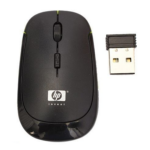
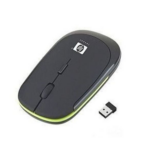
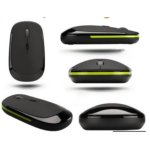
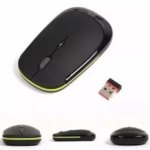


HP Invent Slim Wireless Optical Mouse Adjustable DPI, Rechargeable Battery for Work and Everyday Use
₵70.00
The HP Invent Slim Optical Wireless Mouse features a sleek, durable ABS design with 4 responsive buttons and adjustable DPI settings (800/1200/1600) for precise control. Its 2.4GHz wireless connection provides a stable range of up to 10 meters, while the built-in 500mAh rechargeable battery ensures long-lasting performance.
50 in stock
- Material: Crafted from high-quality ABS plastic, making the mouse lightweight, durable, and resistant to wear.
- Number of Keys: Features 4 responsive buttons, including left, right, middle click, and DPI adjustment, designed for smooth, accurate operation.
- Type: Operates on 2.4GHz wireless technology for a fast, stable, and interference-free connection to your PC or laptop.
- Transmission Distance: Offers a reliable wireless range of up to 10 meters, allowing freedom of movement without signal loss.
- DPI: Adjustable DPI settings at 800, 1200, and 1600 provide precise cursor control for gaming, work, or casual use.
- Battery Capacity: Equipped with a built-in 500mAh rechargeable lithium battery, supporting long-lasting performance and easy recharging.
- Wireless Transmission: Advanced 2.4GHz digital wireless ensures smooth, consistent connectivity for uninterrupted work or play.
- Plug-and-Play: Easy to set up—simply insert the USB receiver and start using without installing additional drivers.
- Mini USB Receiver: Compact receiver plugs discreetly into your device, maintaining a clean and organized workspace.
- Ergonomic Design: Slim, contoured shape fits naturally in your hand, reducing fatigue during long usage sessions.
- Low Voltage Alarm: Built-in alert notifies you when battery power is low, preventing unexpected interruptions.
- Sleek & Portable: Slim design and lightweight construction make it perfect for travel, home, office, or gaming setups.
HP Invent Slim 2.4GHz Wireless Optical Mouse
The HP Invent Slim 2.4GHz Wireless Optical Mouse is a lightweight, rechargeable computer mouse designed for laptops and desktop PCs. It combines adjustable DPI settings, four responsive buttons, a wireless range of up to 10 metres, and a slim ergonomic design for everyday computing, office work, and casual gaming.
Whether you are looking for an HP wireless mouse for work, study, or home use, this model offers adjustable cursor sensitivity and a built-in 500mAh rechargeable lithium battery. Its compact design makes it convenient for users who want to keep their workstation organised or carry a mouse alongside a laptop.
Product Overview
The HP Invent Slim Wireless Optical Mouse is designed to provide convenient cursor control without a permanently attached mouse cable. Its 2.4GHz wireless technology connects through a compact USB receiver, according to the supplied product description.
The mouse features a black or otherwise unspecified colour finish in the supplied details, a durable ABS plastic body, four buttons, and three selectable DPI settings: 800, 1200, and 1600. These features give users options for adjusting cursor movement to suit different tasks.
Its stated wireless range is up to 10 metres, while the built-in 500mAh rechargeable lithium battery is intended to support extended use between charges. A low-voltage alarm alerts users when the battery is running low.
The product is suitable for people who need a practical computer mouse for compatible PCs and laptops, including students, office workers, home users, and businesses.
Who Is This HP Wireless Mouse For?
Laptop Users
Laptop users who prefer a physical mouse to a built-in touchpad can use this model for browsing, editing documents, navigating applications, and working with spreadsheets.
Its slim design is convenient for carrying alongside a laptop, subject to the user’s storage preferences.
Office Workers and Professionals
The four-button layout and adjustable DPI settings can support everyday office tasks. Users can adjust cursor sensitivity according to their preferred working style.
The wireless connection also helps reduce cable clutter on desks used for computers, keyboards, chargers, and other accessories.
Students and Teachers
Students can use the mouse for assignments, online research, digital learning, and presentations. Teachers and trainers can use it to navigate educational software on compatible computers.
Home Users
For home computing, the mouse can be used for web browsing, online shopping, communication, entertainment, and general computer navigation.
Casual Gamers
The adjustable 800, 1200, and 1600 DPI settings allow users to change cursor sensitivity for different activities, including casual gaming.
However, the supplied specifications do not identify specialised gaming features such as a high polling rate, programmable gaming buttons, or a dedicated gaming sensor. Buyers who need those features should compare the mouse with models designed specifically for gaming.
Businesses and Institutions
Offices, schools, training centres, and other organisations can consider the mouse for compatible computer workstations.
Businesses seeking multiple units can contact COSMIC ELECTRONICS to enquire about current availability and bulk supply options.
Key Features and Benefits
1. 2.4GHz Wireless Connectivity
The mouse uses 2.4GHz wireless technology to connect to a compatible computer through the USB receiver described in the product information.
This arrangement removes the need for a permanently attached mouse cable and allows users to position the mouse more freely around their workstation.
Benefit: A tidier workspace and convenient wireless cursor control.
2. Wireless Range of Up to 10 Metres
The supplied description states a wireless transmission distance of up to 10 metres.
This gives users flexibility to operate a computer from different positions within the stated range, depending on the surrounding environment and connection conditions.
Benefit: More freedom of movement when working at a desk or using a computer in a larger room.
3. Adjustable DPI: 800, 1200 and 1600
DPI refers to dots per inch and is commonly used to describe a mouse’s sensitivity. A higher DPI setting generally moves the cursor farther across the screen for the same physical mouse movement.
The HP Invent Slim mouse provides three settings:
- 800 DPI: A lower sensitivity option for users who prefer more controlled cursor movement.
- 1200 DPI: A middle setting for general computer navigation.
- 1600 DPI: A higher sensitivity option for users who prefer faster cursor movement.
The most suitable setting depends on screen resolution, personal preference, and the type of work being performed.
Benefit: Adjustable cursor sensitivity for different everyday computing tasks.
4. Four Responsive Buttons
The mouse has four buttons, described as left click, right click, middle click, and DPI adjustment.
The standard buttons support selection, context menus, and scroll-wheel functions, while the DPI button allows users to change cursor sensitivity.
Benefit: Convenient access to essential mouse controls and sensitivity adjustment.
5. Built-In 500mAh Rechargeable Lithium Battery
The detailed product description identifies a built-in 500mAh rechargeable lithium battery.
A rechargeable battery means users can recharge the mouse instead of routinely replacing disposable batteries, provided the unit’s charging method and accessories support this as described.
The source does not specify the exact charging connector, charging time, or operating time per charge.
Benefit: Rechargeable power for everyday mouse use without depending on regular disposable battery replacement.
6. Low-Voltage Alarm
The product description states that a built-in low-voltage alarm notifies users when battery power is low.
This warning can help users recognise when the mouse needs charging before the battery runs out during work.
Benefit: A reminder to recharge the mouse and reduce unexpected interruptions.
7. Durable ABS Plastic Construction
The mouse is made from ABS plastic, a material commonly used for computer accessory housings.
The supplied description presents the body as lightweight and durable, with resistance to wear during normal use. Actual durability depends on handling, storage, and operating conditions.
Benefit: A practical lightweight body suitable for everyday computing.
8. Slim, Ergonomic Design
The mouse has a slim, contoured shape intended to fit naturally in the hand.
A lightweight mouse can be convenient for users who move between workstations or carry computer accessories while travelling. Comfort varies with hand size, grip style, and usage duration.
Benefit: A compact design for home, office, travel, and casual computer use.
9. USB Receiver and Setup
The supplied description states that users can insert the USB receiver and start using the mouse without installing additional drivers.
However, the technical specifications separately list “Plug and Play: No” and identify “Bluetooth, Wireless” as the connection interface. These details are inconsistent with the receiver-based setup description.
Before purchase, confirm the exact connection method and setup requirements of the unit available from the seller.
Benefit: Receiver-based setup may be straightforward when the mouse and computer support the stated configuration.
Technical Specifications
Specification Details supplied
Brand HP
Product name HP Invent Slim Wireless Optical Mouse
Product type Computer mouse
Sensor type Optical
Material ABS plastic
Number of buttons 4
DPI settings 800 / 1200 / 1600
Wireless technology 2.4GHz wireless, according to the description
Stated transmission distance Up to 10 meters
Battery Built-in 500mAh rechargeable lithium battery, according to the description
Battery type in technical specifications AAA batteries
Connection interface in technical specifications Bluetooth, wireless
USB receiver Described as included
Plug and play in technical specifications No
Backlight No
Listed compatibility Laptops and PCs
Features Ergonomic, wireless
Colour Not clearly established by the supplied details
Specification clarification: The product description identifies a built-in 500mAh rechargeable lithium battery, while the technical specifications list AAA batteries. The description also specifies 2.4GHz wireless connectivity and a USB receiver, whereas the interface field lists Bluetooth and wireless. The supplied information does not resolve these differences, so confirm the exact battery and connectivity configuration of the unit before ordering.
Performance Benefits for Everyday Computing
More Flexible Cursor Control
The three DPI settings let users choose between slower and faster cursor movement without relying on a single sensitivity level.
This can be helpful when switching between detailed work and general navigation.
Less Cable Clutter
Wireless operation can help keep desks organised by eliminating a permanently attached mouse cable.
This is useful in shared workstations, compact home offices, and study areas where space is limited.
Convenient for Mobile Work
The slim design is practical for people who carry a laptop between home, school, and the office.
A wireless mouse can be stored with other computer accessories when travelling, provided the receiver and charging accessories are kept secure.
Rechargeable Operation
The described 500mAh rechargeable battery provides an alternative to mice that rely exclusively on disposable batteries.
The actual time between charges is not specified, so users should not assume a particular number of hours or days per charge.
Applications in Ghana
Home and Personal Computing
The mouse is suitable for compatible home computers used for browsing, entertainment, online shopping, personal administration, and communication.
Its adjustable DPI settings let users choose a cursor speed that feels comfortable for their routine tasks.
Offices and Businesses
Businesses can use the mouse for word processing, spreadsheet work, emails, online systems, and general administration.
The wireless design can help keep desks tidy, while the rechargeable battery described in the product information may reduce the need for disposable batteries if the unit matches those specifications.
Schools and Training Centres
Educational institutions can consider the mouse for computer laboratories, classrooms, staff workstations, and training environments.
Before purchasing multiple units, confirm compatibility with the computers in use and verify the actual charging and connection requirements.
Retail and Small Businesses
Retail businesses may use the mouse with compatible computers for inventory records, online orders, product listings, and other administrative work.
Businesses Buying in Bulk
Organisations purchasing mice for multiple staff members should consider consistency across all units. Confirm the exact model configuration, receiver type, battery specifications, and setup requirements before committing to a bulk order.
How to Connect a Wireless Mouse to a Laptop
The product description specifies a USB receiver. If the available unit uses that connection method, follow these general steps:
- Check the mouse’s charging or battery requirements.
- Charge the mouse if it has the described rechargeable battery and needs charging.
- Insert the USB receiver into a compatible port on the laptop.
- Turn on the mouse if it has a power switch.
- Allow the computer to detect the device.
- Move the mouse to check cursor movement and test the buttons.
- Use the DPI button to cycle through the supported sensitivity settings, if the button functions as described.
If the mouse does not work, check its power status, the receiver connection, and the instructions supplied with the unit.
If your laptop has only USB-C ports while the receiver uses a different connector, a compatible adapter may be required.
Because the specifications list plug and play as “No,” verify the setup process for the exact unit rather than assuming that no additional configuration will ever be required.
How to Choose the Right Wireless Mouse
When comparing the HP Invent Slim mouse with other options in Ghana, consider the following factors.
Connection Method
Make sure the mouse uses a connection supported by your laptop or desktop computer.
If you prefer a USB receiver, confirm that the receiver is included and compatible with your computer. If you require Bluetooth, confirm that Bluetooth operation is genuinely supported by the specific unit.
DPI Settings
The supplied model offers 800, 1200, and 1600 DPI.
These settings can suit general computing and casual gaming, but users with specialised gaming or design requirements should compare the precise sensitivity and performance specifications they need.
Battery Requirements
The product description says the mouse has a built-in 500mAh rechargeable lithium battery, but the technical specifications list AAA batteries.
Confirm the actual battery configuration before buying, especially if you specifically want a rechargeable mouse.
Size and Comfort
Consider the mouse’s shape, size and weight relative to your hand and workstation.
The slim, contoured design may be convenient for portable use, but personal comfort depends on how you hold and use the mouse.
Intended Use
For browsing, office work and general computing, a conventional wireless optical mouse may be sufficient. For competitive gaming or specialised professional applications, compare additional
Common Buying Mistakes to Avoid
Before purchasing the HP Invent Slim Wireless Optical Mouse, avoid these common mistakes:
- Assuming the battery specifications agree: The description lists a built-in 500mAh rechargeable lithium battery, but the technical specifications list AAA batteries.
- Assuming Bluetooth support: The description explains 2.4GHz connectivity through a USB receiver, while Bluetooth is listed separately in the interface field.
- Ignoring setup requirements: The detailed description says plug-and-play, but the specifications list “Plug and Play: No.”
- Expecting more DPI settings: The supplied values are 800, 1200, and 1600 DPI.
- Assuming it is designed for competitive gaming: Casual gaming is mentioned, but specialised gaming performance details are not supplied.
- Failing to check receiver compatibility: Confirm that the receiver can connect to your computer.
- Assuming a specific battery runtime: The source does not state exact operating hours per charge.
Confirming these details before purchase can help you choose the right computer mouse and avoid compatibility surprises.
Care and Maintenance
To maintain the mouse during regular use:
- Keep the optical sensor area clean.
- Use it on a clean, suitable surface.
- Recharge the mouse according to the instructions if the available unit has the stated rechargeable battery.
- Respond to the low-voltage alarm by checking and recharging the battery when needed.
- Avoid pulling, bending or damaging the USB receiver.
- Store the mouse securely when travelling.
- Clean the housing with a soft cloth.
- Keep the device away from liquids and excessive moisture.
No water-resistance rating is provided in the supplied details, so do not assume the mouse is waterproof.
Where to Buy an HP Wireless Mouse in Ghana
If you are searching for an HP wireless mouse price in Ghana, contact COSMIC ELECTRONICS to enquire about the current price, stock availability and purchasing options.
COSMIC ELECTRONICS supplies electronics and computer accessories to individual customers, businesses and institutions across Ghana.
Customers can enquire about:
- Current availability and pricing.
- Online ordering and available delivery arrangements.
- Product specifications and computer compatibility.
- Related accessories, such as mouse pads and keyboards.
- Bulk supply for offices, schools and other organisations.
COSMIC ELECTRONICS operates online and physical stores in Ghana. Confirm the available purchasing method, delivery terms and exact product configuration before placing an order.
Why Buy from COSMIC ELECTRONICS?
COSMIC ELECTRONICS is a Ghanaian supplier of electronics, computer accessories, networking equipment and other technology products.
Customers considering the HP Invent Slim Wireless Optical Mouse can contact the business for product enquiries, availability checks and guidance on the specifications supplied by the manufacturer or distributor.
COSMIC ELECTRONICS also welcomes enquiries about bulk supply for businesses and institutions. Buyers should confirm the actual battery type, connection method and setup requirements before ordering, particularly when purchasing several units.
Frequently Asked Questions
1. What is the HP Invent Slim Wireless Optical Mouse?
It is a wireless optical computer mouse described as having four buttons, adjustable DPI settings, a slim contoured design and a stated wireless range of up to 10 metres.
2. What DPI settings does it support?
The supplied description lists 800, 1200 and 1600 DPI, allowing users to select different cursor sensitivity levels.
3. How many buttons does it have?
The mouse has four buttons: left click, right click, middle click and DPI adjustment, according to the product description.
4. Does it have a rechargeable battery?
The detailed description states that it has a built-in 500mAh rechargeable lithium battery. However, the technical specifications list AAA batteries, so confirm the actual configuration of the unit before buying.
5. What is its wireless range?
The supplied description states a transmission distance of up to 10 metres. Actual performance may vary depending on the operating environment.
6. Is it compatible with laptops?
The specifications list laptops and PCs. Confirm compatibility with your particular computer and available ports.
7. Does it support Bluetooth?
Bluetooth appears in the supplied interface specifications, but the detailed description focuses on 2.4GHz wireless connectivity through a USB receiver. Verify Bluetooth support for the exact unit.
8. Is it suitable for gaming?
The product description mentions gaming and offers adjustable DPI settings. However, specialised gaming performance specifications are not provided, so users with competitive gaming requirements should compare alternatives.
9. How do I connect it to a laptop?
If the unit uses the described USB receiver, insert the receiver into a compatible port, power on the mouse, and test cursor movement. Follow the supplied instructions if additional setup is required.
10. Where can I buy it in Ghana?
Contact COSMIC ELECTRONICS to enquire about current pricing, stock availability, online ordering and available delivery options across Ghana.
Quick Summary
- Product: HP Invent Slim 2.4GHz Wireless Optical Mouse.
- Brand: HP.
- Material: ABS plastic.
- Buttons: 4, including DPI adjustment.
- DPI settings: 800, 1200 and 1600.
- Wireless range: Up to 10 metres, as stated in the description.
- Battery: Description states a built-in 500mAh rechargeable lithium battery; specifications list AAA batteries.
- Connection: Description specifies 2.4GHz wireless through a USB receiver; specifications also list Bluetooth.
- -Design: Slim, lightweight and contoured.
- Backlight: No.
- Primary uses: Home computing, office work, education and casual gaming.
- Availability in Ghana: Contact COSMIC ELECTRONICS for current stock and pricing.
- Bulk supply: Enquiries welcome from businesses and institutions.
- The HP Invent Slim Wireless Optical Mouse offers adjustable cursor sensitivity, four-button control and a stated 10-metre wireless range. Before purchasing, confirm the exact battery and connectivity configuration of the available unit with COSMIC ELECTRONICS.
| Brand | HP |
|---|---|
| Backlight | No |
| Battery Type | AAA Batteries |
| Compatibility | Laptops, PCs |
| Connection Type/Interface | Bluetooth, Wireless |
| Features | Ergonomic, Wireless |
| Material | ABS |
| Number of Buttons | 4 |
| Plug and Play | No |
| Product Type | Mouse |
| Sensor Type | Optical |


IT'S ALL ABOUT YOU
At COSMIC ELECTRONICS, we strive to process and dispatch orders as quickly as possible. While some orders may be shipped on the same day they are placed, processing times can vary depending on product availability, order volume, and delivery location. Please allow 2–3 business days for order processing before shipment.
IMPORTANT DELIVERY INFORMATION
- Fast Order Processing: Orders are processed and dispatched as quickly as possible, typically within 2–3 business days. A confirmation email will be sent shortly after your order is placed.
- Nationwide Delivery Across Ghana: We deliver to selected regions and cities across Ghana. Please check our delivery options to confirm availability in your location.
- Delivery & Collection Requirements: All deliveries require a signature upon receipt. Orders are not processed or shipped on Sundays, although you may place orders online at any time. If you do not receive your confirmation email, please check your Spam or Junk Mail folder.
For enquiries regarding delivery times, order status, or the lead time of a specific item, please contact COSMIC ELECTRONICS on +233 54 724 0128. Our team will be happy to assist you with any questions before or after your purchase.
Related products


Dell WM126 Wireless Optical Mouse Ergonomic 3-Button Design for Smooth PC Navigation
The Dell WM126 Wireless Mouse features a sleek black design made from durable plastic, combining style and longevity. Its lightweight build ensures comfortable use for work, gaming, or everyday tasks. Perfect for PCs and laptops, this mouse delivers reliable performance with smooth navigation and effortless control.


Foldable Adjustable Laptop Stand with Anti-Slip Silicone Pads for 10 17″ Laptops
The 10-Level Adjustable Folding Laptop Stand allows height and angle customization for 10–17-inch laptops, improving ergonomics and posture. Foldable, lightweight, and portable with a storage bag, making it ideal for home, office, or travel use. Anti-slip design and open hollow structure provide stability, ventilation, and heat dissipation to protect your device during use.


Generic Wired Optical USB Mouse with 3-Button Design and Scroll Wheel for Smooth Computer Navigation
Enjoy smooth and reliable navigation with this Wired Optical USB Mouse. Featuring a comfortable 3-button design, responsive scroll wheel, and precise optical tracking, it is ideal for everyday computing tasks at home, in the office, or at school. Simply plug it into a USB port and start using it instantly on Windows or macOS devices.


HP X500 USB Wired Optical Mouse with Ergonomic Design for Smooth Everyday Computer Use
The HP X500 USB Wired Optical Mouse features a simple and reliable design with 3 buttons and a scroll wheel for smooth navigation. Compatible with all laptops and desktops, it offers plug-and-play functionality via a USB 2.0 interface. Perfect for everyday work, browsing, and casual use, this wired mouse combines comfort and precision in a compact design.


N99 Adjustable Laptop Cooling Stand with Dual Fans for 10 15.6-Inch Laptops
The N99 Adjustable Laptop Cooling Pad features dual fans and a special airflow design to keep laptops cool during extended use's-powered with adjustable height and built-in USB ports, it offers ergonomic comfort and expanded connectivity. Slim, lightweight, and durable, it’s ideal for home, office, or travel, ensuring reliable heat dissipation for 10–15.6-inch laptops.


P1 Portable Adjustable Laptop Stand Riser with 6-Level Height Adjustment
The P1 Portable Adjustable Laptop Stand provides a stable and convenient platform for laptops and tablets while helping create a more comfortable working position. Its six-level height adjustment, sturdy aluminum alloy frame and non-slip silicone pads provide reliable support for work, study, browsing, typing and entertainment.


YST-1023 USB Mini Stereo Speakers with Volume Control for Clear Laptop Audio
These USB speakers deliver clear stereo sound through two 2-inch full-range loudspeakers, perfect for desktops, laptops, or portable use. The back panel includes USB and signal input lines, a volume control knob, and a large, recessed adjustment dial for easy operation. Compact, cute, and stable with soft feet, they are compatible with devices like iPhone 12 Pro and provide 2W maximum output power.


Reviews
There are no reviews yet.